3 Email Marketing Tools To Use Today and Their 3 Top Features

With more than 80% of B2B and B2C companies using some form of email marketing technology, there is no time to waste. If you aren’t using this marketing strategy you’ll continue to fall behind the competition.

But where do we start? If this question continues to weigh you down, here are three tools you should implement today:

1. Campaign Monitor

Check out where in the world your email is being viewed using Campaign Monitor!

Described by the company as a service that “makes it radically easy to create, send and measure the impact of your email marketing campaigns,” you can’t go wrong by choosing Campaign Monitor. Frankly we use them to do our weekly email communications.

Top 3 Features of Campaign Monitor

  • Drag-and-drop email builder with auto-save.
  • Variety of reporting and analytics tools. Worldview enables you to see REAL TIME where in the world your email is being viewed…geek out!
  • Access to email automation tools, such as drip campaigns. This is a killer feature.

2. VerticalResponse

Create autoresponders like this when someone joins your list using VerticalResponse!

Are you interested in reaching your audience via email and social media marketing? Well, VerticalResponse brings together the best of both worlds. We know, most of our team has either worked for or co-founded this company!

With the ability to create professional emails in minutes, thanks to a variety of customizable templates, you can be up and running in an hour.

Top 3 Features of VerticalResponse

  • Super awesome HTML editor and image manipulation tools to make your email the best it can be!
  • Powerful autoresponder tools to thank your new subscribers when they sign up for your newsletter.
  • Send up to 4,000 emails to 1,000 contacts every month, free of charge.

3. Emma

It’s easy to set up a lightbox form on your website with Emma!

Here is how Emma describes its service:

“Emma helps you build smarter email programs that maximize the power of marketing’s most effective channel.”

Sounds good, doesn’t it? Well, it will sound even better once you learn more about Emma.

Top 3 Features of Emma

  • Pricing that fits any and every email program.
  • Option to code your own HTML, great for advanced users that know how to code and want an awesome delivery mechanism.
  • Super cool lightbox forms that can almost double your subscription rate!

Make Your Move

Email marketing is not dead. In fact, it’s more powerful than ever before. Which one of these email marketing tools will you use to improve this area of your business?

P.S. Check out the awesome apps Dasheroo integrates with for your email marketing dashboard!

5 Metrics to Track for Your Beginner Marketing Dashboard

You may not be new to marketing, but the idea of using a marketing dashboard could be foreign. But don’t be scared. Don’t let a lack of knowledge keep you away from this game changing tool.

As you setup your beginner marketing dashboard and begin to use it to your advantage, pay close attention to the following five metrics.

1. Email Marketing List GrowthDasheroo data dashboard - list growth

With the opportunity to generate a large return on investment, email marketing should be a big part of what you do.

The size of your list at the present time is not nearly as important as its growth. Use your marketing dashboard to track the growth of your list, striving to increase sign-ups month over month.

And it doesn’t matter what email marketing platform you use, they’ll all give you this data.

2. Social Media Engagement

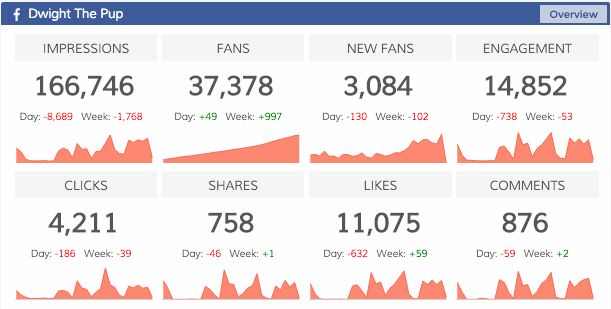
From Twitter to Facebook to Instagram, there is more to social media than posting updates dasheroo data dashboard: social media engagementand waiting for something good to happen. You need to implement a strategy that boosts engagement.

For instance with Facebook engagement includes:

  • Liked
  • Shared
  • Commented
  • Clicked

Make sure your charts are going up and to the right and if it isn’t dig in and find out why!

3. Google Analytics UsersDasheroo data dashboard: Google Anaytics userss

Traffic, traffic, traffic. A big part of your online success is based on your ability to drive users to your website.

Sync your new marketing dashboard with your Google Analytics account to track users. This shows if your traffic is increasing or decreasing, while also lending data on how visitors are finding your website.

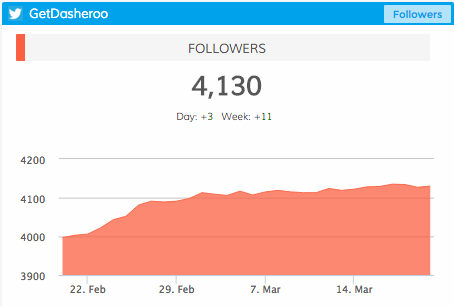
4. Social Media FollowersDasheroo data dashboard: Twitter Followers
Much the same as social media engagement, it’s important to understand how many people are following you on social media. Is your reach growing?

From day to day, from month to month, you can track your number of followers on each social platform. Positive movement is what you are looking for.

5. Ecommerce

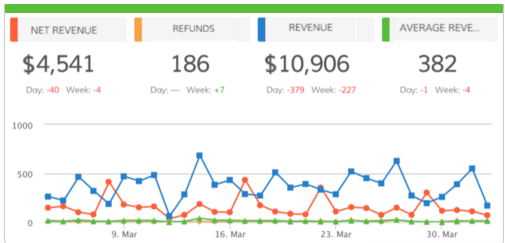
Are you selling a product (or products) online? If so, accurate data can be the difference between success and failure. A marketing dashboard can help Dasheroo data dashboard: Ecommerceanswer questions such as:

  • Where are consumers coming from?
  • How much time are consumers spending on your website?
  • How many items are they buying at a time?
  • How much is the average consumer spending?

Whether you use Shopify, Infusionsoft, Hubspot, Stripe or Paypal you can easily access this data!

Experiment and Adjust

Your beginner marketing dashboard will not look the same for long. Once you understand what you can track, once you understand how this impacts your business, you can then begin to make changes.

The most important thing right now is getting started. Sign up for Dasheroo to learn more, it’s free!

New Release! New Dasheroo Dashboards for HubSpot

hubspotHubSpot has features for social media marketing, email marketing, web analytics, search engine optimization and a new CRM solution which includes deals, companies, sales pipeline process and more.

With the expert help from HubSpot, we’ve created 13 dynamic insights for your dashboards, with a few more to come in the near future.

Email Marketing

List Growth – View the total number of email addresses added to selected lists by day.

CRM

Dasheroo dashboards: Hubspot analytics

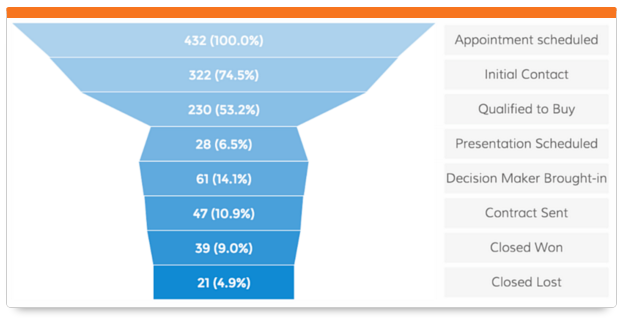
View what stage of the funnel your deals are in HubSpot.

Contacts – View the total number of contacts added to your HubSpot account in the given time period and how it trends.

Contacts Lifecycle Funnel – View a funnel insight that shows the lifecycle stages and the number of contacts in each stage.

Deal Stages Pipeline – View a funnel insight of the number of deals in different stages of the sales lifecycle.

Top Contacts by Lead Score – View a leaderboard report of contacts ranked by their lead score.

Workflow Performance – View a trending line insight showing the number of contacts in each stage of the selected workflow’s performance.

Sources

Displays the different sources of traffic and number of visits from each.

Displays the different sources of traffic and number of visits from each.

Sources Distribution – View the different sources and the number of visits, contacts and customers they generate.

Customers by Source – View sources of traffic and the number of customers each generated in the given time period.

Contacts by Source – View sources of traffic and the number of contacts each generated in the given time period.

Visits by Source – View sources of traffic and the number of visits each generated in the given time period.

Keywords

Dasheroo dashboards: Hubspot analytics

Keep a close eye on how many leads specific keywords generate!

Top Keywords by Visits – View a leaderboard insights that ranks keywords based on the number of website visits they generated in the given time period.

Top Keywords by Contacts – View a leaderboard insight that ranks keywords based on the number of contacts they generated in the given time period.

Top Keywords by Leads – View a leaderboard insight that ranks keywords based on the number of leads they generated in the given time period.


These awesome HubSpot Analytics are available with the Dasheroo Grande ($19/month or Venti $49/month packages.

Dasheroo Dashboards Get Great Press!

We always like to share with you when Dasheroo gets some great ink for our awesome dashboards, and just recently we had four great companies talking about Dasheroo, from marketing tools to marketing blogs! Thanks guys!

jotformJotForm

Dasheroo made a very relaxed list created by JotForm‘s own Chad Reid, Lazy Marketers: Here are Your New Tools. Thanks to Chad for putting us alongside some other great tools to help ease the workload like Help a Reporter Out (Haro) and Buffer!

Examiner.comExaminer logo for Dasheroo dashboards

Automation is a key to every business so that there is more time and energy to be focused on business growth. Dasheroo dashboards do just do that, and has made a list: 10 Affordable Tools That Automate Your Business for Faster Growth. Thanks, Norah.

Screen Shot 2016-02-10 at 4.24.18 PMCampaign Monitor

Dasheroo integration partner, Campaign Monitor listed the Dasheroo Blog in 51 Must-Read Marketing Blogs You Should Know.

funnlsfunnls logo for Dasheroo dashboards

The Dasheroo Blog gets some more attention in Charlie Rose‘s second year of this list Top 25 Marketing Blogs to Read in 2016 on his website funnls. Thanks again Charlie!

Texas Christian University: How We Use Dasheroo to Measure KPIs

Dasheroo customer Texas Christian UniversityWhen we found out that Texas Christian University used Dasheroo to track their KPIs with our dashboards we couldn’t wait to talk to them to find how how and why. So we reached out to the TCU Assistant Director of Student Activities Brad Thompson. Here’s his story (and it’s probably a lot like yours!)

What’s Their Problem Anyway?

Brad Thompson is responsible for collaborating with the school’s marketing team, along with 30+ student volunteers, to launch more than 600 events per year. And with limited resources, this is a colossal undertaking.

As the Assistant Director of Student Activities, Brad is always looking for ways to build a bigger brand, generate more awareness, and more efficiently communicate with staff, students, and other on campus personnel.

Every week, Brad sends 10k to 20k emails while also managing a robust social media presence. His focus is simple: to increase student involvement.

Show Me The Money!

Within any university environment, there is regular questioning regarding KPIs, marketing efforts, budget, and return on investment (ROI). Brad had no data to back up his hard work. Having access to data helps with the following:

  •   Justifying implemented marketing strategies.
  •   Introducing new marketing channels.
  •   Calculating and communicating return on investment.
  •   Forecasting.
  •   Bringing credibility to what Brad is working so hard to do!

What Did They Find Out?

Despite his best efforts, Brad was unable to find a solution to his biggest challenges. During the summer of 2015, however, he came across Dasheroo.

He said, “I found Dasheroo over the summer, right after their launch. I had been dreaming of an business analytics dashboard for over three years and had yet to find anything. I had trials with a couple other providers, but ultimately found that Dasheroo offered the features I need and is also the easiest to use.We are now obsessed with Dasheroo!”

After connecting with Dasheroo, Brad soon experienced its true power. Early on, he used a Dasheroo dashboard to learn more about the email marketing service, Emma (an integrated partner of Dasheroo).

From there, the university jumped on board with Emma, thanks in large part to its Dasheroo integration.

Brad noted a variety of other benefits provided by the Dasheroo dashboard:

  •   It’s a simple integration, clean, and access to all metrics in one spot.
  •   It gives the ability to pull up information anytime, anywhere, with all data continually updated, even on a mobile device.
  •   It integrates with their much used applications; Emma, Facebook ads, Google Analytics, and other platforms.

With a focus on email marketing, Brad and his team have found the Emma integration to be a lifesaver.

“For email marketing, the response metrics are huge. Furthermore, we want to grow our site beyond students, and once again, a targeted email marketing strategy can assist with this.”

When asked about his favorite feature, Brad didn’t waste a minute:

“I love that we have all of our data in once place. We really value data collection, but it’s spread across so many platforms that it gets to be overwhelming. Dasheroo puts our data together, making it both intuitive to understand and easy to act on.”

Now What?

Moving forward, the TCU Student Activities department plans on doing more marketing for public events.

While most their current efforts revolve around Facebook, the team wants to expand their approach and touch on other social channels, such as Instagram.

Brad has taken advantage of many features provided by Dasheroo, while also using the dashboard to learn more about Emma. This will lead to the addition of other apps to help with events, surveys, e-commerce and more to have a true marketing dashboard.

“We’ve connected Google Analytics, Facebook, Facebook ads, and Emma. From here, we want to look into a payment integration for paid events, and will consider all Dasheroo integrations that may be able to help.”

Track Our Startup: Dasheroo Invited to the LAUNCH Scale Demo Pit!

We Launch Logowere so excited and proud that Dasheroo was nominated to host a demo table at LAUNCH Scale as a Top 100 company most likely to scale! Holy Moly! We’re even happier to be invited to the Top 100 Demo Pit!! If you’re in San Francisco today or Wednesday (sorry for the short notice!) you should go to this event! Stop by and say hi to Josh or Alf.
Back to Scaling…

We are ready for Q4 I tell ya. We’re tracking our numbers for the early part of Q4 and it’s looking good as far as website visits, converted leads and new customers finding value in what we provide (i.e. paying us!) Onward and upward as they say.

New Stuff We’re Working On…

We’ve been working on a few new integrations like Pinterest. It’s not been easy and it’s our #1 requested integration but they recently opened up their API to give us data for your Pinterest analytics. So they’re up next!

For Pinterest you’ll be able to track business metrics like:

  • Total number of boards
  • Total number of pins
  • Total number of followers
  • Total number of re-pins
  • Total number of comments
  • Total number of favorites
We’re also working on dashboard insight for Pinterest Reach, Engagement, New Followers, Engagement Rate, Engagement Rate by Boards, Boards Leaderboard, Highest Engagement Pins and Popular Pin Types. Whew!
We’ve been revisiting current integrations we have and adding additional insights for you to include on your data dashboard.

For all email marketing providers like VerticalResponse, Campaign Monitor, AWeber, Emma, Constant Contact, Mail Chimp and Get Response you’ll now be able to track growth broken out by each subscriber list.

Alerts (we had to put this feature on hold for a bit but it’s back!) You’ll soon be able to set an alert when a threshold is met on a KPI you track in your dashboard. For instance if you want to know the minute you hit 100 Likes on a given day on your Facebook page you’ll get an email!

We continue to work on our Partner program administrative functionality which we’d like to release soon. So if you’re an agency or you manage a larger team of people and you need controls over who sees what data, we’ve got you covered.

Our co-founder James developed the coolest way to export your data into a PDF. He’s calling it Drone and soon we’re gong to release it to all of our users and he’s going to release it as an open source application to the developer community. We’re pretty happy about that for many, many, many reasons!

Now back to work and back to LAUNCH Scale!

Facebook Ads Business Dashboards Launched!

When we had our launch (read the story here) we also snuck in a few great new applications to add to your business dashboards; Emma for email marketing and Facebook Ads so you can track some of your ad stats. If you want to see the press release for our launch here it is.

We’re pretty excited about it and even more excited about our board meeting yesterday, the day after we launched Dasheroo, with our buddy Matt Holleran from Cloud Apps Capital Partners. We also had a bunch of meetings to talk about what’s going to be happening next (can’t we just relish the moment?) so after we chat this week we’ll sure be informing you about the roadmap, keep the suggestions coming though!

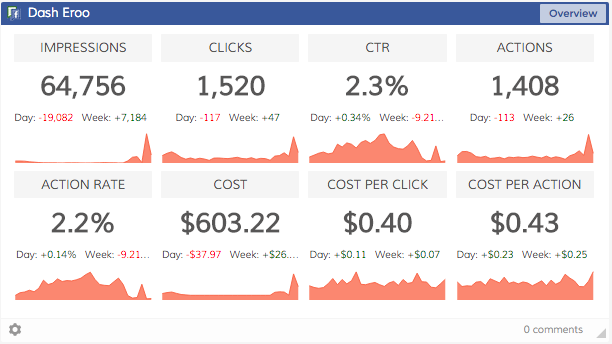
So for Facebook Ads, you’ll be able to filter your insights at the Ad, Ad Set, Campaign and Account level for:

  • Overview – View all of the metrics below in one insight.New Facebook Ads relevance score dashboard
  • Impressions – View your ad impressions over time. Impression = total number of times your ad entered the screen for the first time.
  • Clicks – View the total number of clicks on your ad over time. Depending on what you’re promoting, this can include Page likes, event responses or app installs.
  • CTR – View your click-through rates over time. CTR is all clicks ÷ by impressions in the date range.
  • Actions – View the number of actions taken on your ad, Page, app or event after someone viewed your ad, even if they didn’t click on it. Actions include Page likes, app installs, conversions, event responses and more.
  • Action Rate – View your action rate for your ads over time. Action rate is all actions ÷ by impressions in the date range.
  • Cost – View your ad costs over time. Filter by Ad Account, Campaign, Ad Set or single Ad.
  • Cost Per Click (CPC) – View your cost per click over time. CPC = amount spent ÷ number of clicks for the ad.
  • Cost Per Action – View your cost per action over time. Cost Per Action = amount spent ÷ number of actions for the ad.

More excitement? We also give you insights for:

  • Highest Click Through Rate – View a list of the last 7 ads that had the highest click through rate
  • Highest Relevance Score – View a list of the last 7 ads that had the highest relevance score
  • Highest Action Rate – View a list of the last 7 ads that had the highest action rate

Log into your Dasheroo account now and check them out!

There are a few things we do know that are coming:

Campaign Monitor! – If you use this cool email marketing app (and we love Alex, Craig, Sean and Andrea over at Campaign Monitor) you’ll be able to see a snapshot of your last few campaigns and how they did, how your subscriber growth is going and the trending of your overall click, open, bounce and unsubscribe rates. We hear that Aweber might be next!

Market New York (@MarketNewYork or #MKTNY) – We’ll be showing our wares in NYC, the big Javits center for a day, May 21st! This show is great, our buddy Ramon Ray is going to be there with Infusionsoft (also Smart Hustle Magazine, we love Ramon!) and Dave Kerpen from Likeable Local. We’ll be front and center with our selling shoes on (how can you sell something that is free?) in our fancy new booth. Visit John at the booth, he can’t wait to see ya!

Go check out Facebook Ads and Emma insights.

Daily Beast Does an Email Marketing Design Makeover

We are pretty adamant about getting our news headlines from two sources, The Daily Beast and Nextdraft (thanks to Dave Pell for THE most compelling headlines you’ll ever read in your entire life on this planet Earth.)

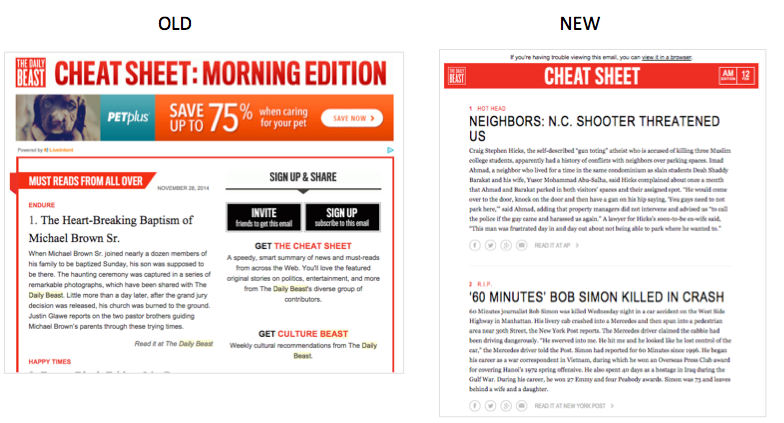
So recently we saw that The Daily Beast did a bit of an email marketing design makeover on their campaigns and we felt compelled to dissect the old vs. the new. Here goes:

An example of what the Daily Beast used to look like and now.

  • The old had just 2 spots for ads in the email. The new now has spots for 4 ads. More ads=more revenue. Good job.
  • The old doesn’t have social links on each article, the new one allows one to socialize the article. We like that one!
  • The new one is very text-heavy, they may be embracing the “less is more” rule?
  • The old one doesn’t look super-great on mobile, the new one has larger text and is a bit more optimized for mobile, so it’s easier to read.
  • The old one uses valuable space above-the-fold for sign up and invite, but these people are already getting the email. The new one uses the share links within each article and the follow links at the bottom. Once people are on the site, all information is very shareable.

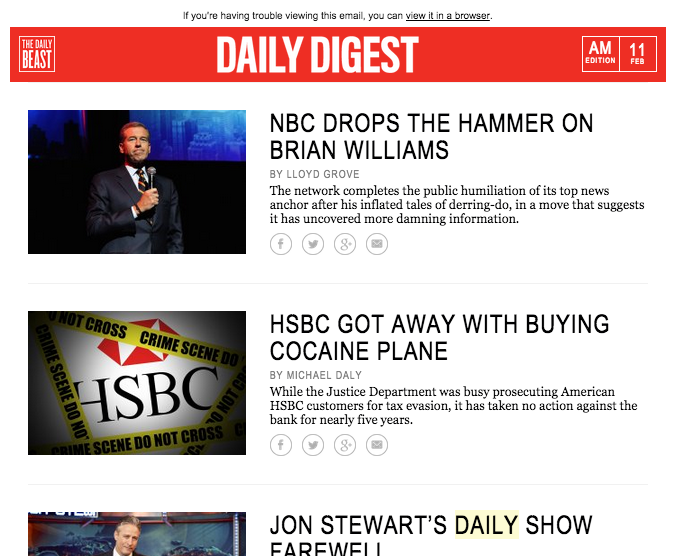
They added more emails! They started a new Daily Digest for only the most important can’t-miss news complete with images and incorporates their new best practices from above. Now we have to get to the bottom of Brian William’s on “leave”!

The new Daily Beast Daily Digest, AM edition.

The new Daily Beast Daily Digest, AM edition.


So if you’re in the mood to do some testing with your email marketing campaigns you might consider using a few of these ideas and see what happens!

How Many Email Marketing Clicks Come From Mobile Devices?

Did you ever wonder how many email marketing clicks are coming from people reading your email on their mobile devices and tablets? Us too! So off to Google Analytics to find out exactly how many. This blog post will tell you how to look at your email marketing campaigns by click rate. We’ll write about how to view open rates by mobile in a later post. If you need that right away we found this incredibly helpful article.

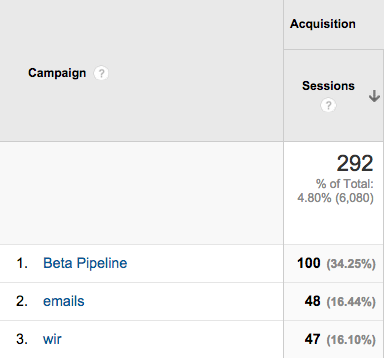
Assuming you are using UTM codes in your email marketing campaigns and are monitoring your campaigns you probably see something like this:

Google Analytics - Tracking email marketing clicks from mobile devices

Here we clicked on Campaigns and the campaigns we have where we set up UTM codes are displayed. The one we’re interested in is wir or “Week in Review.” This is the email we send that gathers all of the blog content we spend a ton of time creating for each week.

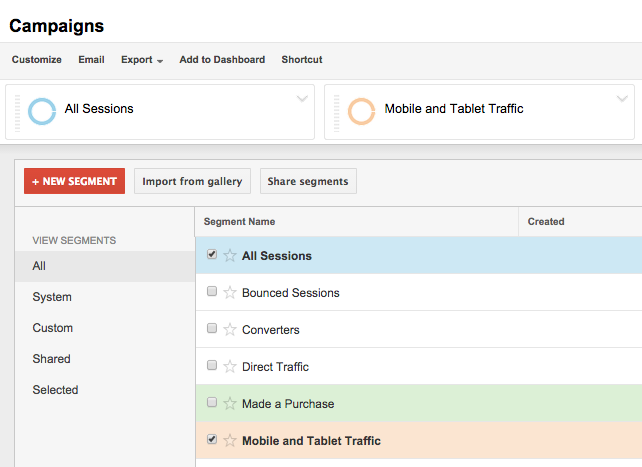
We then go to add a Segment and select Mobile and Tablet Traffic.

Google Analytics - How to track email marketing clicks from mobile devices


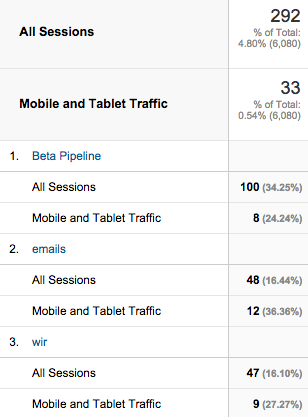
Then voila! We get to see what percentage of people have clicked on an email from a mobile or tablet device!

Google Analytics - email marketing clicks that come from mobile devices

In our case you’ll see that 12 of 48 or 25% of our overall clicks are coming from mobile. This means that it’s very important for us to be designing our emails for these types of devices.

The New Gmail Inbox: Your New To-Do List

Gmail Inbox is the new way to look at your email. It is still by invitation only but yours truly got in! We wanted to see what it looks like and how it might affect an email marketing campaign as it relates to inbox placement and well, what the “coolness” factor really is.

Do we like it? As a user coolness factor is 8.

What’s different? Everything!

You can now think of your email inbox as your to-do list. It’s what it really is isn’t it?

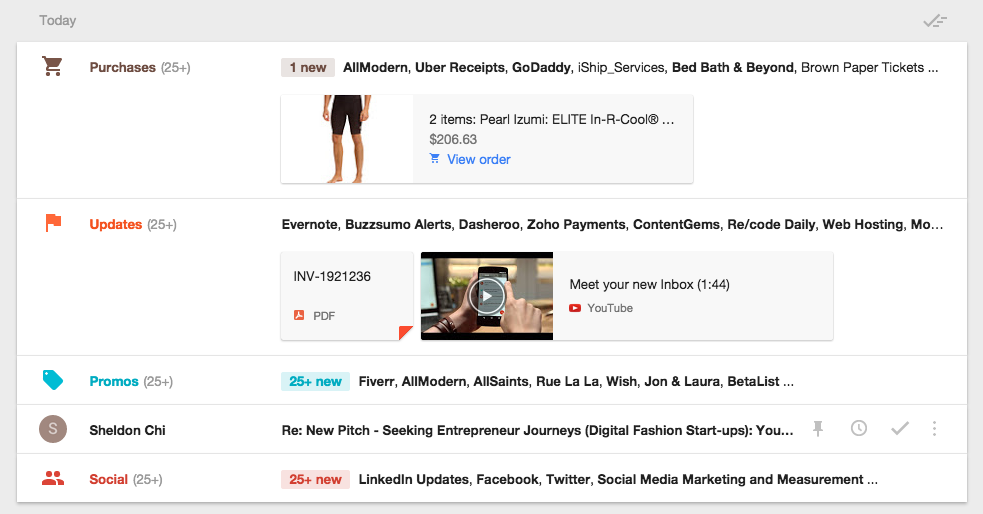
Much like the “Promotions” and “Social” tabs in Gmail classic, Inbox attempts to do the thinking for you. So things like Promos (likely where most email marketing campaigns will end up) and Social, Inbox will bundle these items for you, but there are a host of other “bundles” like Travel and Purchases as well. Need to find that receipt from All Modern? It might be easier than you think. Need to find all of your travel arrangements? Easy. And a user can stop the bundles and see everything if they want.

Things are bundled into Today, Yesterday, This Month and previous months emails as well, so there’s not a lot of scrolling through hundreds of messages, you can go right to the day if you like. Search is still awesome, they are Google after all.

The new Gmail Inbox might affect your email marketing, here's how.

You can see “bundles” of emails like Purchases, Updates and Promos, but Sheldon’s email stands on its own!

However, if you’re a business and you send emails to your customers, you might find you are getting “bundled” into the promotions file. Although Inbox will tell a user you’ve got “new” items within a bundle, your email still might get buried. So look at your open rates on your email marketing campaigns and track this closely.

Here are cool “to-do” things you can do with Gmail Inbox:

  • You’ll also be able to mark an email off as “done” in your list of things to do. This won’t trash your email forever it just gets it out of the view of your inbox so you’ll be able to focus on what you need to do.
  • You’ll be able to “pin” an email if it’s important. It will show up if you toggle to the “pinned” emails so you know what’s really important.
  • And finally you’ll be able to “snooze” an email. So this is for if it’s important, you need to act on it, but not right away, so you snooze it for later, tomorrow or “someday” which is pretty funny.

It’s still so new we’re not sure how we feel, but so far so good. If you want to get Inbox email ask for an invite. You might like what you see.