
Gmail Inbox is the new way to look at your email. It is still by invitation only but yours truly got in! We wanted to see what it looks like and how it might affect an email marketing campaign as it relates to inbox placement and well, what the “coolness” factor really is.
Do we like it? As a user coolness factor is 8.
What’s different? Everything!
You can now think of your email inbox as your to-do list. It’s what it really is isn’t it?
Much like the “Promotions” and “Social” tabs in Gmail classic, Inbox attempts to do the thinking for you. So things like Promos (likely where most email marketing campaigns will end up) and Social, Inbox will bundle these items for you, but there are a host of other “bundles” like Travel and Purchases as well. Need to find that receipt from All Modern? It might be easier than you think. Need to find all of your travel arrangements? Easy. And a user can stop the bundles and see everything if they want.
Things are bundled into Today, Yesterday, This Month and previous months emails as well, so there’s not a lot of scrolling through hundreds of messages, you can go right to the day if you like. Search is still awesome, they are Google after all.
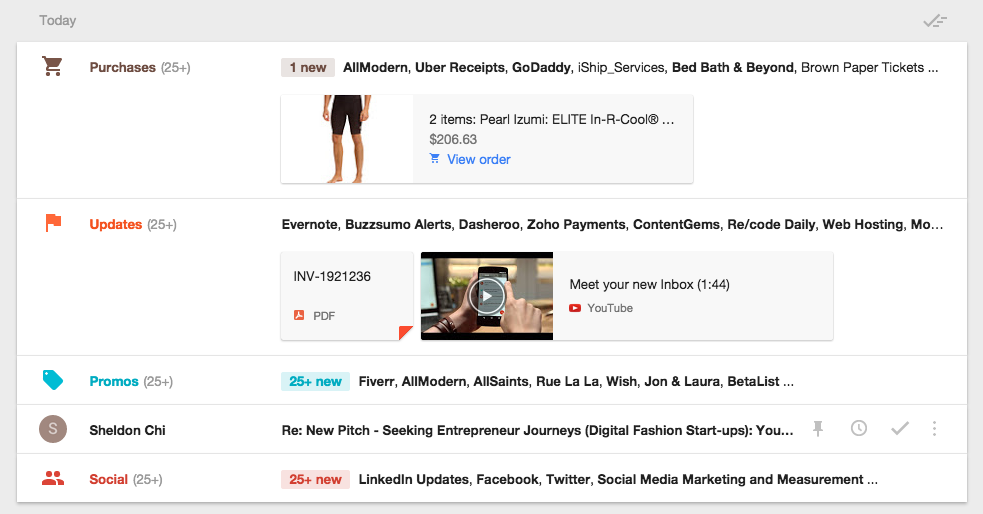
You can see “bundles” of emails like Purchases, Updates and Promos, but Sheldon’s email stands on its own!
However, if you’re a business and you send emails to your customers, you might find you are getting “bundled” into the promotions file. Although Inbox will tell a user you’ve got “new” items within a bundle, your email still might get buried. So look at your open rates on your email marketing campaigns and track this closely.
Here are cool “to-do” things you can do with Gmail Inbox:
- You’ll also be able to mark an email off as “done” in your list of things to do. This won’t trash your email forever it just gets it out of the view of your inbox so you’ll be able to focus on what you need to do.
- You’ll be able to “pin” an email if it’s important. It will show up if you toggle to the “pinned” emails so you know what’s really important.
- And finally you’ll be able to “snooze” an email. So this is for if it’s important, you need to act on it, but not right away, so you snooze it for later, tomorrow or “someday” which is pretty funny.
It’s still so new we’re not sure how we feel, but so far so good. If you want to get Inbox email ask for an invite. You might like what you see.