
With 320 million monthly active users, you know that Twitter provides a unique opportunity to connect with customers, prospects, and thought leaders among others. And while a large number of followers is a step in the right direction, you won’t fully understand what to do next until you start tracking your Twitter analytics.
Here are three questions to address:
1. Are You Tracking When Your Followers are Online?
There are instances when timely tweets are necessary, such as to announce breaking news. There are also times when you should wait to make an update.
By tracking when your followers are online, you can increase your reach while improving the chance of engagement (retweets, replies, mentions, and likes).
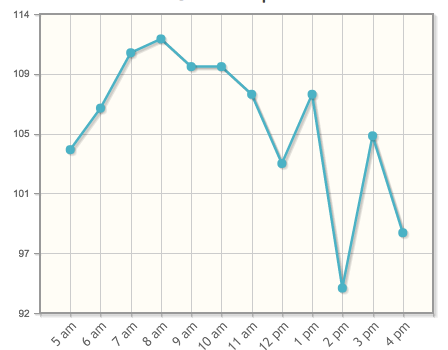
At Dasheroo we schedule our Tweets between 6am and 11am!
Tweriod gives you a nice taste of when a portion of your followers are online for free. If you upgrade to premium most people will pay between $4-$8/month with a robust offering.
2. When is the Best Time to Post?
This goes along with question #1 above. Once you know when your followers are online, it’s easier to understand the best times to post.
Like many, you don’t have enough time in your schedule to tweet throughout the day. For this reason, you need to schedule out posts at relevant time intervals.
Buffer and Hootsuite really help with automation of posts. Here’s a great article on using Buffer and another one on using Hootsuite to automate your Tweets!
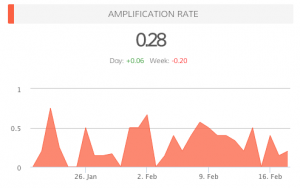 3. What is Your Amplification Rate?
When you know when your followers are online, when you know the best time to post, your amplification rate will increase. This is the rate at which your followers share your tweets (amplification = number of RT’s per tweet).
Your goal with each tweet is to generate as much engagement as possible. Retweets are important, as this means your followers are sharing your updates with their followers, thus increasing your reach.
Do You Need Help Answering These Questions?
In addition to Dasheroo, experiment with other services, like Tweriod, that provide data on the best times to Tweet. By analyzing your Tweets, as well as your followers’ Tweets, you will have a better idea of when it makes sense to publish updates.
In the near future, we plan on providing additional Twitter analytics, such as when followers are online and the ideal times for posting.
Can you think of any other features that could benefit your social media strategy?
P.S. Did you know we have free Twitter Analytics dashboards for you to track? Check them out today!
Why doesn’t Dasheroo list Tweet Impressions? Also, the Engagement Rate that Dasheroo calculates is much lower than the Engagement Rate that Twitter calculates. Twitter includes: Detail expands, Profile clicks, Link clicks and other forms of Engagement, in addition to what Dasheroo includes in their calculation. This makes using Dasheroo very problematic for those of us with clients who are not comparing apples to apples. Previously, my client was looking at the Engagment Rate that Twitter supplied; so when I walk in with the Engagement Rate from Dasheroo it looks like things have gotten worse under my watch, when they’ve actually gotten much better. How can Dasheroo solve this problem?