Dasheroo Dashboards Get Great Press!

When we get mentioned by awesome folks that like our dashboards we’re always happy and always wanting to share with our readers. Here are two amazing articles highlighting some really great online tools that we’re humbled to be a part of!

Carl Ramallo - dashboardsHow to save TIME with these Top Social Media Management Tools.

Carl Ramallo, voted a top social media coach, wrote this article highlighting social media management tools like Social Rank, Hootsuite, Buffer and you guessed it…Dasheroo dashboards.

11 Content Marketing Tools You Can’t Live Without
The Marketing Insight's logo - dashboards

Suttida Yang, that awesome digital marketing consultant and CEO of Fast Markit, wrote a great article about the tools she can’t live without and why. Two tools she mentions we absolutely love are BuzzSumo and Canva, oh, and Dasheroo for dashboards! Check out her list.

Thanks guys!

Twitter Analytics: The Importance of Knowing Your Audience

With 320 million monthly active users, you know that Twitter provides a unique opportunity to connect with customers, prospects, and thought leaders among others. And while a large number of followers is a step in the right direction, you won’t fully understand what to do next until you start tracking your Twitter analytics.

Here are three questions to address:

1. Are You Tracking When Your Followers are Online?

There are instances when timely tweets are necessary, such as to announce breaking news. There are also times when you should wait to make an update.

By tracking when your followers are online, you can increase your reach while improving the chance of engagement (retweets, replies, mentions, and likes).

Tweriod Twitter Analytics dashboard

At Dasheroo we schedule our Tweets between 6am and 11am!

Tweriod gives you a nice taste of when a portion of your followers are online for free. If you upgrade to premium most people will pay between $4-$8/month with a robust offering.

2. When is the Best Time to Post?

This goes along with question #1 above. Once you know when your followers are online, it’s easier to understand the best times to post.

Like many, you don’t have enough time in your schedule to tweet throughout the day. For this reason, you need to schedule out posts at relevant time intervals.

Buffer and Hootsuite really help with automation of posts. Here’s a great article on using Buffer and another one on using Hootsuite to automate your Tweets!

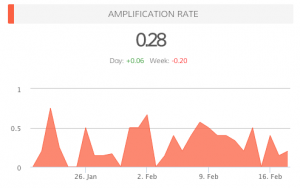
amplification_rate-37c16ba1dd3ec0e9957571ab4f6305f23. What is Your Amplification Rate?

When you know when your followers are online, when you know the best time to post, your amplification rate will increase. This is the rate at which your followers share your tweets (amplification = number of RT’s per tweet).

Your goal with each tweet is to generate as much engagement as possible. Retweets are important, as this means your followers are sharing your updates with their followers, thus increasing your reach.

Do You Need Help Answering These Questions?

In addition to Dasheroo, experiment with other services, like Tweriod, that provide data on the best times to Tweet. By analyzing your Tweets, as well as your followers’ Tweets, you will have a better idea of when it makes sense to publish updates.

In the near future, we plan on providing additional Twitter analytics, such as when followers are online and the ideal times for posting.

Can you think of any other features that could benefit your social media strategy?

P.S. Did you know we have free Twitter Analytics dashboards for you to track? Check them out today!

Social Selling: 5 Thing To Do to Get Started

When it comes to the overall sales process, social selling using your social networks can be your best friend and you want it to be. Any help to get to the “yes, I’ll take two” is a great channel for you to cultivate. Social selling is defined as: the process of developing relationships as part of the sales process. Today this often takes place via social networks such as LinkedIn, Twitter, Facebook, and Pinterest, but can take place either online or offline.

Those who take the right approach to social selling continually generate positive results. And those who “hope something sticks” are not typically happy with where they end up.

Fortunately, social selling is not rocket science. It can be extremely simple and straightforward if you know what you are doing. Here are three ways to use social media to your advantage. At Dasheroo we take social selling serious and use all of these ideas when it comes to closing a deal.

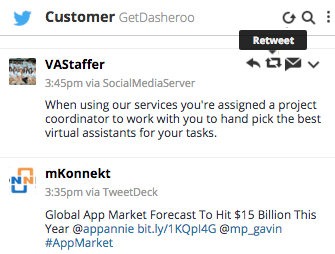
Twitter Engagement for social selling

Using a tool like Hootsuite you can easily track what your customers are doing and ReTweet right from there!

Engage on Twitter

Once you set your sights on a target, you can use Twitter to search and find your target customer. The first steps to take:

  • Follow your target and their company (many times they have multiple Twitter accounts.)
  • Retweet their content.
  • Mention them in your own tweets and make sure you include their Twitter handle!

If your prospect is savvy, they’re looking at the emails they get from Twitter telling them who is Retweeting them and sharing their content. This will hopefully make them follow you back and take interest in what you’re putting out on Twitter.

Twitter is a powerful tool for those who are interested in social selling. You may be surprised at how much progress you can make with 140 characters or less.

Connect on LinkedIn

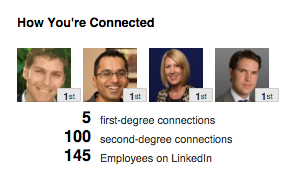
LinkedIn Company Connections

Target your customer and connect with them on LinkedIn through the “company” search.

With more than 400 million registered members, LinkedIn is the place to be for person to person selling. It is the professional network, providing the opportunity to put your social selling skills to the test. The key is that you need to be “connected” to a lot of folks in your industry and in your target audience. So:

  • Search the company name on LinkedIn
  • You’ll see who are your 1st-3rd degree connections
  • Connect with the appropriate people
  • Also, identify your target prospects using the advanced search in LinkedIn. It’s incredibly powerful.
  • Send the person a connect request.
  • Follow their company.
  • Send them an InMail if the connect OR upgrade to Premium and you have several InMails/month to send

We have had so much great luck on LinkedIn at Dasheroo. Check out 3 Easy Ways to Use The Power of LinkedIn Marketing.

Facebook for Business

Many people look at Facebook and see nothing more than pictures of cats, DIY projects, and happy families. On the contrary, while Facebook is a great way to stay in touch with friends and family, it can also be used as a P2P sales tool.

Getting started is as simple as liking the company page and liking, sharing and commenting on their posts. Over time, you can move the conversation from Facebook to another platform, such as LinkedIn or email.

Tools to Use

The best way to follow these people is using a tool like Hootsuite. They have a free version and you’ll be able to easily follow people on multiple social networks, see what they’re posting and react accordingly.

Google Alerts is a great way to keep tabs on what’s going on with the companies you follow. Then you can go ahead and post about their news.

Grow Your Audience

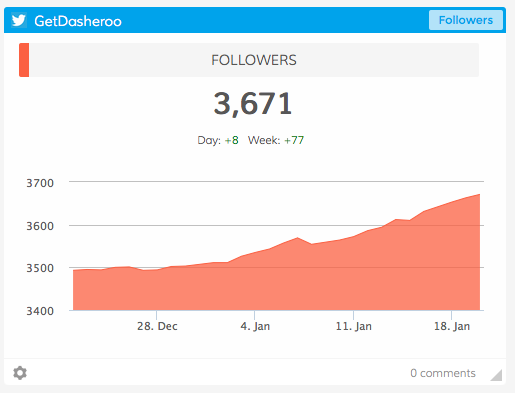
Screen Shot 2016-01-20 at 1.31.20 PM

Use Dasheroo dashboards when social selling to track your growth over time.

You don’t need a large following to achieve success with social selling, but it definitely helps. Be sure your audience is always growing, as this improves the likelihood of connecting with prospects who can one day be turned into paying customers.

With Twitter, for example, it is ideal for your follower count to increase day after day, month after month. This means more opportunity to sell. It also means more people listening to what you have to say.

What are your thoughts on P2P social selling? Are these tips enough for you to get started?

Startup Lessons Learned This Week: Setting Our Pricing

Last week in Startup Lessons Learned I discussed the importance of establishing sales strategies on both ends of the business spectrum – from a strong ‘auto convert’ for the SMBs all the way up to big ‘ol enterprise types. What that means is this – folks that will pull out their credit card for a $19 purchase when electronically prompted, all the way up to negotiated contracts in the several of thousands of dollars.

So when deciding on your startup pricing strategy, there are so many important items to consider. But I’m going to focus on the 3 biggies we drilled into when setting our initial ‘auto convert’ pricing, as I feel they establish the foundation of a good pricing strategy. Here we go:

1) Your costs. Evaluate both fixed and especially variable costs. For us, the incremental costs of supporting each new user is relatively low. Our incremental costs get down to efficiently scaling the backend server and database costs, being very efficient with API calls to the 3rd party applications we connect to, and customer support. With a business freemium model like we have, incremental variable costs must remain low. For yours? Who knows, but start with your cost basis, and make sure you are very realistic on your costs now, and how they will change over time, especially if you grow.

2) Your competition. You need to be mindful of the competitive environment. Businesses are very cost-sensitive. Does that mean you need to undercut your competition? Not necessarily. First, try to understand your competitor’s pricing approach. What are they basing it on? Is it per user or per ‘widget’? Figure out their pricing metric(s). If you can understand that you can shape your pricing to be a greater value. And that is really what it comes down to, to win the long term race. Value.

Note: Don’t get too crazed by just one competitor’s pricing. You could whip yourself into a frenzy trying to compete with it, and then they change their pricing the next day!

3) Your value. Here’s where your pricing strategy culminates into a successful business. Answering the question “What do users derive the most value from?” You can’t trick, cajole, or hold important stuff hostage, in order to drive long term profitable relationships with your users. And although price points are a huge consideration, if they are not based on ‘value realized’ it won’t matter.

Bottom line, here’s what we did for our SMB auto-convert pricing (I’ll talk agency and larger company pricing in a future post.)

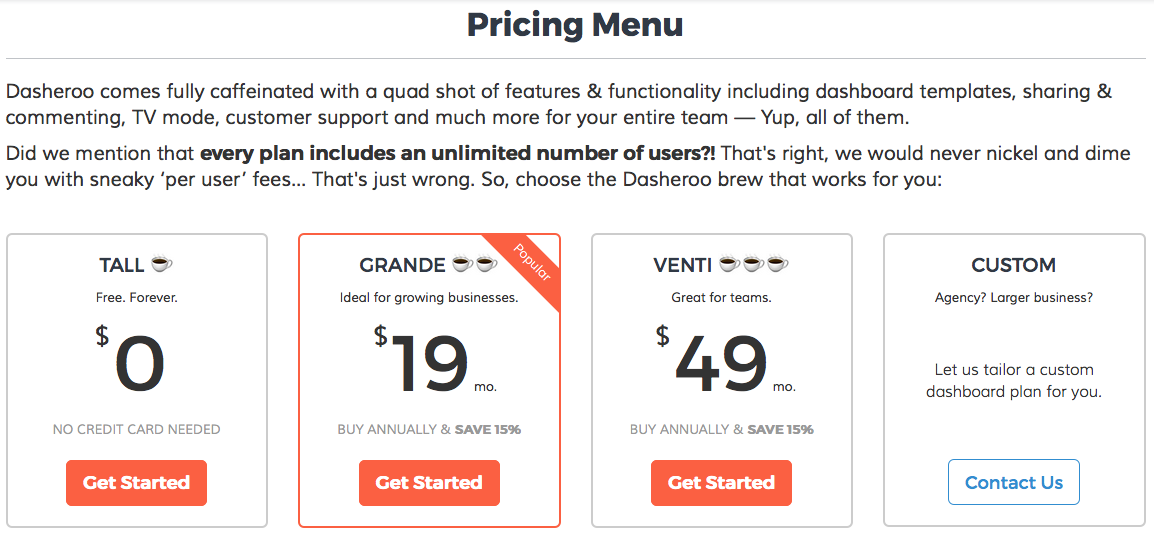
Ou just launched business dashboard pricing

Our just launched business dashboard pricing!

  • Free! We call this our “Tall” pricing tier. We feel business freemium reduces the risk a business takes, and allows for rapid global adoption. Sharp folks like Mailchimp, LinkedIn, Hootsuite and SurveyMonkey have all proven this out. Otherwise, users are forced to make a pay/flee decision after a 14-30 day trial, and often these busy users need a longer period of time to derive value from a product. We felt that leading with a 100% risk-free offer satisfies my three considerations above, provides a huge value, a competitive advantage and fits within our cost structure.
    • We’re big believers in really providing great value in the freemium edition. No stripped down bait-and-switch type stuff. At VerticalResponse (where a lot of us have experience from) we re-tooled the traditional 30-day free trial into a freemium.

Dilbert: Freemium Model Cartoon

  • No ‘per user’ pricing. We really deliberated on this one! Debated. Argued. Hell, I think I argued with myself on this decision! But at the end, we all came to agreement that our pricing should be more like Basecamp’s pricing for project management than Insightly’s per-user pricing for CRM. CRM tools like Insightly naturally lend themselves to a per-user pricing schema, but with business dashboards, you get some users that may casually log in once per month, others that log in daily. So why make people hesitant to invite that casual user?
  • Great conversion price points and clear value triggers. So, the next pricing tiers are Grande and Venti, tipping a hat to Starbucks. You want to achieve a couple things here. First, there are natural price points that tend to drive a conversion. As in our $19 Grande plan. Sure we could have priced at $23 or $16. But we’ve done enough testing in our (long) lives to know that we’ll get as many folks to pay us $19 than $16 (I’ll take an extra $3/month to invest in innovation), and probably drive 30%+ conversions than pricing a couple bucks over the magic $20. Same goes for the Venti pricing. Secondly, our value-add (triggers) are clear. It’s completely usage based. You consume more Insights, we hope it’s clear that you should budget a little more per month for that additional usage, and a couple more bells and whistles.

A guarantee? We’ll most likely change our pricing at some point. As we learn, instrument (we love Mixpanel!) usage, get feedback from our awesome users and add more features and functionality we’ll adjust our prices. But we plan on always treating our current users well, and offer ‘grandfather’ plans to them.

Oh yeah, why the caffienated pricing? It just seemed catchy and fun. Hopefully it’s clear to people, otherwise we may change those labels as well!

CoSchedule – Automatically Publish Blog Posts to Social

Since we blog all the time we’re constantly on the lookout for cool apps that help us save time. And since that’s the business we’re in (saving you time) we love it when we come across a good one!

We’re avid bloggers, we try to do it once a day, although lately we’ve been taking Saturday’s off, and we actively publish our blog posts to all of the social networks that make sense for us. So naturally we look to automate as much as humanly possible. Well we ran across CoSchedule and thought it might be too good to be true and you know what? So far it is!

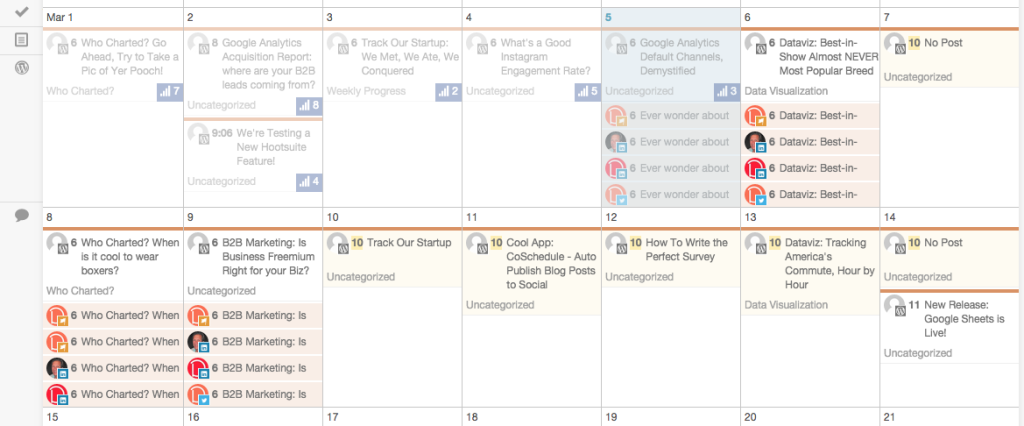
CoSchedule calendar view that we love!

Our Dasheroo blog & social calendar using CoSchedule in our WordPress account!

1. It’s a plug-in for WordPress which is our blogging platform.

2. It’s a visually-appealing calendar where we can see all of the upcoming posts and which social networks it’s going out to.

3. When the post goes live, it automatically posts to the social networks we connect with in the visual format we want (text, image, link)

4. It auto-posts it out when the scheduled post goes live.

We had a slight issue setting it up that we’ll blame on the crappy go-go connection we had on a Virgin America flight, but the customer support people (using Intercom.io) got right to me and cleared up any issue I had. Thanks guys!

So now we don’t have to get up and run to post this stuff to each social network. We use and love Hootsuite which is an alternative if you don’t mind the format that the RSS feed pulls it in. We also use it for bulk uploading posts for the month. We want to get as much out of our previous posts as possible and Hootsuite is great for that!

The 5 Steps of “Starting Small” With Your Social Media Marketing

Social media marketing can be daunting for any small business. And no matter what business you’re in you need to focus on running all of the facets of it, right? The social stuff is yet another thing you need to give focus to and it’s another thing you don’t have time for.

So here at Dasheroo you know we like to share our trials and tribulations with you as we’re starting out a new company and everything fresh. So we decided to tell you how we spun up our social media, which accounts for 25% of our overall traffic.

So without further adieu, here’s how we do it. Take from it what you wish.

Start With Your Content

For our platform we chose WordPress. We blog short articles, long how-to articles and some fun content as well with our weekly Who Charted? series. Either way we make sure that almost every day there is a piece of content out on our blog with our keywords placed into every post. Google loves it and it gives us some great content to share on social media. And since we didn’t have a ton of content to put on our site, this was a great way to start to get noticed by search engines for our related keywords.

Pick Your First Social Network
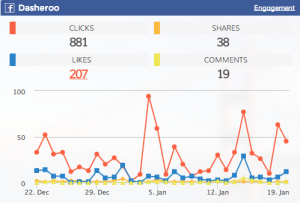
Dasheroo's Facebook business dashboard

We started with Facebook, then rolled to other social networks. We’re only a few people!

We chose Facebook. Every time we published to our blog we published the link to Facebook. And since we were on Facebook first we invited all of our friends to like the page. We run an ad campaign for likes on Facebook so that when we were ready to announce our Alpha and Beta versions of Dasheroo, our Facebook fans would have first dibs. Nine months later we have over 12,500 fans and continue to post, run ads and grow. Facebook is our number one source of traffic at Dasheroo, currently at 12% of all traffic.

Add Another and Another

Twitter – Once we had Facebook figured out our next social network was Twitter, we made sure that John (@therealhingley) had his own Twitter account separate from @GetDasheroo and we posted our blog content to both Twitter accounts. We realized that only posting once per day on Twitter wouldn’t move the needle, the life of a Tweet is only a few minutes these days so we would have to post 4-5 times per day at least to get noticed. That’s a lot. Once we started to post more often now 4% of our overall traffic comes from Twitter, up from 2.5%.

Linkedin – Linkedin was our next social network we chose and we share the daily posts to John’s Linkedin page. Our company page doesn’t get much traction yet but hopefully will soon. We’d rather use the thousand or so of John’s contacts to leverage our content. And Linkedin doesn’t seem like the proper medium to share posts like you would on Twitter, over and over so we only really share “new” content on Linkedin. Linkedin holds steady at 3% of traffic.

Pinterest – What the heck is a business dashboard startup doing on Pinterest? Well, Pinterest was opportunistic for us. We don’t have a lot of followers but every time we post an image to the blog we pin it on a board we created. For instance every Sunday we do a funny charts series entitled “Who Charted?” so we thought it was appropriate to pin the funny charts here. Pinterest hangs in there at about .5% of traffic. Not bad for just pinning images to a board!

Instagram – Instagram was next on deck. Once we had Facebook, Twitter, Linkedin and Pinterest going (we also added the “follow” images to our site and our email marketing campaigns) we thought it might be somewhat trivial to post a picture on Instagram. Side benefit? We also get to post this content automagically to Facebook and Twitter!

Google+ was the last one we looked at. Should it have been higher on the list? Perhaps, since creating a profile on Google+ boosts your search engine rankings. Not only that but every time a reader clicks the +1 button on one of your blog posts or Google+ posts, it increases your standing with Google.

Whew this is getting time consuming isn’t it? And this took months and months to get rolling! For each new social network we gave it a solid month before we really launched another one.

Automate!
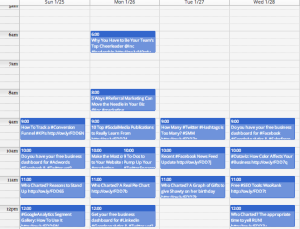
Screen Shot 2015-01-20 at 5.09.16 PM

Once you get the hang of it, automation is key. Gives you time to move onto the next and run your biz!

So the first thing we did was look at a way to automate this as much as humanly possible.

But how?

It took us to launch Twitter in order for us to think we had to automate. Posting over 5 times a day without automation can get tricky!

Every time we publish our WordPress blog we make sure that within WP our content gets published to Facebook and Twitter.

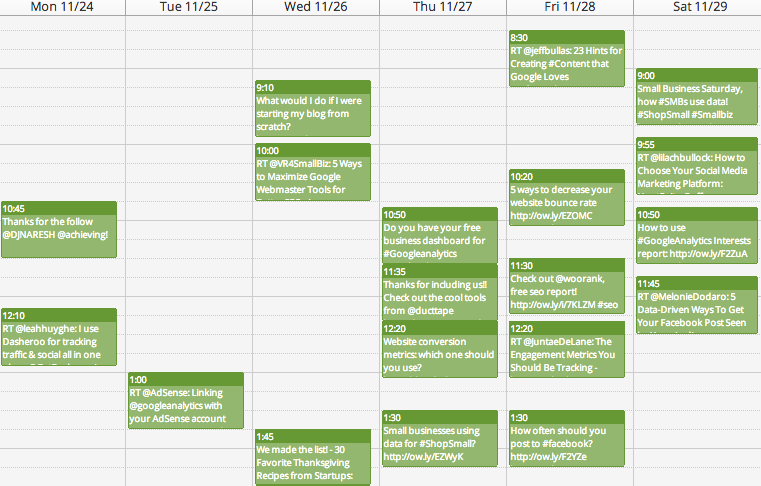
For Twitter we use Hootsuite but you can also check out Buffer. We keep a running list of our blog article headlines, with columns for the date and time we want them published as well as the link in a google spreadsheet. We make sure that we repeat these articles every few days in the spreadsheet so that in the event someone misses it on Twitter, they’ll see it again at a later date. We upload that into Hootsuite and voila, our Twitter is automated for the month. We try to make sure it’s always “evergreen” content and not date specific.

After we had Twitter up and running we added Linkedin and Google+ so that when we do our daily posting we can post from Hootsuite just once to most of our social networks.

So even though we know we want to RT other Tweets or Tweet interesting articles we read we’re always reusing our own content since we put so much time into creating it.

Measure

We’re always looking to see what works best! Using Dasheroo we can see that Facebook is driving the most social traffic for us, we can see that the infographic about dog breeds is hugely popular on the blog and we can see that Linkedin comes in 3rd for overall social media, especially when we share a bunch of articles. Hootsuite has analytics if you’re publishing from there as does Facebook, Twitter, Linkedin and Pinterest, however Dasheroo brings many of your apps together into one business dashboard.

There you have it, start small and grow as you have the time to grow.

Go Green! 5 Ways to Reuse Content

If you’re spending your time drumming up your own content for your blog or site, you need to make sure to get the most out of it, so go ahead and reuse content! Time is money and you don’t need to be wasting it, right? Plus it’s just great to get your content in front of your social media fans so they’ll engage with it and get you more quality fans and followers. So how do you re-use content? Here are a few tips and tricks that will put you on the right path:

  1. Don’t reuse old news. Make sure it’s relevant. As you’re going through your past posts, “newsy” stuff probably won’t cut it, because it’s old news. If you’re reusing a piece of content about how the software that you love works, make sure that it still works that way and hasn’t been upgraded in a way that dramatically changes it.
  2. Look at what’s popular. If you’ve got a post that’s driving a ton of RT’s, shares and likes, keep reusing it.
  3. Publish multiple times. Most people who follow you on social media might not see your post. From what we’ve researched, a Tweet hangs around about 2.8 hours and a Facebook post is about 3.2 hours so make sure you get the most of your content!
  4. Bulk upload. Create a Google Sheet with a list of all of your evergreen content with the post title and the url of the post. If you’re using Hootsuite Pro you can use the bulk uploader as long as you put a date next to the posts you want to post. If you’re not, use that spreadsheet to keep track of what you’re posting one by one.
  5. Mix it Up! Have a healthy mix of reused content along with brand new content.
Screen Shot 2014-12-03 at 8.56.40 PM

Here’s an example of how Dasheroo reuses content, new and reuse!

At Dasheroo here’s what we do:

  • Reuse 2-3 older blog posts per day on Twitter and Linkedin that are still relevant.
  • ReTweet and share awesome stuff from people we follow or great articles we read; it might be new or old, but it’s relevant.
  • Write a new blog post every day and publish it to social media. Then it goes into the rotation for reuse later.
  • Invite people to sign up for our free dashboards each day!
  • Schedule our posts between 7am-2pm PT, that’s when our followers are active.

In the end it’s really about getting your relevant content in front of your followers to inspire them to engage without having to come up with brand new ideas all the time. Whew, that’s a lot of work but worth it!

Measure Twitter Success By Quality Followers, Here’s How to Get them

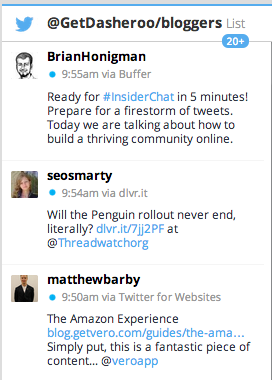
Screen Shot 2014-12-03 at 9.57.33 AM

Dasheroo follows a Twitter list of “bloggers” who blog about our industry, and RT some interesting stuff!

Twitter can take up a bunch of your time, you need to spend time to cultivate relationships and publish and re-publish some really great content whether it’s your own or someone else’s. And it isn’t only about the number of clicks to your site from Twitter users, but how many influencers in your industry follow you and how many ReTweets and favorites you get on your posts. Growing this “engagement” number could get you out in front of the people who you want talking about you.

So how do you get yourself out in front of the people you want to notice you? Here are three easy things you can do right now to give yourself a start so you can measure Twitter success by quality Twitter followers:

1. Follow people who write about your industry, use BuzzSumo for this and search on “influencers.” Follow them, put them on a Twitter list and monitor what they say by creating a stream in Hootsuite. Follow them from your company handle as well as your personal handle.

2. ReTweet and Favorite some awesome content from your industry influencers, they have a ton of followers and they probably publish regularly. If they see you’re genuinely interested in what they are posting they may start to follow you which is exactly what you want.

3. With all of the amazing automation out there you still need to show that you’re breathing. Publicly thank people for RTing your posts (not a DM) and give them a shout out for following you. This shows that you take some time in actually reading what people are doing on Twitter (every now and then:-) and that you’re not only fire-hosing information at them.

Eventually all of this hard work should turn into word of mouth about your business, more clicks to your site and more business.

9 To-Dos to Pump Up Your Twitter Engagement

We’ve been using Twitter since 2008 for business and personal and it’s been a very successful channel for us, but only because we really work it. And we monitor our Twitter analytics with our own Dasheroo dashboard, shocker! Twitter engagement is the metric you need to focus on. And with 284 million monthly active users and 500 million Tweets per day, you need to tap into it and cultivate! So here are 9 quick daily to-dos to pump you up!

  1. Follow your followers – Every day check out your New Followers. View their bio to ensure they’re someone you want to follow and follow them back. Hootsuite is a great tool for checking on your new followers and easily view who they are and what they’re saying.
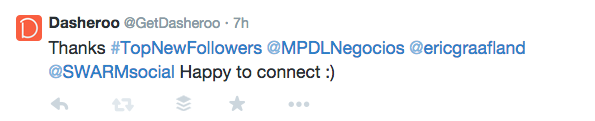
  2. Thank your followers – Every day Tweet “Thanks for following” with the handles of a few of your new followers (Don’t Direct Message them.) Your followers love to get in front of more people and you doing this simple act of kindness gets them there, DMing them does not. They’re likely to retweet your thanks so you get in front of their followers.

    Screen Shot 2014-11-10 at 3.43.05 PM

    GetDasheroo is going nuts thanking new followers!

  3. Follow influencers in your industry – Go to BuzzSumo and search on the keyword for your industry. For instance we did a search on “social media marketing” and followed the top people who write about social media marketing.
  4. Make a Twitter list of who is Tweeting about your industry – Every day go to that list and see what they’re Tweeting about and RT any interesting news they may have. Your hope? They follow you and Tweet about you too.
  5. Your description defines you – With all of the Twitter add-on tools many of them pull in your description of who you are so make sure it’s exactly what you’d want someone to know about you in the few characters they allow.

    Screen Shot 2014-11-10 at 3.41.32 PM

    Kipp is great, uses links, says what he does and for who. We’re following!

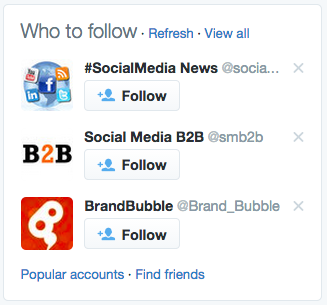
  6. Twitter recommends who to follow – Go there a few times a week and follow some interesting people Twitter is recommending.
    Screen Shot 2014-11-10 at 3.44.12 PM
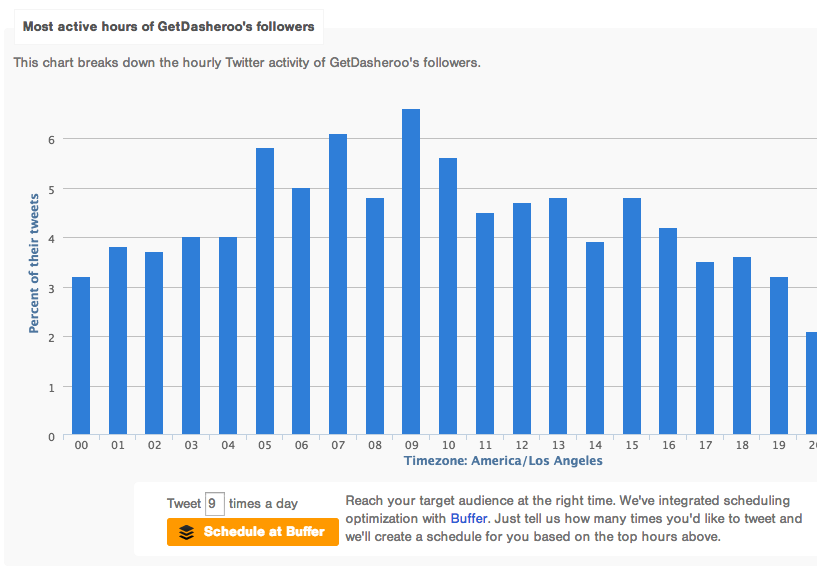
  7. Tweet when your followers care – Go to Followerwonk to find out when your followers are active on Twitter. Then use the fantastic Buffer integration that tells Buffer when to publish your Tweets. Oh, and use Buffer to publish your Tweets ?Screen Shot 2014-11-10 at 3.06.40 PM
  8. Use photos where you can – According to Twitter, Photos average a 35% boost in Retweets so if you can use a photo, get one in there.
  9. Respond fast! – People are used to getting a quick answer in a short amount of characters so make sure you’re monitoring and reacting to anyone who is talking about you.

I’m on #5 today what about you?

P.S. Do you have a Twitter analytics dashboard? It’s free at Dasheroo!