Dasheroo Dashboards Get Great Press!

When we get mentioned by awesome folks that like our dashboards we’re always happy and always wanting to share with our readers. Here are two amazing articles highlighting some really great online tools that we’re humbled to be a part of!

Carl Ramallo - dashboardsHow to save TIME with these Top Social Media Management Tools.

Carl Ramallo, voted a top social media coach, wrote this article highlighting social media management tools like Social Rank, Hootsuite, Buffer and you guessed it…Dasheroo dashboards.

11 Content Marketing Tools You Can’t Live Without
The Marketing Insight's logo - dashboards

Suttida Yang, that awesome digital marketing consultant and CEO of Fast Markit, wrote a great article about the tools she can’t live without and why. Two tools she mentions we absolutely love are BuzzSumo and Canva, oh, and Dasheroo for dashboards! Check out her list.

Thanks guys!

Twitter Analytics: The Importance of Knowing Your Audience

With 320 million monthly active users, you know that Twitter provides a unique opportunity to connect with customers, prospects, and thought leaders among others. And while a large number of followers is a step in the right direction, you won’t fully understand what to do next until you start tracking your Twitter analytics.

Here are three questions to address:

1. Are You Tracking When Your Followers are Online?

There are instances when timely tweets are necessary, such as to announce breaking news. There are also times when you should wait to make an update.

By tracking when your followers are online, you can increase your reach while improving the chance of engagement (retweets, replies, mentions, and likes).

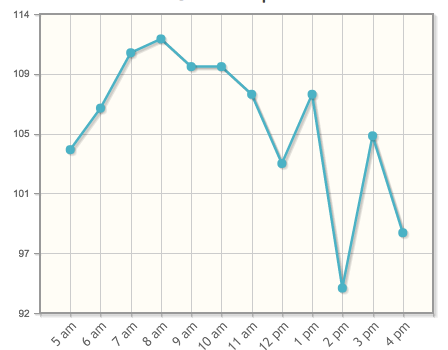
Tweriod Twitter Analytics dashboard

At Dasheroo we schedule our Tweets between 6am and 11am!

Tweriod gives you a nice taste of when a portion of your followers are online for free. If you upgrade to premium most people will pay between $4-$8/month with a robust offering.

2. When is the Best Time to Post?

This goes along with question #1 above. Once you know when your followers are online, it’s easier to understand the best times to post.

Like many, you don’t have enough time in your schedule to tweet throughout the day. For this reason, you need to schedule out posts at relevant time intervals.

Buffer and Hootsuite really help with automation of posts. Here’s a great article on using Buffer and another one on using Hootsuite to automate your Tweets!

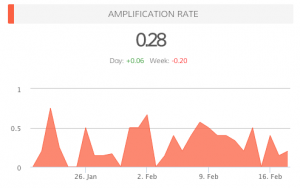
amplification_rate-37c16ba1dd3ec0e9957571ab4f6305f23. What is Your Amplification Rate?

When you know when your followers are online, when you know the best time to post, your amplification rate will increase. This is the rate at which your followers share your tweets (amplification = number of RT’s per tweet).

Your goal with each tweet is to generate as much engagement as possible. Retweets are important, as this means your followers are sharing your updates with their followers, thus increasing your reach.

Do You Need Help Answering These Questions?

In addition to Dasheroo, experiment with other services, like Tweriod, that provide data on the best times to Tweet. By analyzing your Tweets, as well as your followers’ Tweets, you will have a better idea of when it makes sense to publish updates.

In the near future, we plan on providing additional Twitter analytics, such as when followers are online and the ideal times for posting.

Can you think of any other features that could benefit your social media strategy?

P.S. Did you know we have free Twitter Analytics dashboards for you to track? Check them out today!

Startup Lessons Learned – Considering a Probationary Period Hiring Policy

Should you have a 45 day probationary hiring period?Based on our recent experience having to fire a newly hired employee, it got me thinking…should we establish a probation program for all new hires?

The idea immediately resonated with me. Maybe because it was my idea;) Don’t get me wrong, it’s not an original idea, as a few companies out there do have formal probationary periods prior to hiring.

The program would be similar to what our friends at Buffer do with their Buffer Bootcamp:

  • 45-day probationary period
  • An established plan of what success means during at at the end of the probation period.
  • Meet with a senior team member (in our case, each of the 5 co-founders) for a 1:1 during that time.
  • There would be no benefits granted during this time.
  • And, during the probation period the employee gets paid as a 1099 (consultant).
  • The action at the end of the probation period; either get hired as a FTE or we part ways.

What Are The Pros?

  • It may weed out some folks that know they are ‘talking the talk but can’t walk the walk’, as they say.
  • It could save the time and expense of bringing them onto benefits and payroll.
  • There is no employee-employer relationship, meaning we may lessen the need for any type of severance and of litigation.
  • And most importantly, have more confidence that there is a mutually beneficial business relationship.

What Are The Cons?

  • We could lose some very strong candidates who don’t want to jump through the hoops and leave a full-time job to “maybe” get a job. Or just take another job offer that doesn’t have this hoop.
  • We may be on the hook to pay them for the full 45 days even if they don’t stick around that long.
  • Any more?

After a call with our legal guys and doing some other research, I learned a few things:

  • You really have to look at where your employees reside; there are state-by-state regulations to consider.
  • In CA if they’re doing the job of a full time employee they should be paid as such. Uber is having a huge issue with that ruling. One way around this could be to set the probationary period up as a set ‘project’ with a specific start and end date (the length of your probationary period).
  • A contractor relationship doesn’t guarantee less of a obligation to the worker, nor does it shield you any more from potential litigation. In California, a company like Dasheroo actually has as much, if not more, rights in employer-employee relationships by hiring folks.

So what are we going to do?

It’s always a little murky. Bottom line is we always want to do right by, and respect people. But it’s a two-way street and we take our business very seriously. The difference between hiring an A-player and someone else who may not ‘cut it’ has huge negative affects: the cost of on-boarding, and the lost time you’ll never recover in the productivity you expected.

So, we’re probably going to take a hybrid approach to the situation: continue to hire on a traditional full time employee basis, but start to follow a 45-day plan that mirrors most of Buffer’s probation program. A 45-day on-boarding process with weekly 1:1s with senior team members, a very clear action and progress plan by week, and at the end of the 45 days a meeting with the hiring manager to make sure there’s a mutually beneficial working relationship. Will we go as far as Zappo’s, who we really admire? They actually offer to pay people $2000 to go away after the first few weeks. That practice is ballsy and I love it! But it can also take an HR infrastructure that we, and most other startups don’t have. And it can get costly and abused.

So like I said, it’s a 2-way street, it is incumbent upon our folks to properly vet potential new team members prior to hiring, so many times you can find yourself in a ‘hair on fire’ moment when you just need to fill that gap. Fight that temptation, take a little more time to get to know your potential newest A-player and you’ll win in the end.

3 Must-Reads: Measuring ROI for Social Media

We are freaks about data here at Dasheroo and that’s no joke. So this week we scoured our favs and here are 3 articles we think are great about how to measure your ROI (return on investment) for your social media efforts!

5 Steps for Successfully Measuring Social Media ROIScreen Shot 2015-05-31 at 7.23.38 PM

Higher Visibility wrote this great article for Small Business Trends on measuring social media ROI and being that Dasheroo is in the biz of delivering your data from most social networks to you we thought this one was one point! We love that they’re looking at conversions with monetary value!

The Delightfully Short Guide to Social Media ROIScreen Shot 2015-05-31 at 7.26.17 PM

We love the folks at Buffer. They did a great job at telling you to calculate your time, the money you spend on social media tools and any advertising money you spend on social. Then they walk you through how this gets you to your return on investment with a wonderful infographic! Check it out!

A 3-Step Process to Measuring Social Media ROIScreen Shot 2015-05-31 at 7.45.24 PM

Brian Zeng, a Moz community member, did a great job of talking us through a great and easy process of looking at the ROI we nee to assess as we’re spending time and money on social media. We only think you should replace step 1, where you calculate your traffic using Dasheroo!

You need to be aware of how much your spending on social, so calculating your ROI for social media marketing is important!

The 5 Steps of “Starting Small” With Your Social Media Marketing

Social media marketing can be daunting for any small business. And no matter what business you’re in you need to focus on running all of the facets of it, right? The social stuff is yet another thing you need to give focus to and it’s another thing you don’t have time for.

So here at Dasheroo you know we like to share our trials and tribulations with you as we’re starting out a new company and everything fresh. So we decided to tell you how we spun up our social media, which accounts for 25% of our overall traffic.

So without further adieu, here’s how we do it. Take from it what you wish.

Start With Your Content

For our platform we chose WordPress. We blog short articles, long how-to articles and some fun content as well with our weekly Who Charted? series. Either way we make sure that almost every day there is a piece of content out on our blog with our keywords placed into every post. Google loves it and it gives us some great content to share on social media. And since we didn’t have a ton of content to put on our site, this was a great way to start to get noticed by search engines for our related keywords.

Pick Your First Social Network
Dasheroo's Facebook business dashboard

We started with Facebook, then rolled to other social networks. We’re only a few people!

We chose Facebook. Every time we published to our blog we published the link to Facebook. And since we were on Facebook first we invited all of our friends to like the page. We run an ad campaign for likes on Facebook so that when we were ready to announce our Alpha and Beta versions of Dasheroo, our Facebook fans would have first dibs. Nine months later we have over 12,500 fans and continue to post, run ads and grow. Facebook is our number one source of traffic at Dasheroo, currently at 12% of all traffic.

Add Another and Another

Twitter – Once we had Facebook figured out our next social network was Twitter, we made sure that John (@therealhingley) had his own Twitter account separate from @GetDasheroo and we posted our blog content to both Twitter accounts. We realized that only posting once per day on Twitter wouldn’t move the needle, the life of a Tweet is only a few minutes these days so we would have to post 4-5 times per day at least to get noticed. That’s a lot. Once we started to post more often now 4% of our overall traffic comes from Twitter, up from 2.5%.

Linkedin – Linkedin was our next social network we chose and we share the daily posts to John’s Linkedin page. Our company page doesn’t get much traction yet but hopefully will soon. We’d rather use the thousand or so of John’s contacts to leverage our content. And Linkedin doesn’t seem like the proper medium to share posts like you would on Twitter, over and over so we only really share “new” content on Linkedin. Linkedin holds steady at 3% of traffic.

Pinterest – What the heck is a business dashboard startup doing on Pinterest? Well, Pinterest was opportunistic for us. We don’t have a lot of followers but every time we post an image to the blog we pin it on a board we created. For instance every Sunday we do a funny charts series entitled “Who Charted?” so we thought it was appropriate to pin the funny charts here. Pinterest hangs in there at about .5% of traffic. Not bad for just pinning images to a board!

Instagram – Instagram was next on deck. Once we had Facebook, Twitter, Linkedin and Pinterest going (we also added the “follow” images to our site and our email marketing campaigns) we thought it might be somewhat trivial to post a picture on Instagram. Side benefit? We also get to post this content automagically to Facebook and Twitter!

Google+ was the last one we looked at. Should it have been higher on the list? Perhaps, since creating a profile on Google+ boosts your search engine rankings. Not only that but every time a reader clicks the +1 button on one of your blog posts or Google+ posts, it increases your standing with Google.

Whew this is getting time consuming isn’t it? And this took months and months to get rolling! For each new social network we gave it a solid month before we really launched another one.

Automate!
Screen Shot 2015-01-20 at 5.09.16 PM

Once you get the hang of it, automation is key. Gives you time to move onto the next and run your biz!

So the first thing we did was look at a way to automate this as much as humanly possible.

But how?

It took us to launch Twitter in order for us to think we had to automate. Posting over 5 times a day without automation can get tricky!

Every time we publish our WordPress blog we make sure that within WP our content gets published to Facebook and Twitter.

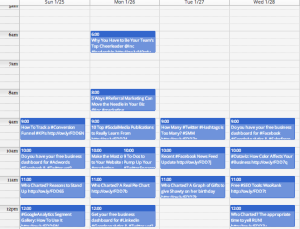
For Twitter we use Hootsuite but you can also check out Buffer. We keep a running list of our blog article headlines, with columns for the date and time we want them published as well as the link in a google spreadsheet. We make sure that we repeat these articles every few days in the spreadsheet so that in the event someone misses it on Twitter, they’ll see it again at a later date. We upload that into Hootsuite and voila, our Twitter is automated for the month. We try to make sure it’s always “evergreen” content and not date specific.

After we had Twitter up and running we added Linkedin and Google+ so that when we do our daily posting we can post from Hootsuite just once to most of our social networks.

So even though we know we want to RT other Tweets or Tweet interesting articles we read we’re always reusing our own content since we put so much time into creating it.

Measure

We’re always looking to see what works best! Using Dasheroo we can see that Facebook is driving the most social traffic for us, we can see that the infographic about dog breeds is hugely popular on the blog and we can see that Linkedin comes in 3rd for overall social media, especially when we share a bunch of articles. Hootsuite has analytics if you’re publishing from there as does Facebook, Twitter, Linkedin and Pinterest, however Dasheroo brings many of your apps together into one business dashboard.

There you have it, start small and grow as you have the time to grow.

9 To-Dos to Pump Up Your Twitter Engagement

We’ve been using Twitter since 2008 for business and personal and it’s been a very successful channel for us, but only because we really work it. And we monitor our Twitter analytics with our own Dasheroo dashboard, shocker! Twitter engagement is the metric you need to focus on. And with 284 million monthly active users and 500 million Tweets per day, you need to tap into it and cultivate! So here are 9 quick daily to-dos to pump you up!

  1. Follow your followers – Every day check out your New Followers. View their bio to ensure they’re someone you want to follow and follow them back. Hootsuite is a great tool for checking on your new followers and easily view who they are and what they’re saying.
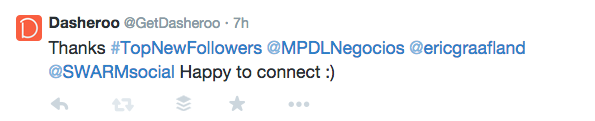
  2. Thank your followers – Every day Tweet “Thanks for following” with the handles of a few of your new followers (Don’t Direct Message them.) Your followers love to get in front of more people and you doing this simple act of kindness gets them there, DMing them does not. They’re likely to retweet your thanks so you get in front of their followers.

    Screen Shot 2014-11-10 at 3.43.05 PM

    GetDasheroo is going nuts thanking new followers!

  3. Follow influencers in your industry – Go to BuzzSumo and search on the keyword for your industry. For instance we did a search on “social media marketing” and followed the top people who write about social media marketing.
  4. Make a Twitter list of who is Tweeting about your industry – Every day go to that list and see what they’re Tweeting about and RT any interesting news they may have. Your hope? They follow you and Tweet about you too.
  5. Your description defines you – With all of the Twitter add-on tools many of them pull in your description of who you are so make sure it’s exactly what you’d want someone to know about you in the few characters they allow.

    Screen Shot 2014-11-10 at 3.41.32 PM

    Kipp is great, uses links, says what he does and for who. We’re following!

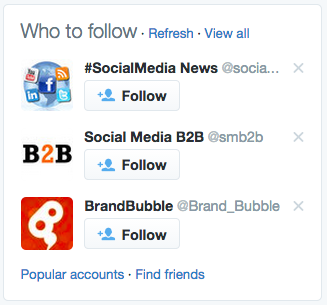
  6. Twitter recommends who to follow – Go there a few times a week and follow some interesting people Twitter is recommending.
    Screen Shot 2014-11-10 at 3.44.12 PM
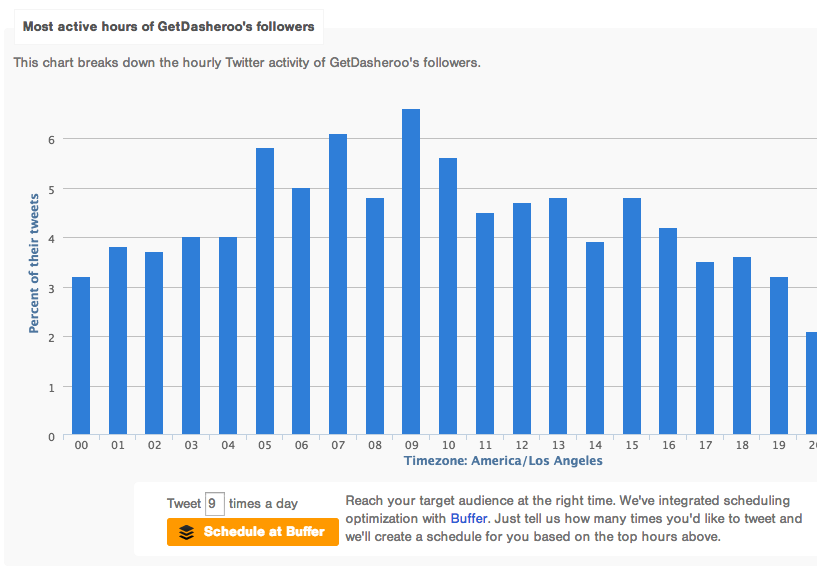
  7. Tweet when your followers care – Go to Followerwonk to find out when your followers are active on Twitter. Then use the fantastic Buffer integration that tells Buffer when to publish your Tweets. Oh, and use Buffer to publish your Tweets ?Screen Shot 2014-11-10 at 3.06.40 PM
  8. Use photos where you can – According to Twitter, Photos average a 35% boost in Retweets so if you can use a photo, get one in there.
  9. Respond fast! – People are used to getting a quick answer in a short amount of characters so make sure you’re monitoring and reacting to anyone who is talking about you.

I’m on #5 today what about you?

P.S. Do you have a Twitter analytics dashboard? It’s free at Dasheroo!

The Twitter Trifecta: How to Manage Twitter for Biz

It can be so frustrating to get your reports from all of the social apps that are driving traffic to your site which is exactly why we started Dasheroo for business dashboards, but it can be equally frustrating to “manage” how to post, what to post, who to follow and who not to follow on Twitter, can’t it?

So in an effort to try to get into a bunch of apps and make heads and tails out of it all we will break down how we use Twitter apps to manage it all. Here’s a day in the life of Twitter and @GetDasheroo.

We start with our own business dashboard at Dasheroo to see at a high level what engagement rates were on specific posts, what amplification rates are and what is resonating with our following. Then on to the apps!

Commun.it

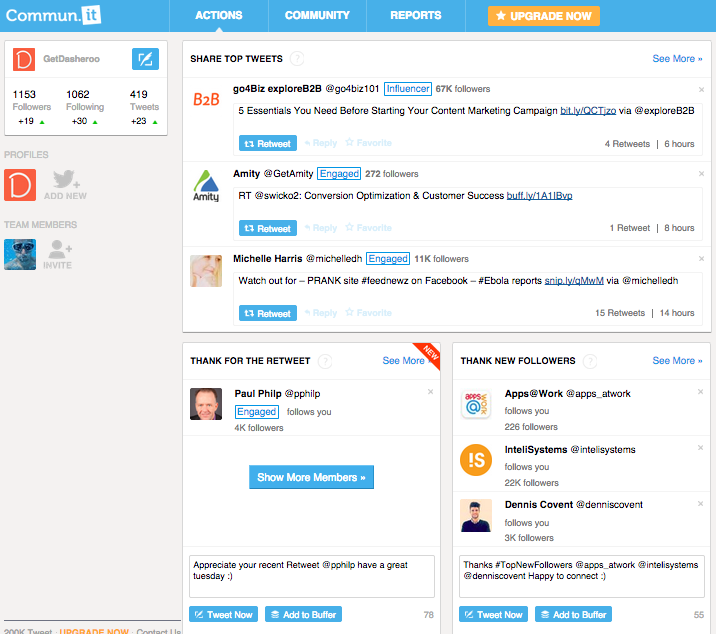
Screen Shot 2014-11-04 at 4.48.20 PMWe love this tool. We go to it first in the morning to see what our to-do Twitter list is.
  • Tells you to thank people for following and pre-fills in a Tweet
  • Recommends #followFriday people and pre-fills in a Tweet
  • Tells you who to follow
  • Tells you who to RT by “engaged or influencer”
  • You see who you might want to unfollow

We get some great RT’s when we thank people and RT some Influencers.

Buffer

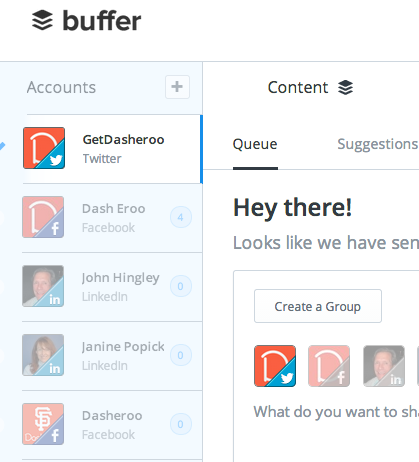
Screen Shot 2014-11-04 at 4.50.21 PMThis app loads up Tweets for the day or for a few days out. You should download the Chrome extension so that when you’re on any site and you want to retweeet or post to Facebook you can load it into Buffer and you’ll have some time between posts to do so. We’ve written about them before.
  • Schedule a Tweet for a specific time or let the app “buffer” them for you
  • Add your Twitter, Facebook, Linkedin accounts
  • You can select by post which social networks you want to post to
  • Schedule a bunch in advance
  • Go back to older blog posts and revive them with Buffer
  • Use the analysis from Followerwonk to let you know when you’re follwers are looking at Twitter

We use it to “fill the tank” of Tweets in a timely fashion so we don’t overwhelm our followers and give them timely and relevant information.

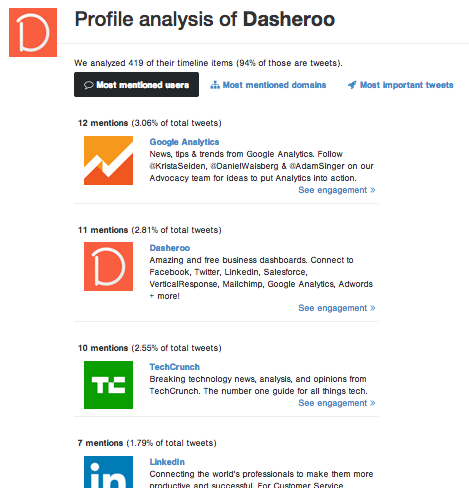
FollowerwonkScreen Shot 2014-11-04 at 4.52.33 PM

This is great to do once a day to see what’s happening in the Twittersphere and what you need to keep an eye on. We’ve written about them here.

  • What your competitors do – Most important Tweets, most mentioned domains
  • Who follows them – You can follow their best followers
  • Who your competitors follow
  • Analyze your own followers
  • When your followers are active

We use it to keep an eye on who is following our competitors, people who write about our industry and follow them!

There you have it, our recipe for Twitter success at Dasheroo.