5 Metrics to Track for Your Beginner Marketing Dashboard

You may not be new to marketing, but the idea of using a marketing dashboard could be foreign. But don’t be scared. Don’t let a lack of knowledge keep you away from this game changing tool.

As you setup your beginner marketing dashboard and begin to use it to your advantage, pay close attention to the following five metrics.

1. Email Marketing List GrowthDasheroo data dashboard - list growth

With the opportunity to generate a large return on investment, email marketing should be a big part of what you do.

The size of your list at the present time is not nearly as important as its growth. Use your marketing dashboard to track the growth of your list, striving to increase sign-ups month over month.

And it doesn’t matter what email marketing platform you use, they’ll all give you this data.

2. Social Media Engagement

From Twitter to Facebook to Instagram, there is more to social media than posting updates dasheroo data dashboard: social media engagementand waiting for something good to happen. You need to implement a strategy that boosts engagement.
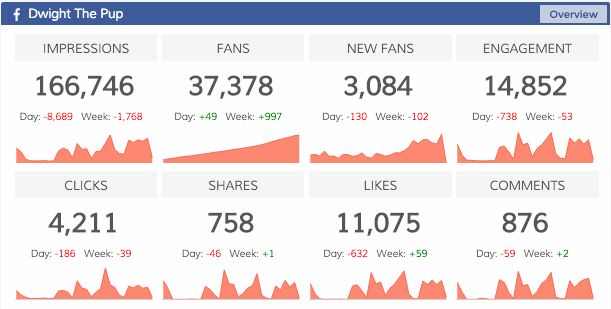
For instance with Facebook engagement includes:

  • Liked
  • Shared
  • Commented
  • Clicked

Make sure your charts are going up and to the right and if it isn’t dig in and find out why!

3. Google Analytics UsersDasheroo data dashboard: Google Anaytics userss

Traffic, traffic, traffic. A big part of your online success is based on your ability to drive users to your website.

Sync your new marketing dashboard with your Google Analytics account to track users. This shows if your traffic is increasing or decreasing, while also lending data on how visitors are finding your website.

4. Social Media FollowersDasheroo data dashboard: Twitter Followers
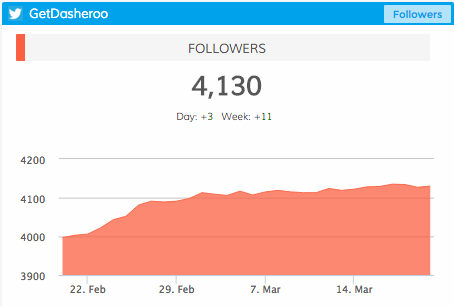
Much the same as social media engagement, it’s important to understand how many people are following you on social media. Is your reach growing?

From day to day, from month to month, you can track your number of followers on each social platform. Positive movement is what you are looking for.

5. Ecommerce

Are you selling a product (or products) online? If so, accurate data can be the difference between success and failure. A marketing dashboard can help Dasheroo data dashboard: Ecommerceanswer questions such as:
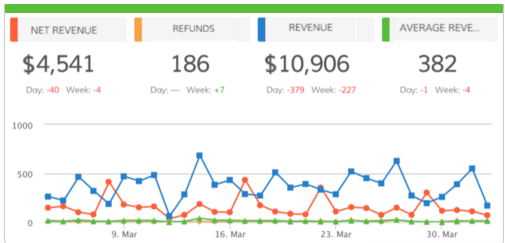
  • Where are consumers coming from?
  • How much time are consumers spending on your website?
  • How many items are they buying at a time?
  • How much is the average consumer spending?

Whether you use Shopify, Infusionsoft, Hubspot, Stripe or Paypal you can easily access this data!

Experiment and Adjust

Your beginner marketing dashboard will not look the same for long. Once you understand what you can track, once you understand how this impacts your business, you can then begin to make changes.

The most important thing right now is getting started. Sign up for Dasheroo to learn more, it’s free!

Track Our Startup: HubSpot + New Platform Features on the Horizon

The team here has been busy with our new HubSpot dashboards release. We now have 13 new insights crossing CRM, sales and marketing for any HubSpot user. You can get a free month to try it out. Then it’s available for anyone who has our Grande or Venti plans.

Dasheroo dashboards: Notes

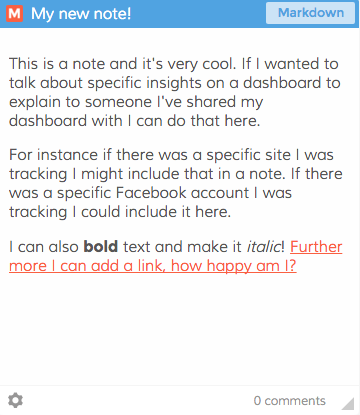
This is a “notes” feature you’ll be able to add to your dashboards!

Janine and I attended Infusionsoft’s ICON event in Phoenix. What a great team of people there and an awesome show for any business to get the need-to-know for all things marketing, sales, CRM and e-commerce related. Way to go guys! If you didn’t know we have Infusionsoft insights for Dasheroo. Check them out here, you can also have a free month trial just like HubSpot.

We’ve been working on our next P release, P is for Platform so that means features we’re working on happen across the entire product. Dasheroo users have been asking to include notes within a given dashboard. When we release this you’ll be able to add text that could be bold or italics and you can add a link! Pretty cool.

Another part of our P release is testing the ability to scroll within an insight. So say for instance you have 25 email marketing campaigns you wanted to see the results of. Right now we give you the ability to see the last 10. But if you segment your lists and happen to send more than 10 in a given week, you have to go to the native app. We’re testing the ability to let you scroll through 10, 25 and 50. You can imagine how we can then take that into your Tweets, Facebook posts, Instagram Analytics and anything you do a bunch of times. Great job to James and his awesome team.

We continue to march down the investing path. It’s not a great time to be raising money. We’re also talking to strategic partners. We read this great interview with Heidi Roizen that really talks about choosing the right VC, we really like her:-)

New Release! New Dasheroo Dashboards for HubSpot

hubspotHubSpot has features for social media marketing, email marketing, web analytics, search engine optimization and a new CRM solution which includes deals, companies, sales pipeline process and more.

With the expert help from HubSpot, we’ve created 13 dynamic insights for your dashboards, with a few more to come in the near future.

Email Marketing

List Growth – View the total number of email addresses added to selected lists by day.

CRM

Dasheroo dashboards: Hubspot analytics

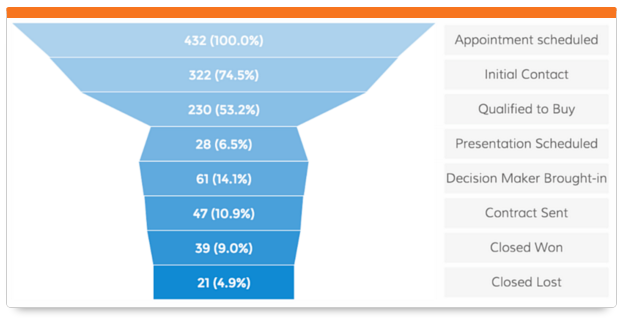
View what stage of the funnel your deals are in HubSpot.

Contacts – View the total number of contacts added to your HubSpot account in the given time period and how it trends.

Contacts Lifecycle Funnel – View a funnel insight that shows the lifecycle stages and the number of contacts in each stage.

Deal Stages Pipeline – View a funnel insight of the number of deals in different stages of the sales lifecycle.

Top Contacts by Lead Score – View a leaderboard report of contacts ranked by their lead score.

Workflow Performance – View a trending line insight showing the number of contacts in each stage of the selected workflow’s performance.

Sources

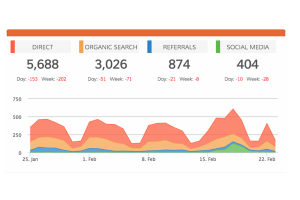
Displays the different sources of traffic and number of visits from each.

Displays the different sources of traffic and number of visits from each.

Sources Distribution – View the different sources and the number of visits, contacts and customers they generate.

Customers by Source – View sources of traffic and the number of customers each generated in the given time period.

Contacts by Source – View sources of traffic and the number of contacts each generated in the given time period.

Visits by Source – View sources of traffic and the number of visits each generated in the given time period.

Keywords

Dasheroo dashboards: Hubspot analytics

Keep a close eye on how many leads specific keywords generate!

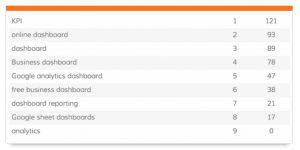
Top Keywords by Visits – View a leaderboard insights that ranks keywords based on the number of website visits they generated in the given time period.

Top Keywords by Contacts – View a leaderboard insight that ranks keywords based on the number of contacts they generated in the given time period.

Top Keywords by Leads – View a leaderboard insight that ranks keywords based on the number of leads they generated in the given time period.


These awesome HubSpot Analytics are available with the Dasheroo Grande ($19/month or Venti $49/month packages.

Track Our Startup: Easy Onboarding + Custom Data Dashboard

You may have heard that we have a Zapier integration that we’re pretty happy about. Why? We’ve got a ton of great users who want us to integrate with their applications but we just can’t do it all. So with Zapier, you can take a trigger from any app that they integrate with and point it to a Dasheroo graph…voila! You’ve done the integration yourself.

What Else is Going On?

We released a new onboarding process. We wanted to do a few things with it, namely make it easy to understand, easy to connect your data dashboard to your data sources and easy to get to a custom data dashboard!

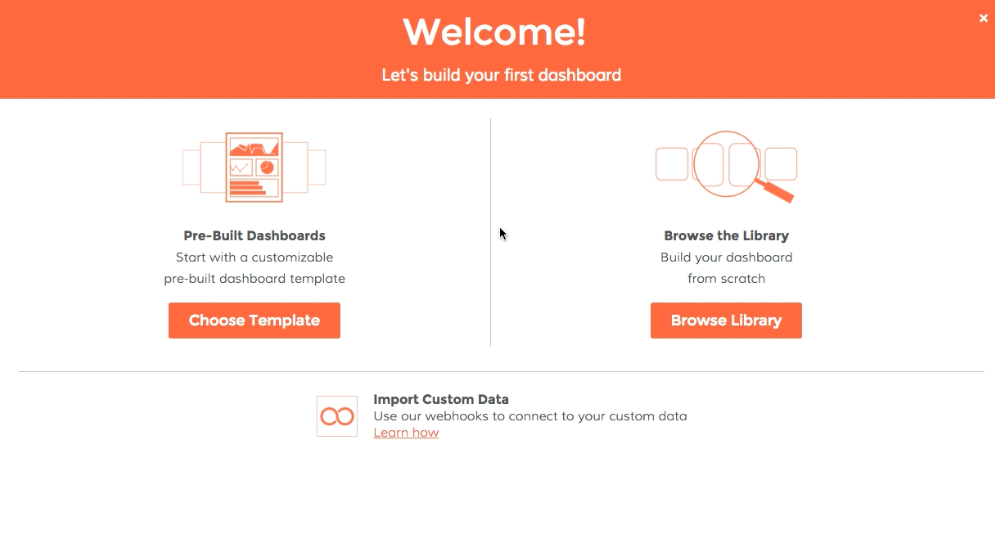
Now when you first come in to Dasheroo you’re met with the following screen designed to get you to the right place as well as highlighting our custom data feature for your dashboards:

Dasheroo data dashboard onboarding process

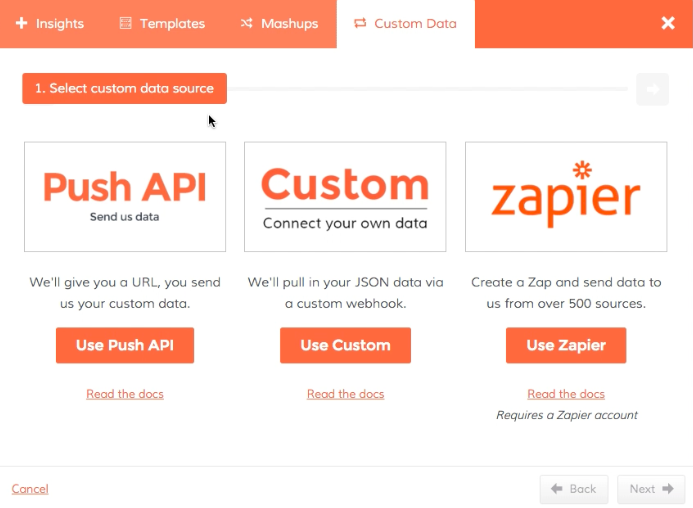
We also wanted to make it easier to find our custom dashboards – Now when you add an insight or connect to a new data source you’re met with a new screen:

Dasheroo custom data dashboard

So you can easily get your data into your dashboard from our Push API, a webhook or our new Zapier integration. Pretty cool, huh?

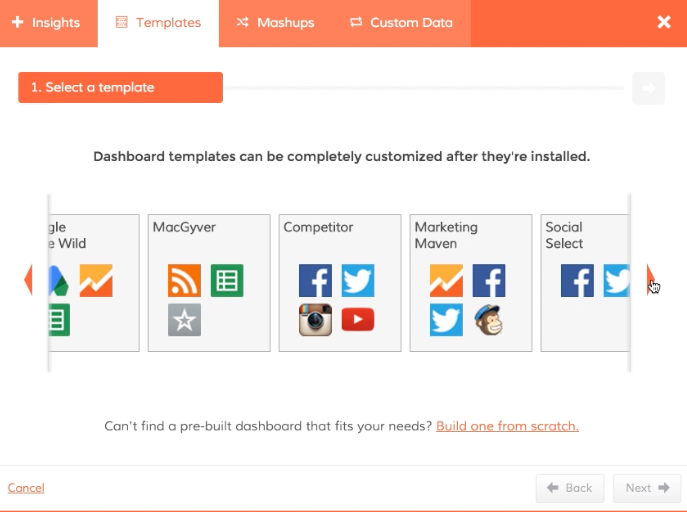
We’ve also redesigned our template gallery where we’ll be adding even more dashboard templates for you to start off with.

Dasheroo dashboards template gallery

You Want More?

We launched with Infusionsoft dashboards, and since those insights are only included in our paid plans (not free!) we’ve decided to give you a free month so you can kick the tires. You need to use promotion code: infusionsoft-trial.

We’re planning an integration with Hubspot soon, we’re not ready yet but we’re working on it. We’ve also got Sendgrid you’ll be able to add to your dashboards as well.

Janine wrote a zinger for Inc. “The Door Isn’t Always Closed, ‘No’ Just Means ‘Not Yet‘”, she got published 0n Relevance.com for “3 Tips to Securing Inbound Links” and I got a piece on Business.com for “Nail Biting, Be Gone: 3 Ways to Avoid a Big Mistake When Making a Big Decision“. Check ’em out, they’re worth a quick read.

We’re planning on raising another round of funding. We’ll let you know how that goes. The environment ain’t great but we’ve got something great going on, at least our users think we do! We’re even thinking of extending our A round to get the right folks in.

We’ve got another board meeting to get ready for this week, here we go.

Track Our Startup: New Dashboards + New Data Sources Coming!

As you know we’ve had a ton going on this quarter already and it’s only the first week of February! We announced our Push API that went live last week. Check out our posts, they’re awesome and great for our growth and scale.

What’s Up Next?

  • Alerts – We’re so close getting this important feature over the finish line! You’ll get an alert when a threshold you set is reached!
  • Hubspot – This is a big one for us, we love the folks over at Hubspot. You’ll be able to get all of your important KPIs from Hubspot right in your Dasheroo dashboards.
  • Sendgrid – If you use Sendgrid for your transactional emails, we’ll provide you how they’re performing and how they’re being delivered.
  • Facebook Ads & Google Adwords – We’re revisiting our pay-for-performance partners to enhance those dashboards. More to come as we research.
  • Mixpanel – We’re in research mode here but we love this integration. We are avid users of Mixpanel so we want to make sure we nail it for everyone who uses this awesome product to track users around your site.

Isn’t that enough? No, we know it’s not. The list never ends. If you want to see insights from data sources you use regularly make sure you get them on the list.

Oh and I’m off the grid till next week (in Burma!) but on the grid enough that you’ll hear from me. Speaking of, how is it that “Burmese” people live in “Myanmar”? Should they not live in Burma? I sure think so;-)

Track Our Startup: Notifications, Sendgrid, Dash Hits the Chrome Store + More!

We had some great meetings this past week even though it was holiday week. We also had some great times for the New Year and I can assure you at Dasheroo we’re really looking forward to it.

On the “You can’t see it yet” front…

James, our co-founder and VP of Engineering, has been heads down on a notification system which is awesome. This system is for you to use in the app and for us internally to use behind the scenes (we get notified if sh*t goes awry.) Notifications can happen for a number of reasons and in a number of ways. For instance you might want to know about a bunch of things happening with your data. You’ll be able to see that in a running notification stream. Additionally you can find out what’s happening via an email or mobile push. Internally this is a huge platform dev project for us to trace bugs. You’ll soon have an “inbox” of messages color coded for read vs. unread. You’ll also see what new product announcements we have. Look for this in late January/Early February. (Isn’t that right around the corner?)

Our stellar Product Managers Dharini and Nivi have been investigating Sendgrid and Mandrill as a possible integrations while the release that is currently in progress contains enhancements to Facebook, Instagram, Facebook Ads, GA and Stripe. And while all of that’s happening, we’re going to be talking to Mixpanel and Insightly as two potential integrations. Finally we’re working on a Hubspot integration as we speak. Whew, really?

Be on the lookout for an awesome Salesforce.com integration we’ll talk about very soon. YoDasheroo on the Chrome Storeu can now see your dashboards in your Salesforce.com account on your mobile device. And yes Infusionsoft is on the way.



We’re knee deep in mapping all of the things we need to work on in a timeframe over the course of the next year, a 5 year revenue plan and nailing pricing. We launched with what we think is great pricing to attract a ton of users, but now it’s time to really get a feel for revenue progress. And don’t worry, there will always be a freemium product.

Chrome Store Reviews Needed!

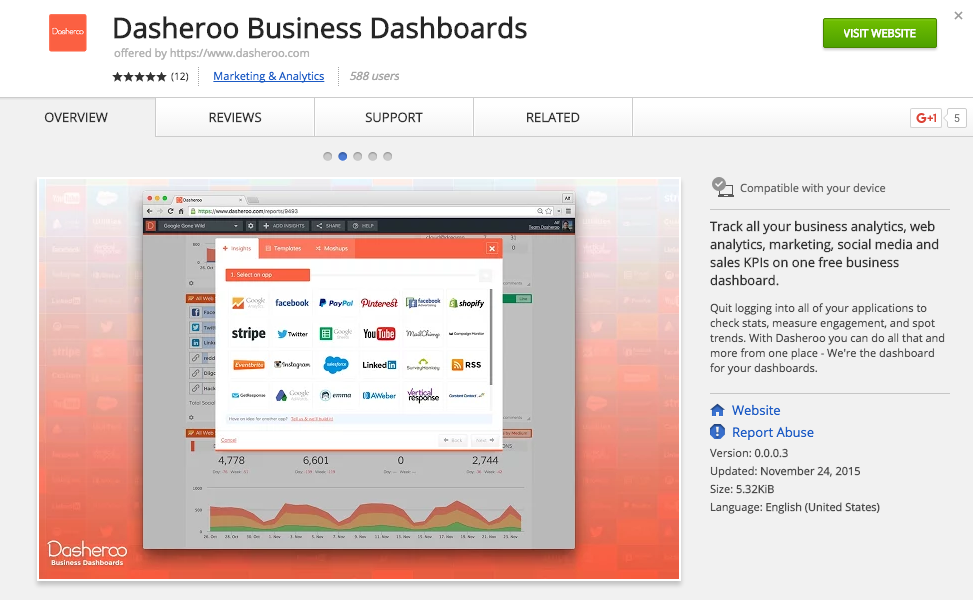
Dasheroo is now on the Chrome Store and we’d love to get more ratings. If you’re a Dasheroo user can you go here and take 10 seconds to give us a review? We really appreciate it!

3 Must-Read Articles: Facebook Ads

11 Examples of Facebook Ads that Actually Work and WhyHubspot Blog logo

Hubspot wrote this zinger all about how to create an effective Facebook Ad Campaign. From offers, to events to multi-product ads you’ll see some of the best brand’s Facebook ads and why they’re grrrreatttt!

++Bonus, Hubspot also has this nifty step-by-step tutorial for how to create Facebook Ads.


Facebook Brings More Advertising Control to Location TargetingJon Loomer

Jon does it again for us with this is a great step-by-step tutorial on how to target your ads to a specific location.

++Also don’t miss Jon’s “How-to” everything Facebook Ads section of his site. Awesome!


Facebook Expands Carousel Ad Format To MobileSocial Media Marketing Daily logo

Gavin O’Malley writes this great article for Social Media Marketing Daily on how Facebook is now offering the use of their carousel ads on a mobile device. Carousel ads offer a brand the ability to include more than one swipe-able image in a single ad which drops cost-per-click by 20% to 30% over single-image link ads.

Email Marketing: What to Expect from Your Rates in 2015

Email marketing continues to be at the top of the list when it comes to customer communications. According to Forrester, spending will increase to $3.1 billion over the next 5 years, up from 2.1 billion over the course of the next 4 years. But times are a changing. People interact with email very differently than they have before with mobile continuing to be the way people keep in touch.

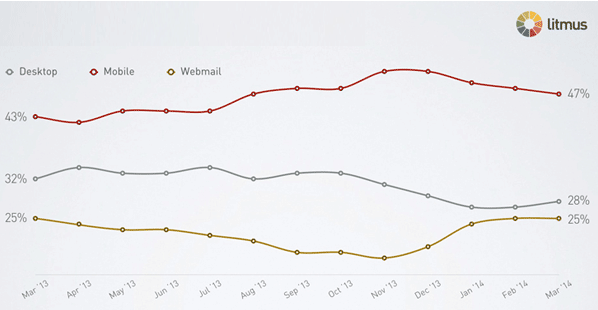
MobileEmail marketing stats: what to expect from your rates in 2015

Litmus reports that through April of 2014, 47% of email is being opened on mobile vs. desktop (28%) and webmail (25%). The Radicati Group reports that by 2018, 80% of email users are expected to access their email accounts via a mobile device. Those numbers are staggering and you need to be aware of how this affects your email marketing.

What to do to make sure you get the highest open rate? Make sure you design your emails to be mobile-friendly and render properly on all devices. According to The Science of Email Clicks from Litmus and Mailchimp you could get a 15% increase in your clicks from mobile users. Folks like VerticalResponse, Mailchimp and Constant Contact all have responsive templates.

Webmail

By the end of 2013 Gmail opens accounted for 6% of all opens and likely grew in 2014. But watch out, there are a ton of emails going into the “Promotions” tab with Gmail. There has been a 7.75% decrease in opens since it intro’d Tabs, you know the “feature” where Google decides what’s important to you and what is less important? We almost lost the opportunity to be in a news article because a reporter emailed us through LinkedIn and it went into the Social Tab. Boooo.

Email marketing stats: what to expect from your rates in 2015

What to do? When someone signs up for your list and you see they have a Gmail address, show them a page with a message like this:

“If you’d like to receive our emails into your Primary Gmail Inbox, simply drag our email from the “Promotions” tab to the “Primary” tab and click “Yes” when they ask you if you want to do this for future messages.”

Click Through Rates

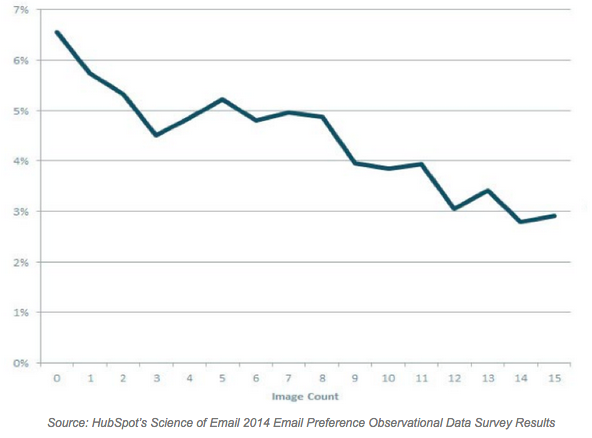
Hubspot’s 2014 Science of Email Report shows a negative CTR as more images are included in an email. But do they know what they want? When they were surveyed two-thirds said they wanted image-based emails instead of text-only but in actuality looks like the more images the less the CTR.

Email marketing stats: what to expect from your rates in 2015

What to do? Test your email marketing campaigns head-to-head with images in one and without images in another. You might find that a simpler email gets more clicks. You also might want to think about those folks reading your email on a mobile device. With too many links and too many images you might find that your recipient clicks on the wrong link just because they use their fatter thumb rather than the skinny pinky and get frustrated when they wind up on the wrong page.

For more amazing email marketing stats visit Jordie over at eMailMonday.

Cheers to a healthy SEO plan for 2015

Wow, only a week or so left of 2014. And what an incredible year it has been! We launched our free business dashboards company, Dasheroo, spent some quality time with friends, family and our pups, & did some fun travel to boot!

And right around the end of one thing and the beginning of the next, it’s a natural time to take stock of some things you may have put on cruise control for the past few months. Like? Search Engine Optimization of course! So we thought we’d spend a few minutes reminding everyone, including us here at Dasheroo, of some important things to keep in mind when thinking about driving high search results for your website. So here goes! (Plus, a bonus for us, we noticed a couple things we should improve as well.)

A quick note: this is meant to be a quick read. For a lengthier, very good, & recent article on SEO, check out ‘Learning SEO from the Experts’ from our buddies over at HubSpot.

First.

And this cannot be hammered home enough: make sure your site is focused toward it’s #1 purpose – to be a useful resource for your target market. Which, if so, should result in leads and sales. If you do that, good things will happen. If you do that and some of the tips below, very good things should happen!

Second.

Keep in mind it’s a marathon not a 50-yard dash. It takes awhile to creep (and it is a creep) up the search rankings. We feel that pain here at Dasheroo. Just starting our, with a new domain, zero authority and building content, we are now on page 4 for our #1 keyword, ‘business dashboards’. But we started out 8 months ago, not even existing. Progress!

Third.

Each page of your site has a purpose. So don’t optimize for the exact same keyword phrases on each page. Now, in this era of single scrolling sites (yes, we are guilty) this can cause a challenge. So, pick 2-3 keyword phrases and target each one for the content on the appropriate area on that looong page.

'Business Dashboard' is our primary keyword!

‘Business Dashboards’ is our primary keyword, but ‘free business dashboard’ is important too. So we include both in our meta tags.

Fourth.

Do some keyword research! Use Google Adwords Keyword Planner, start with a small list first and expand as you learn. It’s all about focus! Plus, look at your goals and see which keywords actually drive your conversions, and then use the Keyword Planner to find more words similar to those!

Lastly.

Think social! How does that impact SEO? Lots. The Googles of the world value the ‘social signals’ you throw off. So think about a) having a great company blog that also includes your main keyword phrases b) have FB, Twitter and other social sharing buttons on your posts! c) use your main keywords within your social media updates.

Oh yeah, and measure. We love Moz, they do a great job of recommendations to improve your on-page SEO. And keep learning! In addition to the Hubspot post mentioned above there’s a wealth of great resources to help you improve. We just picked up a great book, ‘Search Engine Marketing, Inc.’ by Mike Moran and Bill Hunt. A great resource!

OK, even if you just pick a couple things to do to improve, we hope this helps you create a great SEO plan for 2015!