How To Manage Data Dashboards for Multiple Clients or Teams in Dasheroo

We realize we release stuff fast, heck sometimes we don’t even know our amazing engineering team released a new feature. So we’ve got a helluva job keeping up with letting you know what’s available. The “Org” feature is really an amazing tool that you can use within Dasheroo to manage separate data dashboards and KPIs (key performance indicators) for multiple teams or groups.

It’s great if you:

  • Are an agency or manage groups within a company who wants a single log-in to manage multiple clients
  • Don’t want other teams or clients to see each other’s dashboards

FYI: You need to have the Venti package to have 2 different orgs under the same account. If you want more than 2 orgs you need to email us at [email protected] for pricing!

So how do you create separate orgs?

If you’ve got a Dasheroo account you’ve already got one Org by default. To create another simply click on the upper right hand corner of your Dasheroo account and click Plan.
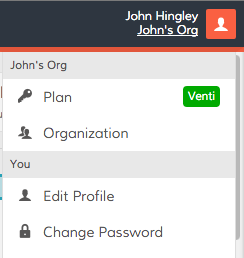
Dasheroo's settings menu

Click Organizations and enter a new name for your team:
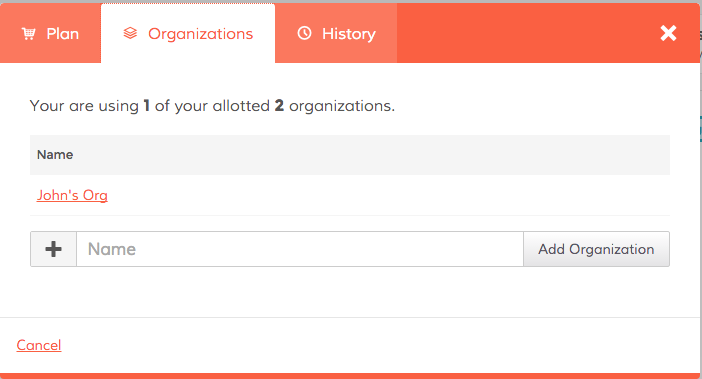
 

Dasheroo's Org feature


Now you can select New Dashboard from the pull down menu in the upper left hand corner and begin to create your new dashboard you want to share with a specific team.

 

Create New Dasheroo Business Dashboard


Now it’s time to share!

Simply click on the Share link in the Nav Bar and click on Team Sharing.

 

Dashboard sharing at Dasheroo


Now you can invite people to your org to see all of the associated dashboards!
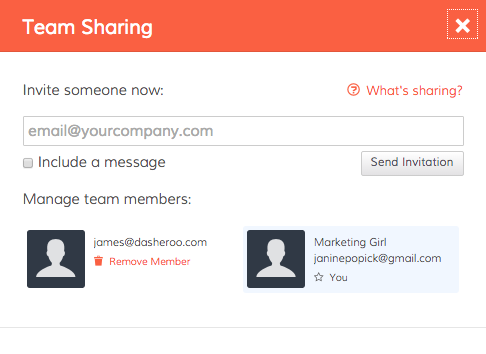
Dashboard sharing at Dasheroo.

Things to note:

If you invite someone to an org, they can see all of the dashboards and insights in that org. If you’ve got more than one org and you only invite a given person to a particular org they will not see any other orgs they’re not invited to.

If you want to limit the number of data dashboards certain people see you’ll need to create a new org to do that.

As of now you can not “lock down” insights or dashboards so anyone you invite can move insights around, create a new business dashboard (or many), add insights and connect with applications. Very very soon we will release tools to prevent this.

This is a pretty powerful tool only to get more powerful, enjoy!
Startup Lessons Learned: Your Weekly Ops Meeting

Doug Savage business cartoonI’m fortunate, Dasheroo has an awesome team. From the 5 co-founders to the balance of our 12-person squad. For one, we have great chemistry and for the most part have all worked with each other at some point in our careers, so there is a ton of familiarity and respect among us all. Great communication is also key. As a distributed team, we take are heavy users of tools like Slack, Basecamp & Zoom. We have daily stand-ups where we hold a scrum-style ‘activities & blockers’ meeting, 1:1s and each Monday the 5 of us co-founders hold a weekly operations meeting. For this week’s startup lessons I’m focusing on the weekly Ops meeting.

Before we launched, a lot of our Ops meeting focus was around product and development deliverables.

But during a recent 1:1 with Josh, he brought up just this fact: “We all know each other, trust each other, and like each other, but are we really digging into the KPIs and discussing what we need to do to move the business forward?” The answer was…No.

I think we let that ‘familiarity’ aspect of the chemistry between the 5 of us get the best of us. Our ops meetings slowly turned into a ‘how’d the weekend go?’ and took on more of something I hate: an unproductive ‘status meeting’ where we updated a few top line goals and then passed the baton to the next co-founder. Ugh!

Let me remind you – one of the main reasons Dasheroo exists is because, during a stint at another company, I turned one of those ‘status meetings’ into what I renamed the Triple S (Sell Some S*^t!). And what that meant was that everyone in the meeting reported on their main KPIs, how each person’s activities affected the others and overall, how we could work together to make sure what we were focused on really helped drive business success.

So, the new format? KPI driven (what tool do you think we’ll use to report on those?!) with an accountability and group brainstorming perspective.

So here are the key business analytics we now focus on, and they should be obvious:

  • Website sessions and key sources
  • # signups (SU)
  • SU conversion rate
  • % SU who connected an Insight (this is an indicator of activity and engagement)
  • Conversion rate to a paid plan – We’ll expand this into a cohort analysis
  • Churn (we need to define this)
  • Revenue

The result after the first few ‘revamped’ ops meetings? Tremendous. For instance, as Janine was talking about the growth of our SEO and how our keyword targeted landing pages are helping capture mid to long tail traffic, James our VP Engineering noted that we should build a developer-focused landing page. Great! And that’s just one small win.

If this format sounds obvious, maybe you’re ahead of the game. But I challenge everyone reading to take a fresh look at your periodic (our is weekly) ops-style meeting and see if you are digging into and discussing your key performance indicators, and how you as a team can maximize your success.