If you’ve created a Google Dashboard for all of your Google metrics, good for you! There are so many to keep track of like Google Analytics Goals, Google Sheets, Google Adwords, the list goes on.
The implementation of a Google Analytics dashboard allows you to do many things. While the primary goal is to learn more about your audience, it goes well beyond how many visitors your website generates on a daily (or weekly, monthly) basis.
Here are three key metrics to track (plus some advice on why it’s a good idea):
New and Returning Users by Number of Sessions
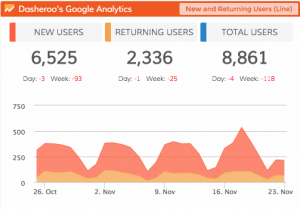 How many new users is your website attracting over a given period of time? What about returning users? By adding the two, you can also see the number of total users.
As the most basic metric in a Google Analytics dashboard, this shows how much progress your website is making (or not making) in terms of user visits.
Social Sources
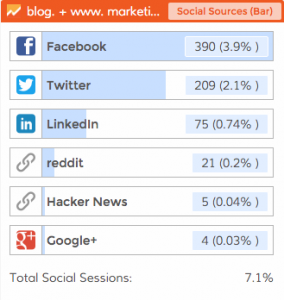
You know by now that social media is a big deal. You have the ability to track performance related to each of your social profiles (such as through a Twitter dashboard), however, you should dig deeper.
Through your Google Analytics dashboard, you can see which social sources send the most traffic. You can then adjust your social media marketing strategy and budget accordingly.
Top Sources by Medium
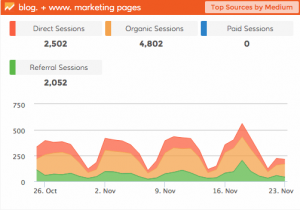 All traffic is created equal, right? Well, not exactly. You want to know how people are finding your website. This is broken down into four distinct categories:
- Direct Sessions
- Organic Sessions
- Paid Sessions
- Referral Sessions
Within each category, you can view how much traffic it is responsible for as well as any growth or decline.
Final Thoughts
Google Analytics is more powerful than many people believe and should be a part of every business’s Google dashboard. Don’t get so caught up in the overall number of visitors that you overlook the finer details that have the biggest impact on your business.
P.S. Did you know you can have your own Google Dashboard right alongside all of your sales, marketing, e-commerce and social media marketing metrics? Finally one place to go for all of your KPIs. Best part? Dasheroo gets you up and running…FREE. Check it out.