Dasheroo Dashboards Get Great Press!

We always like to share with you when Dasheroo gets some great ink for our awesome dashboards, and just recently we had four great companies talking about Dasheroo, from marketing tools to marketing blogs! Thanks guys!

jotformJotForm

Dasheroo made a very relaxed list created by JotForm‘s own Chad Reid, Lazy Marketers: Here are Your New Tools. Thanks to Chad for putting us alongside some other great tools to help ease the workload like Help a Reporter Out (Haro) and Buffer!

Examiner.comExaminer logo for Dasheroo dashboards

Automation is a key to every business so that there is more time and energy to be focused on business growth. Dasheroo dashboards do just do that, and has made a list: 10 Affordable Tools That Automate Your Business for Faster Growth. Thanks, Norah.

Screen Shot 2016-02-10 at 4.24.18 PMCampaign Monitor

Dasheroo integration partner, Campaign Monitor listed the Dasheroo Blog in 51 Must-Read Marketing Blogs You Should Know.

funnlsfunnls logo for Dasheroo dashboards

The Dasheroo Blog gets some more attention in Charlie Rose‘s second year of this list Top 25 Marketing Blogs to Read in 2016 on his website funnls. Thanks again Charlie!

3 Must-Reads: How to Improve Your Content Marketing

We are all about the inbound marketing here at Dasheroo and that means a ton of content. Since we’ve got a few years in the business behind us we figure we can shed some learnings we’ve had over the years and now. And there are a ton of great experts we follow so this week we thought we’d share some articles we thought were pretty cool, all about content marketing. Cheers!


How to Increase Your Content’s SharabilityScreen Shot 2015-05-09 at 11.01.53 AM

Andrianes Pinantoan writes an amazing article about how Canva’s blog increased their visitors to 800,000 in just 60 days, you won’t believe your eyes!


The Content Marketing Challenges Sinking Your ShipScreen Shot 2015-05-19 at 1.28.25 PM

Barry Feldman offers this great quote “Content marketers want shortcuts to success, but there are none.” With this article you’ll see if you match one (or more!) of the 6 problems your content marketing team might be facing. Then you can do something about it!


6 Ways to Grow Your Blog AudienceSocial Media Examiner articl

In this great read, Kristi Hines walks us through ideas on how to show off more of you content on your blog to how to extract content ideas from your visitors.

3 Cool Must-Reads This Week: Social Media Marketing

In an effort to get you all that you need to track important metrics for your business we’re scouring the social media marketing sphere for articles we think are important. Here are our 3 must reads:

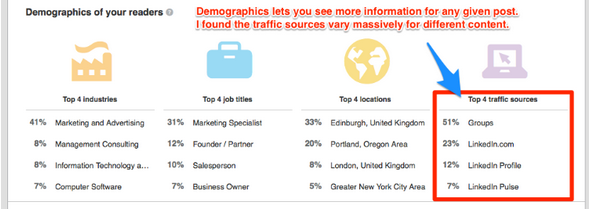
LinkedIn Unveils Analytics for publishing Long Forms on LinkedIn

LinkedIn is constantly changing the access they give companies like Dasheroo access to their API so we can get data for your business dashboards. They’ve actually made a recent change that’s going to affect some of the data we present for your personal stats. Either way, we love LinkedIn and think it’s important for you to know the data that you can get.

Image of LInkedIn's new stats.

Image courtesy David Petherick.

++ In this article, David Petherick steps you through all of the nifty things you can see if you’re publishing long form posts to LinkedIn. Ask the folks at LI if Dasheroo can get access to this data for ya ?

++ In this article on Linked into Business, author John White takes us through how to get your LInkedIn long form posts to show up in Google Search.

10 Ways to Use One Piece of Content

duct tape marketing logoNow we’re huge on content marketing. Why? We believe in developing relationships with our users and readers and we have some really great knowledge of what we do and what we’re passionate about. This builds trust with our followers. So John Jantsch over at Duct Tape Marketing posted this beauty this week and we couldn’t agree more.

++ In this article it starts with a simple blog post as a lead generator, and he turns it in to 9 more ways to use that same piece of content to reach different audiences. Brilliant John, brilliant.

How to Clean Up Your Content for More Credibility

Convince & Convert logoWe love short easy-to-understand articles where we get sheer takeaways we can put to work quickly and this article does just that!

++ Thanks to Hillary Byers who wrote this gem for Convince & Convert, we’ll be taking a keen look at our own content for readability, SEO and overall quality.

Happy reading!

Content Marketing Study: What Marketers Need to Overcome

Screen Shot 2015-03-24 at 7.04.08 AMOur friends over at eMarketer do some really great surveys and this one is no slouch! Timely too with team Dasheroo at Social Media Marketing World (#SMMW15) here in San Diego.

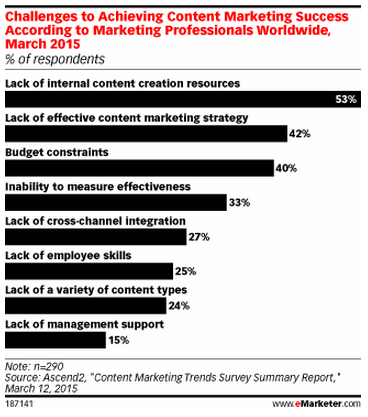
So this survey by Ascend2 looked at the biggest struggles marketers have when it comes to producing and publishing content.

The interesting thing we thought was that “lack of management support” was a mere 15% so it wasn’t because management doesn’t want it but they’re certainly not supporting from a budget perspective with 40% saying they ain’t got the dough.

And when you don’t have the money you need to get content done for you “free” and with a lack of internal content creation resources, especially when the budget isn’t there. So we agree with that one too!

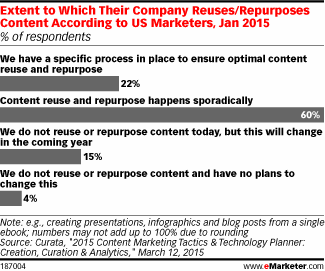
So what do you do? You find every way to repurpose your content. But do people do it? As a study by Curata found, they actually don’t! Huh?

In this study a huge portion of responders said they only repurpose content “sporadically.”

Consider this:

  • The shelf life of a Tweet these days is minutes so if you Tweet once, very few will see it and your Tweet is dead. So Tweet your content often especially if it’s evergreen.
  • Take a series of content pieces that make sense together and reformat them into a PDF. Then distribute that at tradeshows, email it to people who join your list as a “thank you”, use it as a white paper.
  • Post your video to YouTube, your site, put it in a link in your signature, post it to LinkedIn.
  • Take a survey you’ve done and make it into an infographic, then distribute it throughout your social networks for months!
  • Break up a white paper you wrote into snippets and make it 50 Tweets and Facebook posts! Then direct people back to the PDF to download it in full.

You spend a ton of time developing the perfect piece of content, make sure it gets read!

CoSchedule – Automatically Publish Blog Posts to Social

Since we blog all the time we’re constantly on the lookout for cool apps that help us save time. And since that’s the business we’re in (saving you time) we love it when we come across a good one!

We’re avid bloggers, we try to do it once a day, although lately we’ve been taking Saturday’s off, and we actively publish our blog posts to all of the social networks that make sense for us. So naturally we look to automate as much as humanly possible. Well we ran across CoSchedule and thought it might be too good to be true and you know what? So far it is!

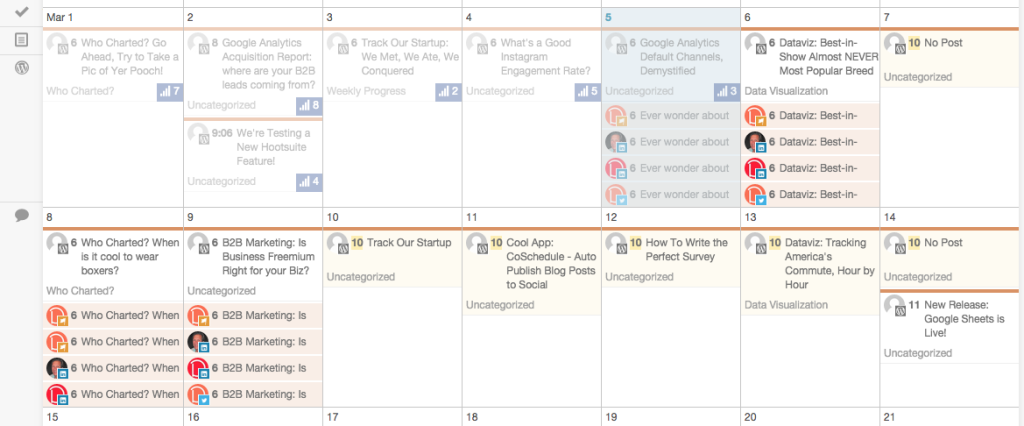
CoSchedule calendar view that we love!

Our Dasheroo blog & social calendar using CoSchedule in our WordPress account!

1. It’s a plug-in for WordPress which is our blogging platform.

2. It’s a visually-appealing calendar where we can see all of the upcoming posts and which social networks it’s going out to.

3. When the post goes live, it automatically posts to the social networks we connect with in the visual format we want (text, image, link)

4. It auto-posts it out when the scheduled post goes live.

We had a slight issue setting it up that we’ll blame on the crappy go-go connection we had on a Virgin America flight, but the customer support people (using Intercom.io) got right to me and cleared up any issue I had. Thanks guys!

So now we don’t have to get up and run to post this stuff to each social network. We use and love Hootsuite which is an alternative if you don’t mind the format that the RSS feed pulls it in. We also use it for bulk uploading posts for the month. We want to get as much out of our previous posts as possible and Hootsuite is great for that!

How Important is Content to B2B Tech Buyers Post Purchase?

We’ve gotta hand it to our friends at eMarketer, they have some of the best content out there. And just the other day, they published a very relevant article about B2B Tech buyers and if they expect and value content after the purchase. And it’s an important reminder; so often after you capture that all-important sale, it’s easy to ‘bag it’ and go on the hunt for the next one. And sure, you need the next sale, but not at the expense of continual value-add to current users.

And this eMarketer article focused on an aspect that’s actually pretty easy to do – adding value in the form of content. They state that a full 80% of respondents to a recent study say that it is important or very important to receive ongoing content after making a purchase. And only 2% stated that they have no interest at all in receiving content post purchase.

But what type of content to B2B buyers really want?

Graph: type of content B2B tech buyers consume post purchase

It appears tech buyers want to be confident you know what you are talking about!

They want information that will help them do their jobs better! Plus, when you publish valuable, relevant, helpful content it will also strengthen your relationship with your users. And that equals customer retention and positive word of mouth marketing. Hopefully keeping your users up to date with new product features and support information is baked into your communications already. If not, get on it!

We talk about the importance of content all the time, so we try to eat our own dog food, publishing content daily, if not several times a day. And since we don’t do any advertising or really any other form of marketing yet, we see the value from both a user acquisition perspective as well as ongoing relationship building.

Hey we’re certainly not perfect, but whenever we add new features, we’re not shy about letting our users know! And here at Dasheroo, we also think transparency is also a real ‘must have’. So we publish a Weekly Progress post that discusses not just new product features, but also provides an insight into our culture, people and the fun and challenges of starting up a new tech company. And when we think we have some advice that will make our users more productive in their jobs, we publish that too. We could probably do a better job of communicating in-app specific tech support updates, and we’re working on that now.

So take a minute to do a little internal audit of your own content marketing strategy. Are you checking all the boxes? Keep in mind that your users want to hear from you, before the sale and after, so invest the time to keep them updated!


3 Easy Ways to Get Around The Facebook 20 Percent Rule

We write a bunch of content for our blog, pretty much daily. We take that content and post it to our social networks to get as much out of the time we spent on that content as we can. Occasionally we boost a post or two on Facebook.

But Facebook has a nasty rule where you can’t boost a post if it has more than 20% text in an image. Why? From Facebook:

“Images may not include more than 20% text in the image to ensure people only see high-quality content. This includes logos and slogans in images. We recommend that you use the text field in the ad to get your message across.”

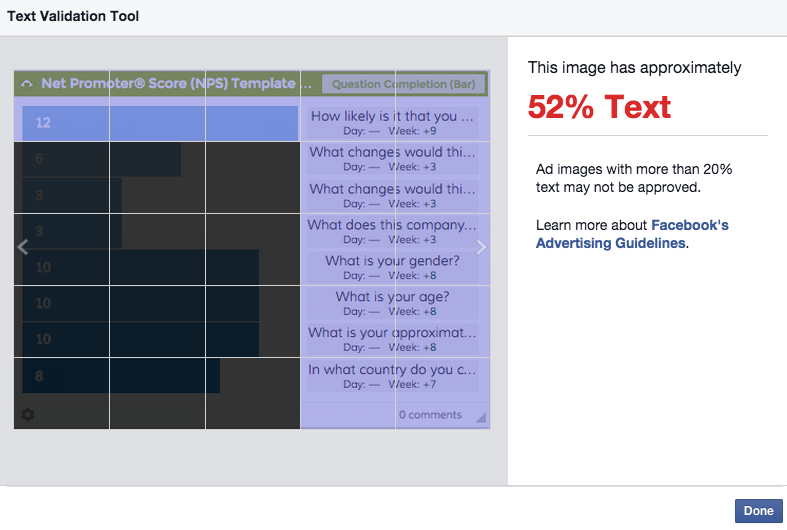
But Facebook helps you with a fancy “Text Validation Tool” you can run your ad through. They’ll even warn you about your ad before hand letting you know it just might not get approved.

Ok so now we have to jump through hoops to do something special for the image for Facebook, not any other social networks…

So here are 3 ways you can get around getting dumped by Facebook when you’re creating posts you want to boost or advertise.

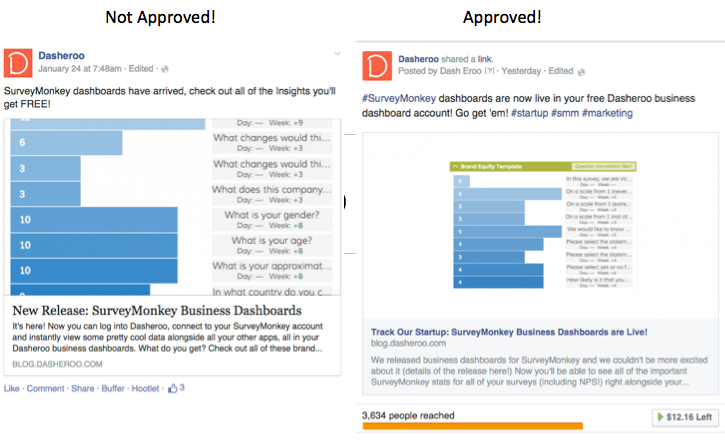
1. Take a smaller picture! Here we took the exact same image, put it in a powerpoint and took a picture including a ton of white space around it. Approved!

Getting around the Facebook 20 percent rule. Facebook business dashboards

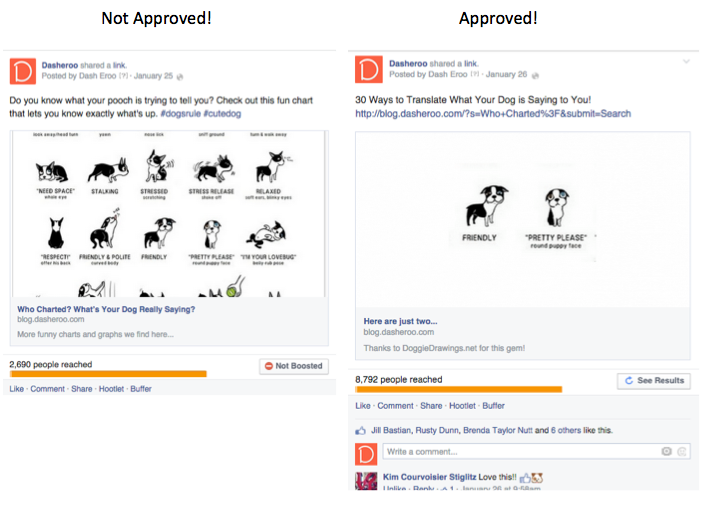
2. Re-do your image so that you have less in your image. Here we took a subset of the picture and gave a teaser of what it was about. Approved.

Screen Shot 2015-01-28 at 4.06.48 PM

3. Re-do your image by ensuring text doesn’t cross any grid lines, it could double or quadruple the ratio for you. So move your text, shrink it, do whatever you need to do to ensure that it fits in 20% of the space. Clearly this one didn’t work for Facebook because text fell into 13 of their boxes. #FAIL. Basically your text can only touch 5 boxes to pass.

Screen Shot 2015-01-28 at 3.54.35 PM

There you have it, ways to get around the silly Facebook 20 percent rule! Fun eh?

Go Green! 5 Ways to Reuse Content

If you’re spending your time drumming up your own content for your blog or site, you need to make sure to get the most out of it, so go ahead and reuse content! Time is money and you don’t need to be wasting it, right? Plus it’s just great to get your content in front of your social media fans so they’ll engage with it and get you more quality fans and followers. So how do you re-use content? Here are a few tips and tricks that will put you on the right path:

  1. Don’t reuse old news. Make sure it’s relevant. As you’re going through your past posts, “newsy” stuff probably won’t cut it, because it’s old news. If you’re reusing a piece of content about how the software that you love works, make sure that it still works that way and hasn’t been upgraded in a way that dramatically changes it.
  2. Look at what’s popular. If you’ve got a post that’s driving a ton of RT’s, shares and likes, keep reusing it.
  3. Publish multiple times. Most people who follow you on social media might not see your post. From what we’ve researched, a Tweet hangs around about 2.8 hours and a Facebook post is about 3.2 hours so make sure you get the most of your content!
  4. Bulk upload. Create a Google Sheet with a list of all of your evergreen content with the post title and the url of the post. If you’re using Hootsuite Pro you can use the bulk uploader as long as you put a date next to the posts you want to post. If you’re not, use that spreadsheet to keep track of what you’re posting one by one.
  5. Mix it Up! Have a healthy mix of reused content along with brand new content.
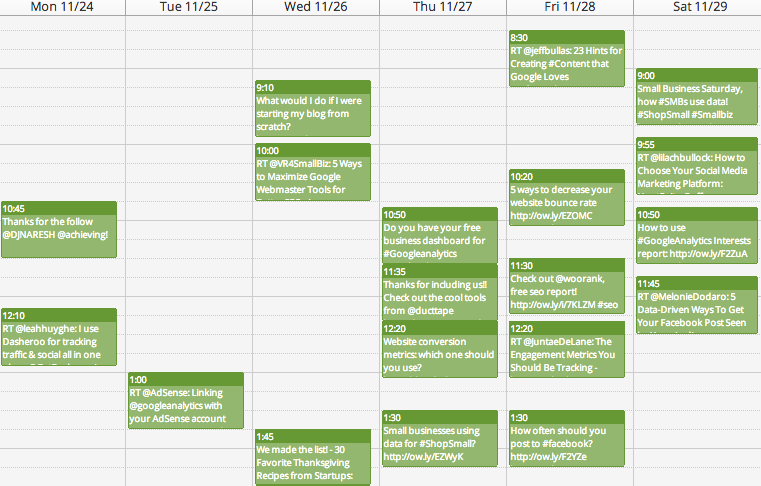
Screen Shot 2014-12-03 at 8.56.40 PM

Here’s an example of how Dasheroo reuses content, new and reuse!

At Dasheroo here’s what we do:

  • Reuse 2-3 older blog posts per day on Twitter and Linkedin that are still relevant.
  • ReTweet and share awesome stuff from people we follow or great articles we read; it might be new or old, but it’s relevant.
  • Write a new blog post every day and publish it to social media. Then it goes into the rotation for reuse later.
  • Invite people to sign up for our free dashboards each day!
  • Schedule our posts between 7am-2pm PT, that’s when our followers are active.

In the end it’s really about getting your relevant content in front of your followers to inspire them to engage without having to come up with brand new ideas all the time. Whew, that’s a lot of work but worth it!