We are super excited to announce launching our newest integration, Eventbrite! Many of you use this awesome application to manage all aspects of your events so we wanted to give you a starting overview of things that matter the most to you. If you have more that you’d like to see we need to hear from you so submit your insight feedback please!
Without further adieu, here are the insights for Eventbrite you can add do your Dasheroo business dashboards:
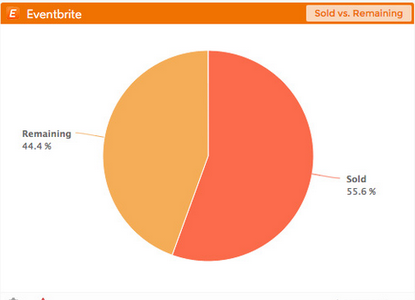
Tickets sold vs. remaining, start selling!
- Ticket Sales insight – View a line chart that plots daily quantity of sold tickets (# of tickets/day) over time for the selected event
- Ticket Sales by Type – View a pie chart that displays a breakdown of the different ticket types that have been sold for the selected event
- Sold vs. Remaining insight – View a pie chart that displays a breakdown of the number of tickets sold compared to the number of tickets still remaining for the selected event
Ticket Orders insight – View a line chart that plots daily order totals (# of orders/day) over time for the selected event - Ticket Revenue insight – View a line chart that plots daily dollar value of all sold tickets ($/day) over time for the selected event
- Recent Orders insight – View a table that displays a listing of the most recent orders for the selected event with the the name of the buyer, date, quantity, price and order #
- Most Orders insight – View a table that displays a listing of the events that generated the highest total number of orders within the selected date range with name of the event, number of orders and status (like “live” or “completed”)
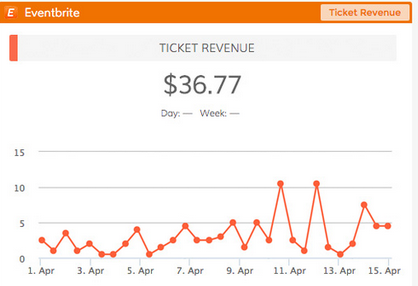
How much revenue are you making from your event? It’s right here in your Dasheroo Eventbrite Ticket Revenue insight.
- Most Revenue insight – View a table that displays a listing of the events that generated the highest total revenue within the selected date range with name of the event, number of orders and status (like “live” or “completed”)
- Most Tickets insight – View a table that displays a listing of the events that generated the highest total number of tickets sold within the selected date range with name of the event, number of orders and status (like “live” or “completed”)
Whew! We’ll be adding more to this as we hear from you so don’t forget to let us know what you need!