
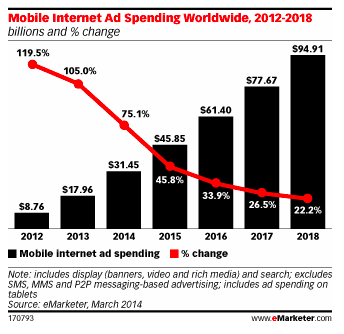
Our buds over at eMarketer say that mobile advertising spending is going to rise by 75% in the coming year! Holy cow! What does that mean for you? You need to be a part of that mix and Google and Facebook are on the forefront of the spending growth.
How to create your mobile ad from Google Adwords help:
Not sure if you’ve selected the “Mobile devices with full browsers” setting in Adwords so your ads can show on high-end mobile devices? Keep in mind that if you’re already using enhanced campaigns, your ads will be eligible to run across all devices.
Here’s how to check the device settings in your account:
- Sign in to your AdWords account at https://adwords.google.com.
- Go to your Campaigns page and select the campaign where you want to have mobile ads.
- Click the Settings tab.
- In the Networks and devices section, click Edit next to Devices.
- Select Let me choose…
- Make sure that Mobile devices with full browsers is checked.
- Click Save if you’ve made any changes.
Now you’ve got a mobile ad for Google. And if you’ve got a mix of mobile ads and regular ads, as far as we can tell mobile ads will automatically render if the reader is on a mobile device. One more thing, of course if mobile ads are on the rise so is there cost, check out this Forbes article.