The Perfect Social Media Dashboard: The Socialite

Social Media is either something you love, love, love for your business or a complete thorn in your side! If you’re anything like us it’s a love fest with social media but we’re ok if you don’t love it so much, it certainly takes some time to devote to it to make it work.

On top of it all trying to track down what actually IS working and what isn’t is a real time suck, for us anyway. So when we really looked at what we needed to track here internally we thought “hmmm, if we need to consolidate our social media marketing metrics so does everyone else, let’s make a dashboard template!”

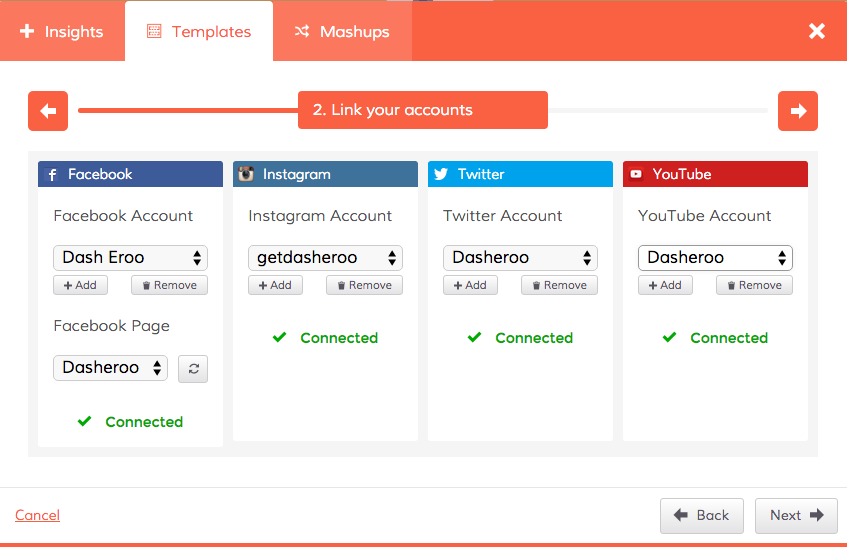
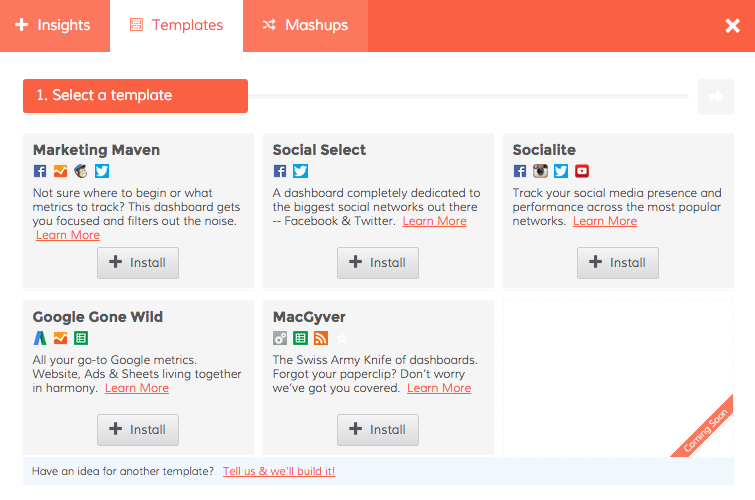
So without further adieu, simply click on Add Insights and Templates in the top of your Dasheroo menu and you’ll see this:

Dasheroo's social media marketing dashboard

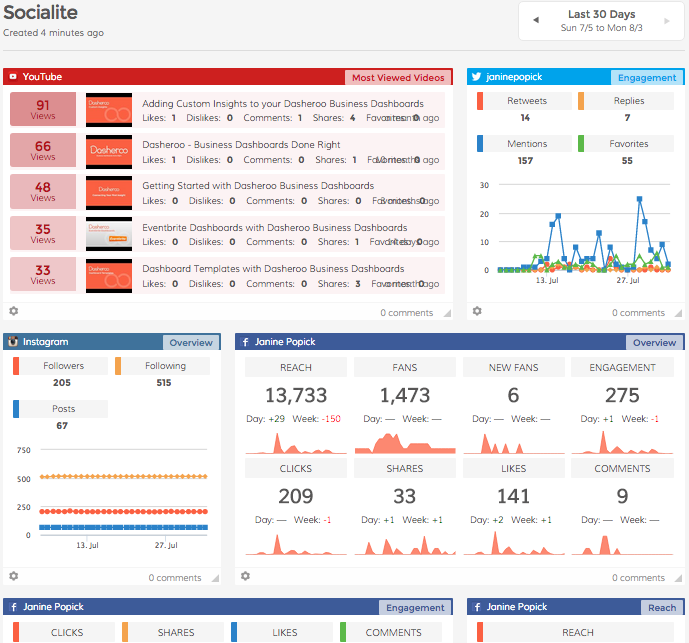
Select “Socialite” if you need to see your metrics for Facebook, Instagram, Twitter and YouTube in an instant!

Dasheroo's Social Media Marketing dashboard template


Click to connect all of your social media accounts and you’ve got a fancy social media mix of awesome insights. You can add to this dashboard if you think the insights we selected don’t meet your needs or add any other application that makes sense like Google Analytics Sessions or LinkedIn insights.


Dasheroo's social media marketing dashboard


There you have it, a free social media dashboard in an instant!

What’s Really Important in a Google Analytics Dashboard

At Dasheroo we’re all about looking at our Google Analytics dashboards when we get up in the morning, multiple times during the day and before we go to bed at night. Why? We’re a growing online business and we want a quick snapshot of what’s working and more importantly what isn’t.

So here’s what a portion of our GA Dashboard looks like:
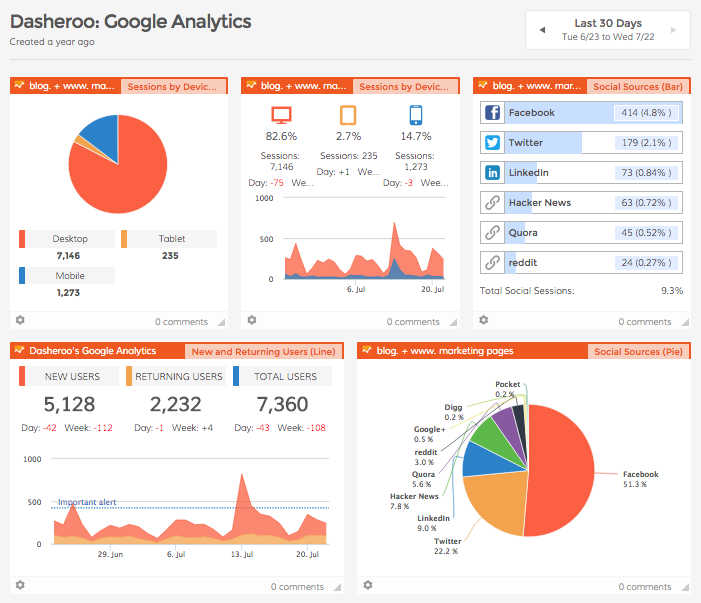
Screenshot of Dasheroo's own Google Analytics Dashboard

Here’s what we like to look at:

Since we do a ton of social media marketing (there’s a dashboard for that) we like to keep an eye on the Social Sources insight to track traffic to the website from our social channels. If you look at the pie chart above you’ll see that Facebook drives a ton of traffic for us which is great but every now and then we get a boost from Twitter, then we can go to ourTwitter Dashboard to see what’s driving the goodness.

We like to see our New and Returning Users insight. We always want to have newbies coming to our site more than returning users. The returning ones we love ALOT but they’re probably coming back to log in. A spike like the one you see just above is even better because that means a whole host of new users came to the site.

The Top Sources By Medium is a great way to track Google’s Channels to see how traffic is coming to your site. The Direct channel is people typing in your URL into the browser while the Organic channel is people searching on a keyword (not paid) and coming to your site. You can see here that there was a huge spike in Organic traffic on July 13. We like to closely monitor that especially since we don’t pay for it!
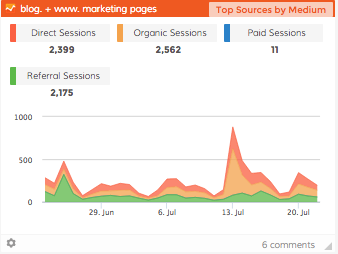
A screenshot of Dasheroo's Search Traffic on their dashboard.

We also track our internal metrics in a Custom Insight [ SHORT VIDEO]. In this case it’s the total number of people who register for a free business dashboard. We like to put it smack dab in the middle of our Google Analytics Dashboard right next to our Sessions insight. Why? We like to make sure we’re getting around a 10% conversion rate and we are, phew.
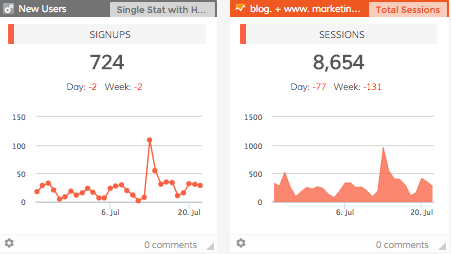
Dasheroo's dashboard with custom data.

If we see that there might be something going on with traffic, like maybe we got a new traffic source (or lost an existing one) we compare date ranges on the All Traffic insight. We select a date range or “Last Week” vs. a “30-Day” range and compare where traffic is coming from. In this one you’ll see we got a new source of traffic because LaunchingNext linked to us and included us in an email. Awesome!
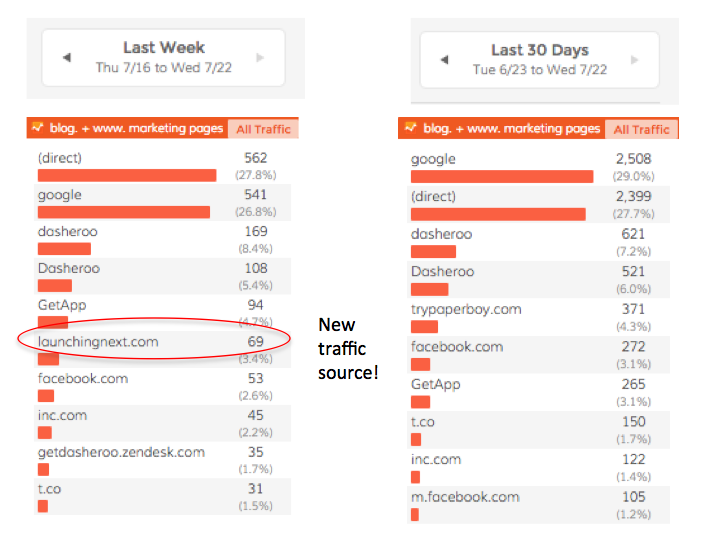
Screenshot of Dasheroo dashboard for all traffic sources to your website.So there’s a quick overview of how we use our own Google Analytics dashboards. When we need to dive deeper we go directly into our Google Analytics native account, but this gives us a great starting point to ask questions.

Oh, we’ll be adding even more insights to Dasheroo so check back frequently but don’t worry, we’ll tell ya!

New Email Marketing Dashboard: GetResponse

Dasheroo email marketing dashboard for GetResponseWe’ve now hit the last nail on the head when it comes to marketing dashboards for email service providers. If you can think of another one please let us know but we think we have 90% of the market covered!

So for GetResponse you’ll see:

  • Your engagement: track your trending open and click rates by day based on the last 30 emails you’ve sent.
  • Subscribers: view your subscriber growth over time.
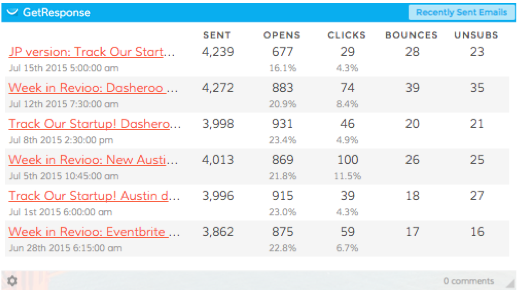
  • Dasheroo email marketing dashboard for GetResponseRecently sent emails: A list of the most recently sent emails including the quantity sent, # opens, # clicks, # bounces and # unsubscribes, handy!
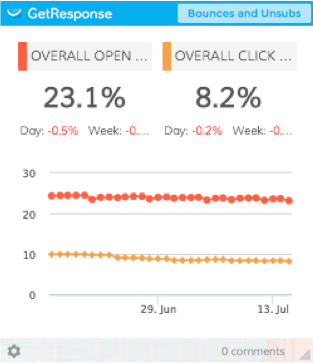
  • Bounces and unsubscribes: track your trending bounce and unsubscribe rates by day based on the last 30 emails you’ve sent.It’s the one graph where “down and to the right” makes sense!

So get on into your Dasheroo account and set up your new GetResponse dashboard!

Dasheroo’s Marketing Dashboard Template: Marketing Maven

We’re coming out with new features all of the time, to a) make your life easier and 2) get your business booming fast. Because of this we knew that connecting a single insight-by-insight was a time-wasting pain in the butt. So this is all about selecting a marketing dashboard template for your business.

Of course you can swap out insights and apps to your dashboards and make them customized to your business.

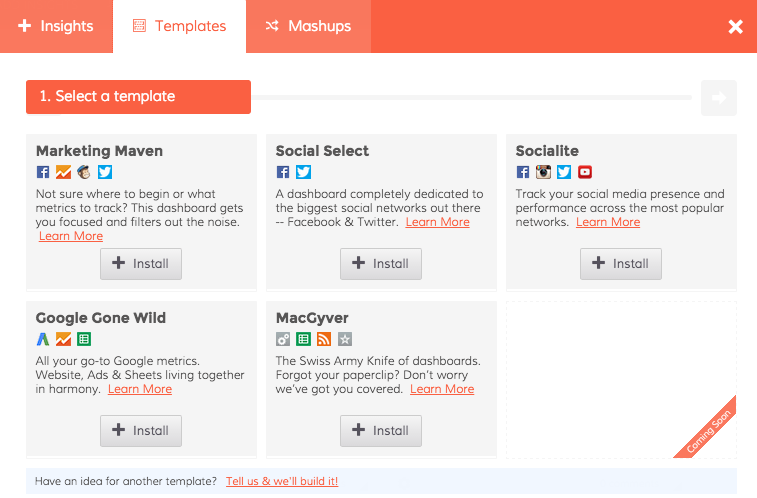
Start with the Marketing Maven when you select your template:

Dasheroo business dashboard templates

So we created a few templates for your dashboards. This post is all about the Marketing Maven dashboard template.

Marketing Dashboard Marketing Maven Template

Once you connect you’ll get:

  • Google Analytics – Top Pages people visit, Top Sources of All Traffic, Total Session and New vs. Returning Users.
  • Twitter – You’ll get a great overview of the total followers, following and Tweets as well as an Engagement insight tracking RTs, Replies, Mentions and Favorites.
  • Facebook – You’ll get an awesome overview including reach, fans, new fans, engagement rate, clicks, shares, likes and comments. You’ll also get a reach insight and an engagement insight.
  • MailChimp – You’ll get insight on engagement as well as opens, clicks, bounces and unsubscribes on recently sent emails. DON’T USE MAILCHIMP for email marketing? Go ahead and customize with our integrations with Constant Contact, VerticalResponse, Emma, Campaign Monitor, AWeber and soon GetResponse.

Set up your own marketing dashboard, it’ll take you about 5 minutes and you’ll have access to all of this great data in one spot!