Why a Social Media Dashboard is Imperative to Your Business

We all know that social media is not a fad, it’s here to stay and stay for a long time. Consider this nugget of information from the Pew Research Center: as of January 2014, 74% of online adults use social networking sites.

As a business owner or marketing pro, you should never overlook the power of social media. From Twitter to Facebook to LinkedIn, there are a variety of platforms that deserve your attention.

It’s easy enough to use social media. After all, it only takes a couple minutes to Tweet and post an update to Facebook. But that’s not a sound social media marketing strategy. You need to dig much deeper. You need to understand why a social media dashboard is imperative to your business.

Screen Shot 2016-01-22 at 11.34.25 AM1. Keep an Eye on Your Channels

Have you noticed your Twitter follower count increasing month over month? Are you wondering why you aren’t achieving the same traction on Facebook?

With a social media dashboard, you can keep a finger on the pulse of your growing channels and more importantly those that need more attention.

Your social media channels should always be growing. This is a positive sign for your business.

2. Know what Type of Content Your Audience LikesScreen Shot 2016-01-22 at 11.34.50 AM

You can post as much as you want to social media, but none of this matters if your engagement is subpar.

Let your social media dashboard show you what type of content your audience likes. Focus on the posts with the highest engagement rate, as these are the ones generating the most interest.

Once you know what your audience enjoys, you can tweak your strategy to publish similar content in the future.

3. Track Your TrafficScreen Shot 2016-01-22 at 11.37.56 AM
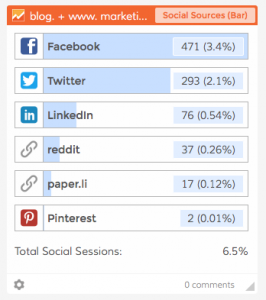
Just the same as engagement, it’s important to track the amount of traffic generated through social channels.

In addition to overall traffic in Google Analytics, break this down to see which channels are most effective in terms of driving visitors to your website. This data will allow you to accordingly adjust your content creation and posting strategy.

Shortly after implementing a social media dashboard you will be faced with more data than you ever thought possible. And there is nothing better than that!

P.S. Get a free social media dashboard from Dasheroo, it takes minutes!
Startup Lessons Learned: The Importance of Employee On-boarding

Seems like we’re hiring like crazy lately! Suddenly every one of the co-founders of Dasheroo has at least one direct report. Wow. We are officially up to 13 awesome people – 10 cranking away now, 2 more signed and one ‘secret weapon’ we’ll announce soon!

We’re actually going to hold off on any more new hires, it’s kinda of like letting your food digest after you’ve had a big ‘ol meal. Plus, we need to start generating some $$ to offset our investment in our team.

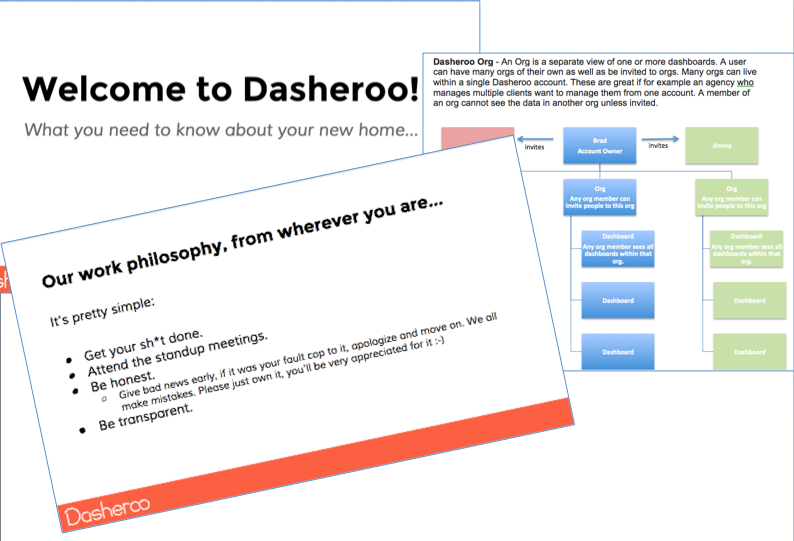
OK, like I mentioned before we are a distributed work environment, with folks all over the SF Bay Area, Austin and a sprinkling of additional developers in Malaysia & Siberia. So the topic of onboarding our new people is something we feel especially strong about! It’s super key to communicate our story, our competitive benefits, our expectations, our tools and give a feel of our culture. This is even more important as we hire folks outside of our ‘family’, people we don’t have prior work experience with.

So what’d we do? We developed a couple cool Google docs, that’s what. One is called Onboarding Newbies and the other is simply, Dasheroo Glossary. We really have to work on some jazzier titles for these, but they are chock full of great info, all to get our next A-team Dasherooer up to speed in a flash.

(almost) all the basic info a newbie needs to get up and running fast & efficient at Dasheroo!

(almost) all the basic info a newbie needs to get up and running fast & efficient at Dasheroo!

The glossary includes not just our internal lingo, like ‘what’s an Insight?’ but also industry terminology, like defining what an API (Application Protocol Interface) is and why these are important to our business.

The on-boarding doc includes cool info like our story (why we started Dasheroo), information on each of our team, and our values.

We just shared these docs our Director of Sales, Mimi, who has been here for 3 weeks. She’s already provided info she wished she would have had on her day 1. Awesome!

We’ve also used Screenflow to create videos on how we do things, for instance like email marketing. A) It’s a great help to the new person who needs to learn how we do it and 2) they can refer back to it without continually asking questions.

Speaking of, I need to work on a Screenflow to record a demo to get folks comfy on how we position our product. That’s coming soon, as I’m sure lots of other helpful stuff as we get feedback from our newbies.

Now I wish we would have done this a couple months ago so all new folks could have had it, but hey it’s better to start it at Employee #10 than never!

What are your plans or policies for employee on-boarding? Let me know!

Track Our Startup: 28 Days to Launch Business Dashboards!

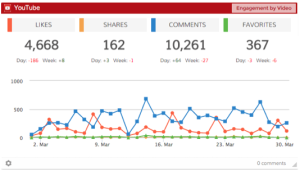
Your YouTube data right in your Dasheroo business dashboards!

Your YouTube data right in your Dasheroo business dashboards!

We have been heads down getting ready to launch, and boy have we been working our dashy little butts off! We’ve got about 3 more releases left before our big launch (our stake in the ground for “hey, we’re here and we’re real!”)

Ok, here’s the rundown:

Next Release – YOUTUBE!

We’re gearing up for our next release this week (we try to do them every two weeks) and this one includes:

  • YouTube Insights – Recent videos, most viewed videos, engagement, views by video and more!
  • RSS feed – This cool widget will let you track feeds of content you want to keep an eye on.

We’re also always fixing bugs and working on stuff that you can’t see to make Dasheroo more robust for your business dashboards.

Next Up – Facebook Ads Insights? Perhaps!

We did some initial data-gathering for our next app integration for Facebook Ads since we’re having some issues with Google+. We’re not there yet but look for more deets on this next week.

We’re also going to be changing our calculation for Twitter engagement, adding Favorites to the score since that’s how more people are looking at it.

And we’re knee-deep in figuring out how to give you a great interface for bundling apps in a dashboard!

Dasheroo business cards from Moo

We handed out a buncha Moo biz cards at #SMMW15!

#SMMW15 – Social Media Marketing World, San Diego

We went to this amazing show that highlighted the fact that what we’re doing is so necessary for small businesses, agencies, consultants and more. We heard from @tedrubin @meloniedadaro @kimgarst @marismith, @jenns_trends, @suebzimmerman @lutzfinger @joepulizzi and one of our faves @ducttape that social media marketing is growing and has never been better for businesses to get them to prosper. Check out the first in a few posts about the show.

We also wanted to get Dasheroo in front of a lot of pretty influential people in the industry as we’re getting ready for launch, and we were really successful at that.

Josh Feinberg our newest Dasheroo memberOur Newest Addition…Josh!

We just announced that our buddy Josh Feinberg is joining Team Dasheroo. Why do we love Josh? Well this team has worked under his Product Guru-ness for the last 13 years so we’re super-excited to have him on board as a co-founder. And no we don’t only hire people with J-names.


CoSchedule – Automatically Publish Blog Posts to Social

Since we blog all the time we’re constantly on the lookout for cool apps that help us save time. And since that’s the business we’re in (saving you time) we love it when we come across a good one!

We’re avid bloggers, we try to do it once a day, although lately we’ve been taking Saturday’s off, and we actively publish our blog posts to all of the social networks that make sense for us. So naturally we look to automate as much as humanly possible. Well we ran across CoSchedule and thought it might be too good to be true and you know what? So far it is!

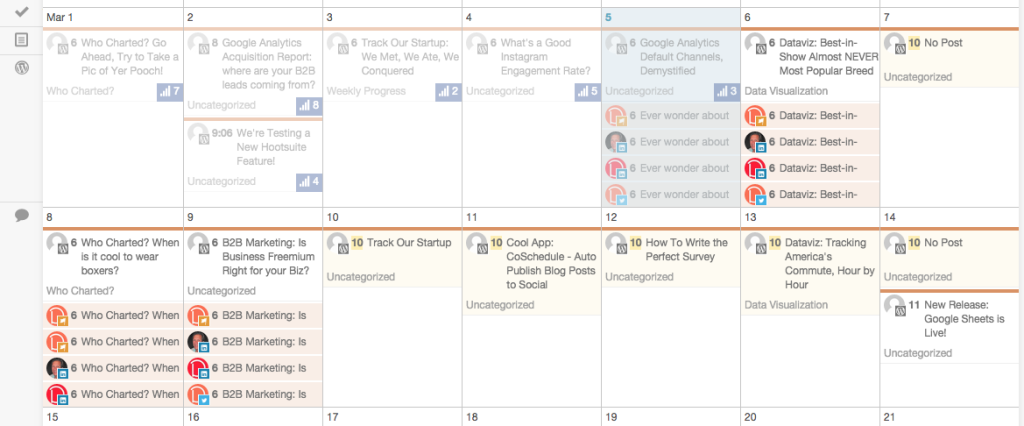
CoSchedule calendar view that we love!

Our Dasheroo blog & social calendar using CoSchedule in our WordPress account!

1. It’s a plug-in for WordPress which is our blogging platform.

2. It’s a visually-appealing calendar where we can see all of the upcoming posts and which social networks it’s going out to.

3. When the post goes live, it automatically posts to the social networks we connect with in the visual format we want (text, image, link)

4. It auto-posts it out when the scheduled post goes live.

We had a slight issue setting it up that we’ll blame on the crappy go-go connection we had on a Virgin America flight, but the customer support people (using Intercom.io) got right to me and cleared up any issue I had. Thanks guys!

So now we don’t have to get up and run to post this stuff to each social network. We use and love Hootsuite which is an alternative if you don’t mind the format that the RSS feed pulls it in. We also use it for bulk uploading posts for the month. We want to get as much out of our previous posts as possible and Hootsuite is great for that!