
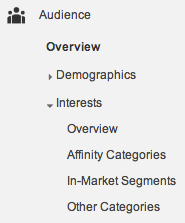
You’ll find your Affinity Categories under Interests in Google Analytics.
We’ve talked about the Google Analytics Demographic report here but now it’s time for the Google Analytics Interests report lowdown.
What is it? Much like the GAD report you’ve got to set it up first. It begins to collect information about your site visitors based on other sites they’ve visited on the Internet and categorizes them into an Affinity.
So like the GAD report is it perfect? No way, but it’s a good directional report.
You’ll see your Affinity Categories right in your Google Analytics, under Audience.
For instance we just set it up here at Dasheroo and saw that Technophiles were visiting our site! Not a shocker but cool.
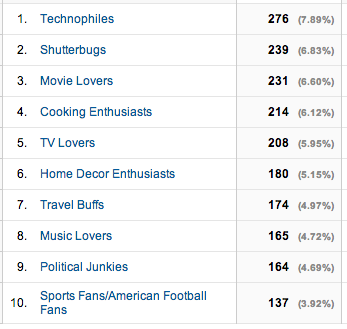
Then we clicked on Technophiles and saw that a ton of our sessions were from 25-34 year olds. Cool.
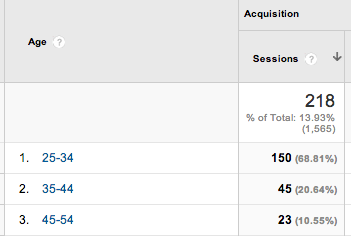
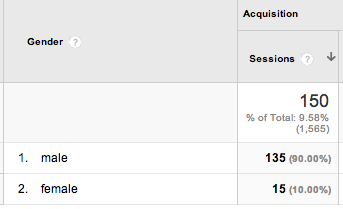
Then we clicked on 25-34 year olds and found that males are dominant with regards to overall number of site sessions.
So what can you do with information like this?
1. You can target your advertising to where you either want MORE of who is visiting your site or target other audiences that might work better for you.
2. You can set up a remarketing campaign right from within Google Analytics if you have your Google Adwords connected. Then you’ll be exposed to the Google Distributed Network and you can target a remarketing list of people (below Technophiles age 25-34) with a special promo.
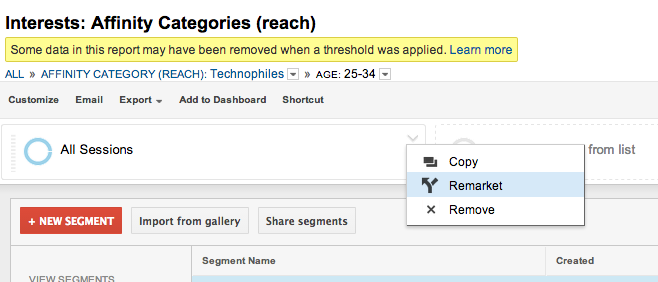
There you have it, your Google Interest Report - Affinity Categories summarized.