
SurveyMonkey Business Dashboards
It’s here! Now you can log into Dasheroo, connect to your SurveyMonkey account and instantly view some pretty cool data alongside all your other apps, all in your Dasheroo business dashboards.
What do you get? Check out all of these brand spankin’ new Insights:
List of Surveys Insight - The name of the survey with a link that brings you into the reporting page in SurveyMonkey, total number of responses, & status of survey (open or closed)
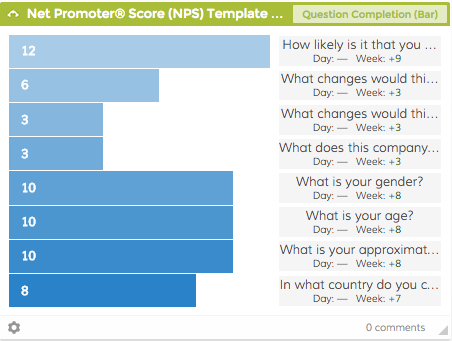
Question Completion Breakdown Insight - A bar or funnel chart displaying the # of responses per question including drop-off points
Page Completion Breakdown Insight - A funnel or bar chart displaying the # of responses per page including drop-off points
Recent Responders Insight - A list of recent responders for a selected survey. Survey responder name/label is clickable and links you right into SurveyMonkey to see the details of the response
Overview Survey Stats Insight - Select a single survey from your account to view its details: survey name, created date, # of questions, # of pages, # of responses, and status (open or closed)
Responses Over Time Insight - Select a specific survey to view the total survey responses by day. You can view a line chart with a header, where X axis = time and Y axis = total # of responses per day
Survey Completion Rates Insight - For a given survey you can see in a pie chart format: survey name, created date, total views, partially completed, completed
On top of all of this we fixed some buggy bugs that were annoying us (and probably you too!) Get in there and give it a try!