
Do you use Custom Alerts in Google Analytics? Did you even know you could set up a custom alert in Google Analytics? Well, you can, and you should! Custom alerts can notify you when important things are happening on your site, such as:
- New sessions drop by more than 20%,
- Sign-up goal increases by more than 100
- Bounce rate increases by more than 10%
You get it, and the list goes on and on: sessions, users, mobile sessions, pageviews, session duration, yada yada. You can set a custom alert for just about any metric in Google Analytics.
Plus, it’s pretty easy to do, if you know where to look! Wanna know more? Here we go:
First, go to any of your reports, then click on Intelligence Events:
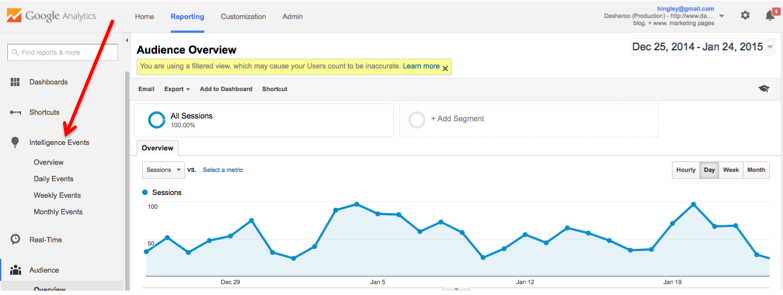
Lots of people don’t know where to find the Custom Alerts settings.
Second, select a Daily, Weekly or Monthly time frame. We’re going daily, since we really want to keep an eagle eye on New Sessions activity.
Then, click through the easy list to set your alert parameters:
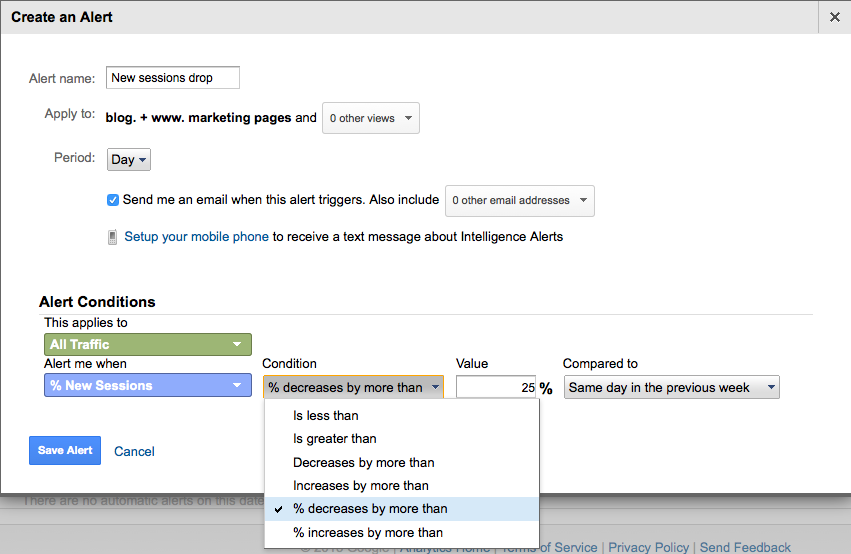
Then, do this:
- Name your Alert. Hint, if you’re going to have several alerts (and you will) be sure to give each a very specific name so when you receive an alert you immediately know which metric it’s about.
- Select the report view(s). It’ll automatically set the report view you were on, but here you can add other views too.
- The period (day week or month) you want to set the alert for. We selected Daily for this one, but if you want to look at an entire week’s worth of data, or even a whole month of data for your comparison date ranges, you can.
- Set email and/or mobile alert format.
- Then you’ll select from a drop down list for what level of traffic your want to set. In this case, we want to look at All Traffic, not a subset.
- Then, set the alert you want to be notified for! Like we said, we keep a close eye on New Sessions, but you could choose bounce rate, session duration, goal conversions or any number of other values.
- And then, what’s the condition? We want to know if New Sessions drop on a daily (i.e. Friday over Friday) basis.
- Set the value. You can always adjust this, but we thought 25% sounded like a reasonable variance to be alerted to.
- And last but not least, what’s the time comparison? Like we said, we want to look at same day of week drops, like Friday over the previous Friday. But you could also select previous day (Friday versus the Thursday before) or versus same day in the previous year.
- Click Create Alert.
Bam! That’s it, it’ll take way less time to create your alert than it did to read this post!