Dasheroo Data Dashboard: How To Spot Correlations

We make it pretty easy to spot trends on your Dasheroo data dashboard. Then you can drill into the native application to get more data. The more insights you have on your dashboards, the more data you have at your fingertips to spot these trends.

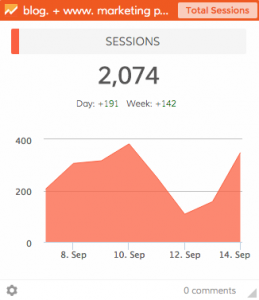
We look at our KPIs (Key Performance Indicators) side by side on our dashboards. In this particular dashboard in a given time period you see that on September 10 we got a spike in Google Sessions.

Screen Shot 2015-09-27 at 3.41.18 PM

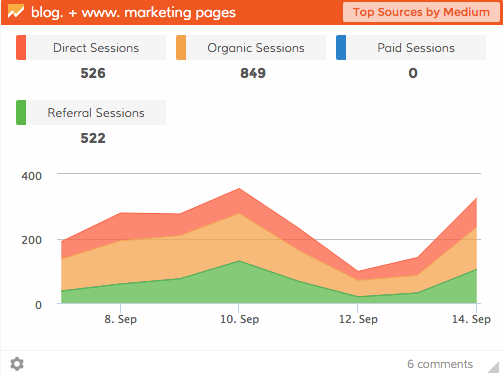
Then we looked at the next insight on our dashboard and we saw Referral traffic (in green) had a little spike too.

Dasheroo Data Dashboard: Google Analytics

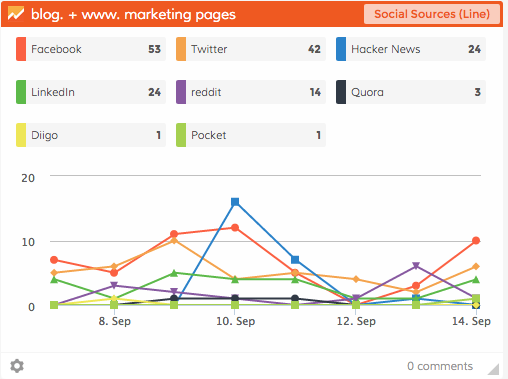
Finally our eyes went over to our Social Sources insight and voila, Hacker News is the culprit!

Dasheroo Data Dashboard: Google Analytics Social Sources

So it’s pretty easy to see some correlating data just using your Dasheroo data dashboard.

Track Our Startup: Tracking Internal KPIs + Customer Success

What are we working on? What aren’t we working on is more like it! As for product features we’ve had a bunch of stuff in the hopper. If you recall just a few:

  • Competitor Dashboards - we’re very close with these, look for them in a week or so!
  • Google Campaigns and Goals
  • Hashtag tools for Instagram Analytics
  • Exporting a data dashboard to a PDF so you can send reports, we’ve seen this work on our test servers and it’s very, very cool.

Features Further Down the Road…

  • Always more integrations with more apps
  • Speaking of more integrations, we’ll be helping get outside developers developing dashboards of their own with our internal tools
  • Ability to have an ADMIN user manage multiple users for agencies and larger teams
  • The ability for you to build your own custom insights for your data dashboard!

Customer Success

Alf, our VP of Customer Success was tasked with documenting our user’s journey and all of the touch points we already do as well as all of the ones we need to add and change. When it’s in a nifty data visualization it’s so much more clear where there are opportunities and improvements to be made. He’ll be working closely with Jenny to refine it and start acting on all of the things to make the customer experience the best it can be.

Bring on the Traffic!

Traffic was a bit flat this week due to just 2 blogs and referral traffic down. It’s what you get when you don’t write content for two week. THAT won’t happen again :-).

Speaking of traffic, we’ve been working on a mammoth SEO project. What we do know here is that SEO is a journey, not a destination, that’s for sure. And since we have to deliver reporting on KPIs (Key Performance Indicators) for you, we need to do if for us too and traffic driven by SEO is a huge KPI for us to keep a close eye on. Thanks to SEMrush and Moz we’ll start to work on getting those search results and traffic to spike.

Mimi will be attending Constant Contact’s OneCon next week, it’s where Constant Contact Solution Providers and Formula 1 Austin TXAuthorized Local Experts from all over the world are invited to network and learn from each other, Constant Contact executives, and small business experts. Seems like a cool networking thang.

What was I thinking? The two days I planned for a company offsite in Austin (where half of our amazing team resides) is the day after Formula 1, Austin weekend! Way to go, John!

Ok, more next week. Don’t forget to watch out for this week’s Startup Lessons Learned. Should be “Don’t book a meeting in Austin the day after F1” LOL.

Startup Lessons - How We Chose To Spend on An Expensive Event

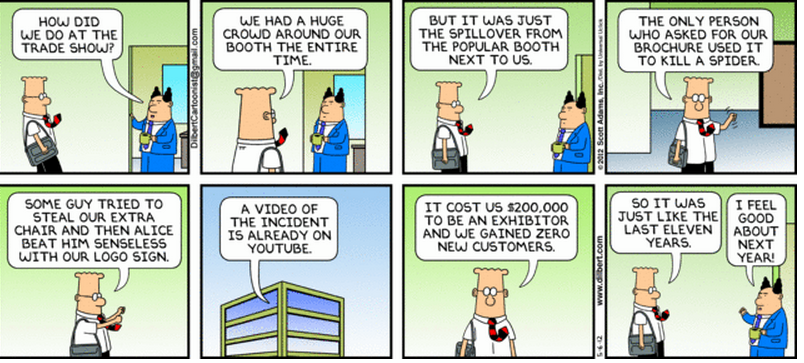
In caDilbert for Dasheroo's tracking a KPI for an expensive event.se you didn’t hear, we’re knee deep with Salesforce. We spent resources developing a Lightning Component in time for the
annual “Biggest Event of All Time vs. Oracle”, aka Dreamforce ’15. Some of us thought the decision to go ‘all in’ with Salesforce and prioritize developing a Lightning Component a ‘pivot’, you can also call it just plain being fluid.

Anyhoo, I wrote a different post about that, read it here. Nuff said.

So, we spent precious and finite dev & product resources to build a Lightning Component. What does that mean? It means you’ll be able to view any Key Performance Indicator (KPI) in your Dasheroo business dashboard right within the Salesforce.com application, cool huh?

Our friends at Salesforce were impressed with what our team, and especially Alex, developed in a very short amount of time! And I must say, so was I. SFDC was so happy, they invited Josh and I to speak about it at Dreamforce.

So, the next logical decision was: “hell, should we sponsor as well?”, meaning, should we have a booth at the event. It’s a $25,000 investment for a tiny pod alone, not to mention the cost for a rotating crew of 2-3 Dasheroo folks to staff the pod for 4 days.

Exhibiting at events can be very expensive, and I get pretty frugal when that decision comes around. We’ve only exhibited at one other event, the Market New York Expo last May. And that was less than $5,000 for a full 10′ x 10′ booth for 3 days.

So what were the factors I used to make a decision in this case?

  • Q: Do we want to be 1/2 in or go all the way?
    A: We already made a significant investment in product and engineering, so it seemed like a reasonable investment to go ‘all in’ to hopefully build on our relationship and get Salesforce behind us and our Lightning Component. It worked well for us back in the early days at VerticalResponse when we integrated and got listed on the AppExchange and became the most downloaded application at the time.
  • Q: How close of a match is our market to the Dreamforce attendees?
    A: We knew most DF attendees would be larger businesses than our core SMB target, and we’d be asked to compare ourselves to enterprise offerings like Salesforce Wave, Tableau and Domo. So not a great match, but we really wanted to learn from this type of feedback. And what we confirmed was that Dasheroo is more of a complementary offering to the big guys than a straight-up competitor. Valuable info!
  • Q: Will there be solid feedback and learnings we can use to improve our product development strategy?
    A: If you ask some questions and really listen to the folks that stop by your booth, you should always learn some important things. So Josh (VP Product) and James (VP Engineering) spent a lot of time at the booth and heard challenges and needs first hand. For one, a “BI-light” approach, meaning perhaps we should go one level deeper in uncovering trends or the proverbial ‘canary in the coal mine’.
  • Q: What are the all-in costs (inclusive of travel and lodging)?
    A: Since Dreamforce is in San Francisco, travel and lodging costs were nil. All but one of us that attended lives here. Otherwise, we may have decided to not attend, or may have decided to really trim down the number of us who attended.
  • Q: Will there be partnership opportunities?
    A: I felt we’d get in front of companies that we could have long term growth opportunities with, that we may not get in front of otherwise. And yes, there are a few of those in the hopper!
  • Q: What do we consider an acceptable ‘ROI’?
    A: Contrary to my ROI for most events, I didn’t base this purely on number of leads and estimated sales close rate. That would be a tough calculation to make work, when you have a freemium business dashboard product! I based it on the factors above. Plus, we will measure the ROI on more traditional ‘payback’ approaches. But if we took an estimated $35,000 total investment on the 160 leads we generated, that’s $218 per lead. So we’ll see what happens - maybe we’ll get some larger deals or a couple great partnerships that pay that off. I’ll let you know.

So, yes we attended and 4 of the 5 of us co-founders said ‘yes’ it was worth it. The 5th was on the fence for valid reasons. Now, don’t get me wrong - we have no plans to throw around $25,000 willy nilly, it’s just not in our budget. Plus it hampered our productivity for a full week. But sometimes you have to look past short term traditional ROI to get to a logical decision in these cases when the strategic value can far outweigh the short-term investment.

What’s your take on trade show investment? Let me know!

How To Manage Data Dashboards for Multiple Clients or Teams in Dasheroo

We realize we release stuff fast, heck sometimes we don’t even know our amazing engineering team released a new feature. So we’ve got a helluva job keeping up with letting you know what’s available. The “Org” feature is really an amazing tool that you can use within Dasheroo to manage separate data dashboards and KPIs (key performance indicators) for multiple teams or groups.

It’s great if you:

  • Are an agency or manage groups within a company who wants a single log-in to manage multiple clients
  • Don’t want other teams or clients to see each other’s dashboards

FYI: You need to have the Venti package to have 2 different orgs under the same account. If you want more than 2 orgs you need to email us at [email protected] for pricing!

So how do you create separate orgs?

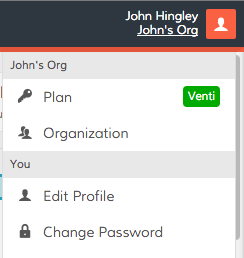
If you’ve got a Dasheroo account you’ve already got one Org by default. To create another simply click on the upper right hand corner of your Dasheroo account and click Plan.

Dasheroo's settings menu

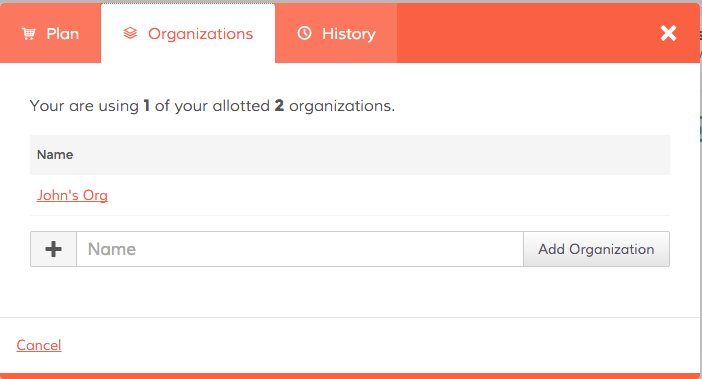
Click Organizations and enter a new name for your team:


Dasheroo's Org feature


Now you can select New Dashboard from the pull down menu in the upper left hand corner and begin to create your new dashboard you want to share with a specific team.


Create New Dasheroo Business Dashboard


Now it’s time to share!

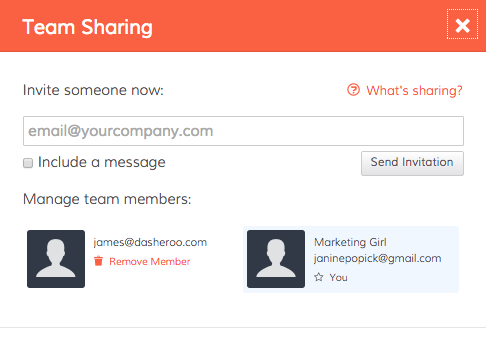
Simply click on the Share link in the Nav Bar and click on Team Sharing.


Dashboard sharing at Dasheroo


Now you can invite people to your org to see all of the associated dashboards!
Dashboard sharing at Dasheroo.

Things to note:

If you invite someone to an org, they can see all of the dashboards and insights in that org. If you’ve got more than one org and you only invite a given person to a particular org they will not see any other orgs they’re not invited to.

If you want to limit the number of data dashboards certain people see you’ll need to create a new org to do that.

As of now you can not “lock down” insights or dashboards so anyone you invite can move insights around, create a new business dashboard (or many), add insights and connect with applications. Very very soon we will release tools to prevent this.

This is a pretty powerful tool only to get more powerful, enjoy!

Track Our Startup: We Survived Dreamforce + On To Q4 Growth

Even though about 6 of us were rotating around a booth schedule and a bunch of meetings at Dreamforce we still managed to work on some serious new features.

Dreamforce ’15

We had a great Dreamforce event here in San Francisco, thanks to everyone who stopped by and said hey! Josh and I had an 8am speaking gig in the Marriott Marquis. We thought there would be crickets at that hour but it was standing room only, great job, Josh!

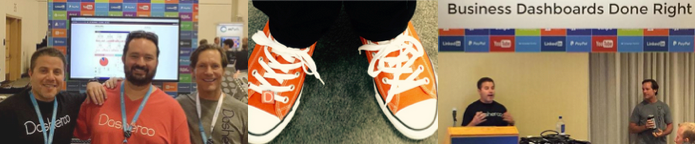
Pics of Dasheroo at Dreamforce 2015.

Four days just “might” be a bit long for a trade show but we tried to make sure we got the best of our spend on this show. For those of you who don’t know, we built a “component” for Dasheroo dashboards using Lightning App builder so you can get your Dasheroo dashboards right in your Salesforce account. Right now it’s only for mobile, but hopefully soon you’ll be able to get them right on your desktop instance of Salesforce.com.

Feedback from the show attendees to Dasheroo? People were pretty happy that there was an easy, lower-cost alternative to Domo, Tableau and Wave which was cool. Some businesses even said they use us alongside those more expensive products to get a quick snapshot of how the business is really doing, then they use those tools to drill into an issue in more detail. Nice, huh?

Bonus? James came up from our Austin office so it was awesome to see him. Since we’re a distributed company we don’t get to see our peeps face to face as often as we’d like, so it was great to all who came out for it. AND everyone donned their fancy new Chucks so we were pretty happy about that. Sorry about your blisters, Jenny!

Newbie on BoardDasheroo's newest addition, Alvaro!

It’s been a while since we hired a new person, so now meet Alvaro Tijero our newest addition to the team here in the Bay Area. He’s no stranger to this group, he used to work with us in sales a lllloooonnnngggg time ago at VerticalResponse. You and Mimi will be a fierce sales team!

On To Q4 growth

We’re going to focus pretty hard on growth for our business and that means rapid integrations, going deeper on some existing integrations and figuring out any triggers to get ya’ll happy about paying. We’re pretty jazzed to give the service for free but when you can get the value you need out of what we provide we hope you’ll pay a modest amount for your business dashboard.

We plan on getting the team together for a day in Austin next month. It’s going to be great to see everyone and get us all on the same page as far as the milestones we really need to be hitting. Can’t wait.

If you haven’t read my Startup Lessons Learned for last week it’s pretty cool: Your Weekly Ops Meeting, you might need to revisit it! I’ve also got an article on Business.com entitled: Help is On The Way: 5 Easy Things To Automate in Your Business.

We’ve got our monthly board meeting to get ready for next week and a ton of catching up this week so I’ve gotta run!

Startup Lessons Learned: Your Weekly Ops Meeting

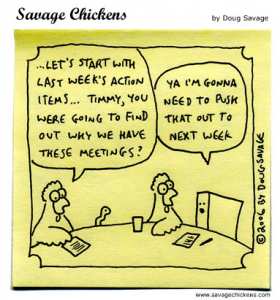
Doug Savage business cartoonI’m fortunate, Dasheroo has an awesome team. From the 5 co-founders to the balance of our 12-person squad. For one, we have great chemistry and for the most part have all worked with each other at some point in our careers, so there is a ton of familiarity and respect among us all. Great communication is also key. As a distributed team, we take are heavy users of tools like Slack, Basecamp & Zoom. We have daily stand-ups where we hold a scrum-style ‘activities & blockers’ meeting, 1:1s and each Monday the 5 of us co-founders hold a weekly operations meeting. For this week’s startup lessons I’m focusing on the weekly Ops meeting.

Before we launched, a lot of our Ops meeting focus was around product and development deliverables.

But during a recent 1:1 with Josh, he brought up just this fact: “We all know each other, trust each other, and like each other, but are we really digging into the KPIs and discussing what we need to do to move the business forward?” The answer was…No.

I think we let that ‘familiarity’ aspect of the chemistry between the 5 of us get the best of us. Our ops meetings slowly turned into a ‘how’d the weekend go?’ and took on more of something I hate: an unproductive ‘status meeting’ where we updated a few top line goals and then passed the baton to the next co-founder. Ugh!

Let me remind you - one of the main reasons Dasheroo exists is because, during a stint at another company, I turned one of those ‘status meetings’ into what I renamed the Triple S (Sell Some S*^t!). And what that meant was that everyone in the meeting reported on their main KPIs, how each person’s activities affected the others and overall, how we could work together to make sure what we were focused on really helped drive business success.

So, the new format? KPI driven (what tool do you think we’ll use to report on those?!) with an accountability and group brainstorming perspective.

So here are the key business analytics we now focus on, and they should be obvious:

  • Website sessions and key sources
  • # signups (SU)
  • SU conversion rate
  • % SU who connected an Insight (this is an indicator of activity and engagement)
  • Conversion rate to a paid plan - We’ll expand this into a cohort analysis
  • Churn (we need to define this)
  • Revenue

The result after the first few ‘revamped’ ops meetings? Tremendous. For instance, as Janine was talking about the growth of our SEO and how our keyword targeted landing pages are helping capture mid to long tail traffic, James our VP Engineering noted that we should build a developer-focused landing page. Great! And that’s just one small win.

If this format sounds obvious, maybe you’re ahead of the game. But I challenge everyone reading to take a fresh look at your periodic (our is weekly) ops-style meeting and see if you are digging into and discussing your key performance indicators, and how you as a team can maximize your success.

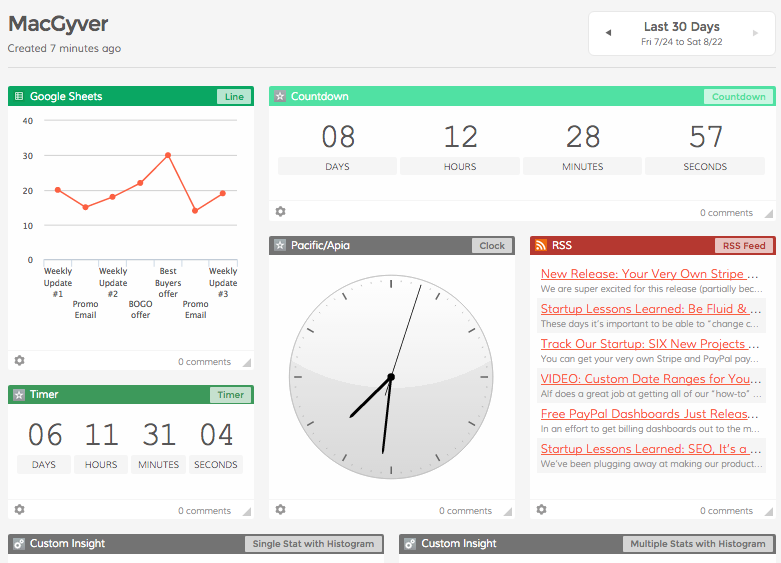
Dasheroo Data Dashboard Templates: The MacGyver

We’ve got a bevy of data dashboard templates at Dasheroo and they’ll get you a dashboard in minutes! We had fun with this particular one. Since we threw in a menagerie of insights it deserved the name “MacGMacGyveryver” because it’s the Swiss Army Knife of dashboards. Richard Dean Anderson would use this data dashboard!

With it you’ll get insights for RSS feeds, timers and countdown clocks and Google Sheets. Then go ahead and add whatever you want to your MacGyver Dashboard to customize it for you..

Select Add Insights from the top nav bar.

Dasheroo "Add Insights" button

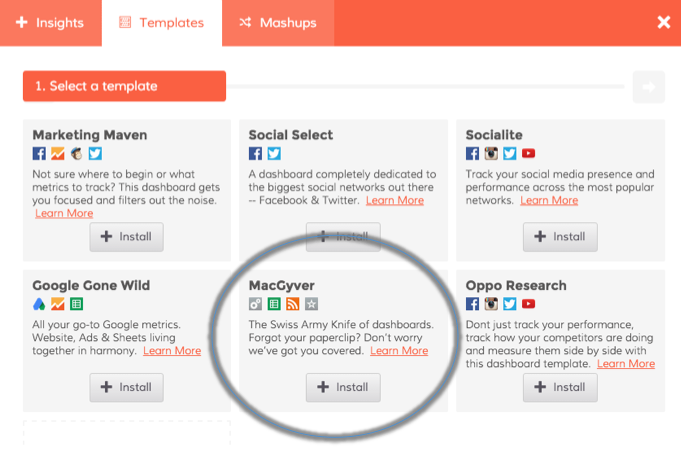
Select the MacGyver template. You’ll have access to an RSS feed, a clock, a countdown timer, Google Sheets and custom insights. You can customize by adding to it or delete insights once your dashboard is built!

Dasheroo's MacGyver dashboard template

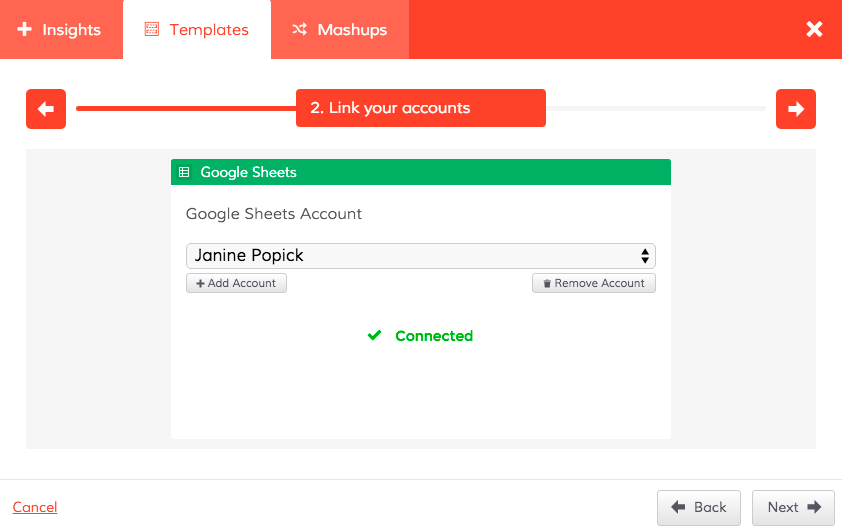
Connect your accounts if you haven’t done so yet.

Screen to connect your accounts in your Dasheroo MacGyver dashboard template.

Voila! You’ve got your Swiss Army knife dashboard!

Your very own Dasheroo MacGyver business dashboard.

Go get your own free MacGyver business dashboard at Dasheroo now!

We’re at Dreamforce + Lightning App Builder + New Features On The Way

It’s the first day of Dreamforce and it’s starting out to be awesome. With keynotes from Marc Benioff, Salesforce.com; Julia Hartz, Eventbrite; John Collison, Stripe; Boylon Slat, The Ocean Cleanup and so many more, plus the 150,000+ attendees here all over San Francisco, it’s pretty exciting.

However the level of douchbaggery that goes with any show like this increases with a huge increase in attendees. You know the guys who’ve been buzzing around big events like the Salesforce event for years that think they’re super awesome and they’ll tell you just how awesome? “I’m speaking at the blah, blah, blah keynote, here’s who I am and what I do and I don’t give a rat’s ass who you are and what you do.” Those types. Ewe! Spoke to one a day ago, like that, and when I tried to get a word in edgewise to actually introduce myself, he just kept on steamrolling me. I did break out “Oh great to meet you too; my wife here was the first partner ever of Salesforce.com at VerticalResponse, yeah the most downloaded app for years and years I’m sure you remember her.” No response, don’t even think it registered with him. Wait, did I just become one of “them”? No.

But, how does he know we couldn’t be a great partner or customer?! Isn’t the point of these shows to network and make deals?

Anyhoo, along with those types, there’s lots of really cool people and a ton of awesome new apps to see. Plus, some great and familiar faces like our friends at Salesforce, InsideView, Campaign Monitor, VerticalResponse, Zuora, & Full Circle Insights.

We’re lucky enough to be asked to speak tomorrow on Salesforce’s new Lightning App Builder Salesforce Components Imagebuilt on the Salesforce 1 Platform. One of our engineers was able to build Dasheroo as a component right in the mobile version of Salesforce which is really slick. Way to go Alex! We’ll be at the Marriott Marquis on 4th St. in San Francisco at 8 am Wednesday the 16th. Check out our fancy press release here. This is an expensive show so we’ve got to get the most out of it.

New Stuff

Last week Josh went through our product roadmap for our Platform and it’s pretty cool. Some notes below:

Features On Deck and/or in QA:

  • Competitor Dashboards
  • Android App
  • Google Campaigns and Goals
  • Hashtag tools for Twitter and Instagram

Features Further Down the Road…

  • More integrations with more apps
  • Speaking of more integrations, helping get other developers developing dashboards of their own with developer tools
  • Ability to have an ADMIN user manage multiple users for agencies and larger teams
  • Exporting a dashboard to a PDF so you can send reports
  • The ability for you to build your own insights!

Dasheroo in The News

Dasheroo got a nice mention on the Hooklead blog, 5 KPIs to Track on Your Dashboard, John’s Business.com article is out, 6 Rules for Following People on Twitter. His awesome Duct Tape Marketing Article hit, 3 Smart Templates to Use to Generate Leads, and Janine’s Inc.com article, is out: 5 KPIs to Measure Weekly Will Uncover Gems of Data,

We were nominated for Small Business Influencer Awards by Small Biz Trends! These are so cool. When voting starts we’ll be asking you to help us out!

Dasheroo Demoing Lightning App Builder at Dreamforce

We’ve been talking about a secret project we’ve been working on behind the scenes here at Dasheroo and we couldn’t be more excited about it! All of the projects we have been working on with regards to responsive design and OAuth are releasing!

Imagine if you’re in your favorite application that’s your go-to app every day. All you want to do is place “components” from other applications in that beloved app. Let’s say that beloved app is Salesforce.com and you want your Dasheroo business dashboards to be viewable in your Salesforce account.

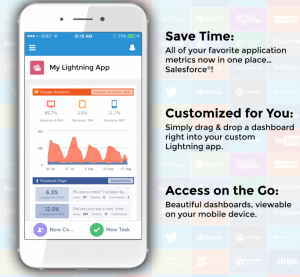
Introducing “Components” by Salesforce. Using their nifty technology they call the Lightning App Builder (nod to the cloud) they just announced, we got our Dasheroo KPI dashboards to be viewable right in a Salesforce account on a mobile device!

Why is this so freaking cool?Dasheroo's new Salesforce.com lightning component

  • It’s right in time for Dreamforce, Salesforce.com’s annual event in San Francisco.
  • Josh and I are demoing it at Dreamforce this week at the Marriott Marquis in SF at 8am on Wednesday. C’mon by!
  • We got to work with new technology from Salesforce
  • BIG DEAL: This enables us to have our insights and dashboards anywhere! James calls it Dashboards-as-a-Service (DaaS). Think about taking your important metrics and putting them on any web page or in any app that will accept “widgets”.

Ok, off to the show tomorrow, see you there! #DF15

Startup Lessons Learned: Establishing & Revising Your Cash Burn Rate

Startup cartoon about startup stage.Whether you raise angel money, seed money or completely blow off taking any outside money for your startup, you need a cost model. A full-on ‘what cash is going out the door?’ model. In my opinion this is way more important at the inception of a startup, than some fancy accrual-based accounting model. Your cash burn rate, and cash management, is king. I may be slightly biased on that approach since I have a finance, not accounting, background but most folks I talk to agree.

You want to go into this process with your eyes wide open on both the cost and revenue side of your early stage business. As good as things may go, new customers and sales may start later or ramp slightly slower than anticipated, and costs are usually the opposite!

One of the first projects I took on after we decided that Dasheroo was ‘a go’ was just this, developing a cost model. I’m not calling it a revenue model because I knew although we would drive some sales early on, it’d be all about investing to establish and grow our team and product offering. Nobody’s going to pay for a 1/2-ass product, at least not for long.

It’s also really important to identify your big costs. There will always be some gotchas that you just didn’t anticipate, like that cool project management software that costs $50 a month. Oh well. As long as you don’t miss a ton of those you should be OK.

So where should you start? First, I think an initial 18-month cost model is a good place to start. Much beyond that is all B.S…I mean, conjecture. And, as detailed as you should be, you should focus on your big ticket items! At Dasheroo, we are leveraging our business freemium model to minimize marketing costs, so the real big expense is people. Our biggest expense categories are:

  • Full time employees
  • Contractors
  • To lesser amounts:
    • Legal & accounting (since we did raise an A round, legal fees were significant)
    • Rent (as we are mainly distributed team, rent is for a small Austin presence)
    • Marketing & Travel and Entertainment (T&E)
    • Amazon Web Services, where we are hosted
    • Software and back-end ops expenses (software like Zendesk, CRM, project management and Amazon Web Services)

Here was the first whack I took at this in late 2014, for January 2015 out. The actual amounts aren’t so relevant so this shows the distribution of costs across the main areas:
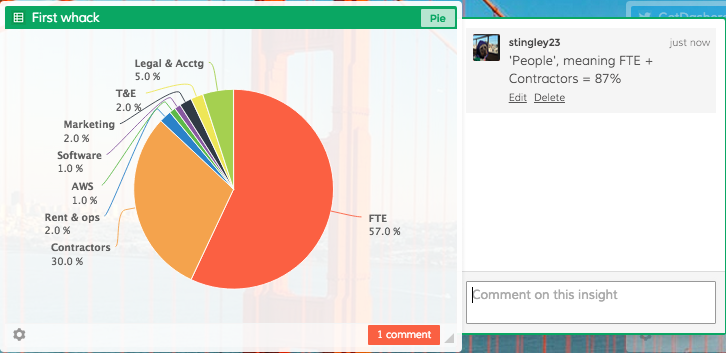
This was my initial cost estimate breakdown for our first 18 months.

This was my initial cost estimate breakdown for our first 18 months.

As you can see, ‘people’ meaning both full time employees and contractors were estimated to make up 87% of our total expenses. That didn’t freak me out, I actually loved it! Great people build awesome things. And especially early on as you are defining and building your product, what else should you be spending on?

This estimate was made before we really had any money to spend, so it was just the best I could do at the time. Note - the total dollar amount also helped guide the amount we needed to raise in our A Round, which was $3.25MM. So, you can do the math!

The model is based on a monthly level of granularity. Other folks do these quarterly, but monthly works best for me. I like measuring on a more frequent basis, and so do my investors.

I then update the burn and input actual expenses each month, and report on variance to forecast to see if there are any big swings I need to take into consideration.

Like I said, things always change, especially when you do have money in the bank. So at least every three months I take a fresh look at what the next months look like. I just did this for the second time, after the initial 6 months of spend. Were there big differences from the original forecast? Let’s see:
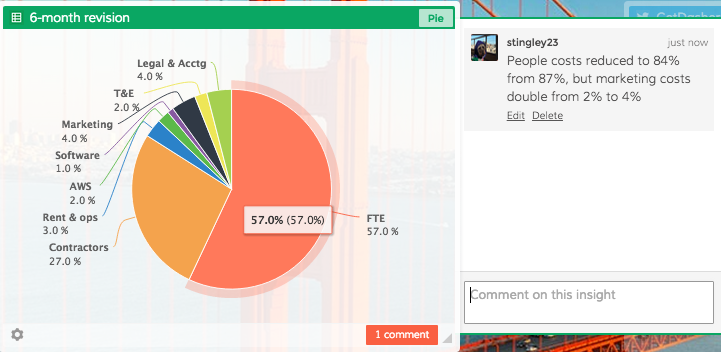
This was a subsequent revision after 6 months of real experience

This was a subsequent revision after 6 months of real experience

Any big differences? Nothing shocking, at least from an ‘expense by category’ perspective. as Not huge, and our % held steady by category. People costs ticked down 3% as we dialed in our main out side contractor, and our marketing share doubled from 2% estimate to 4% of total budget. That’s due to us getting some more detail around key events and trade shows that we plan to exhibit at or attend. We still don’t plan on spending any money on Google Adwords.

Now, if you’ve read this far, you may be asking: “Sure, cost share by category held pretty steady, but how about overall expenses. Did they increase or decrease?”

Great question! Yes they did increase, by approximately 3.5% from original. Now, we are in control of most of this, since our Cost of Goods is very low and the majority of the spend is still in people. So if necessary we could delay a hire or two if we choose to do so.

But, you may have noticed this is pure expense burn before layering in any revenue, which we are already generating, so we’re in great shape.

The bottom line here is that you hope your expense projections do remain in line, but as you gain experience use that to revise projections and make sure you are not spending too far in advance of your model. And make sure to get input from, and share with your team members. Everyone needs to understand the state of the business, and how their actions and performance affects expense and revenue.