How To Manage Data Dashboards for Multiple Clients or Teams in Dasheroo

We realize we release stuff fast, heck sometimes we don’t even know our amazing engineering team released a new feature. So we’ve got a helluva job keeping up with letting you know what’s available. The “Org” feature is really an amazing tool that you can use within Dasheroo to manage separate data dashboards and KPIs (key performance indicators) for multiple teams or groups.

It’s great if you:

  • Are an agency or manage groups within a company who wants a single log-in to manage multiple clients
  • Don’t want other teams or clients to see each other’s dashboards

FYI: You need to have the Venti package to have 2 different orgs under the same account. If you want more than 2 orgs you need to email us at [email protected] for pricing!

So how do you create separate orgs?

If you’ve got a Dasheroo account you’ve already got one Org by default. To create another simply click on the upper right hand corner of your Dasheroo account and click Plan.
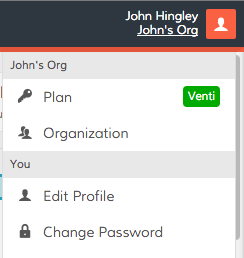
Dasheroo's settings menu

Click Organizations and enter a new name for your team:
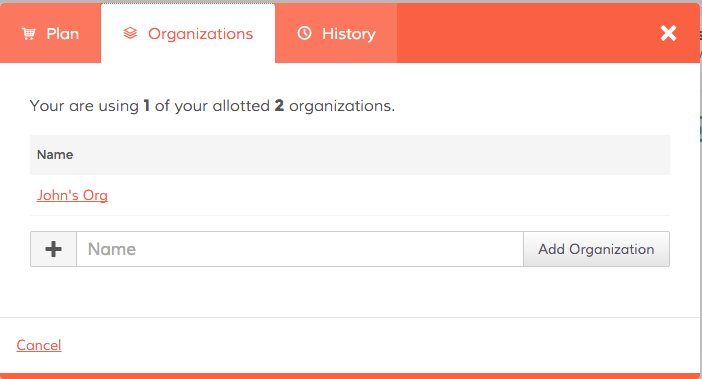
 

Dasheroo's Org feature


Now you can select New Dashboard from the pull down menu in the upper left hand corner and begin to create your new dashboard you want to share with a specific team.

 

Create New Dasheroo Business Dashboard


Now it’s time to share!

Simply click on the Share link in the Nav Bar and click on Team Sharing.


Dashboard sharing at Dasheroo


Now you can invite people to your org to see all of the associated dashboards!
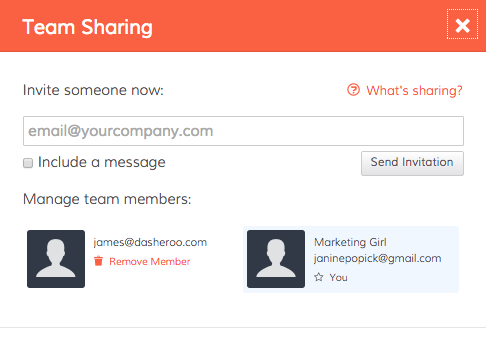
Dashboard sharing at Dasheroo.

Things to note:

If you invite someone to an org, they can see all of the dashboards and insights in that org. If you’ve got more than one org and you only invite a given person to a particular org they will not see any other orgs they’re not invited to.

If you want to limit the number of data dashboards certain people see you’ll need to create a new org to do that.

As of now you can not “lock down” insights or dashboards so anyone you invite can move insights around, create a new business dashboard (or many), add insights and connect with applications. Very very soon we will release tools to prevent this.

This is a pretty powerful tool only to get more powerful, enjoy!
Track Our Startup: Stripe Dashboards + Knee Deep in SEO

We’ve been super-crazy busy these past few weeks. Instead of releasing new features and bug fixes every two weeks we’ve been releasing EVERY WEEK! Our product and engineering groups have been so great at defining and developing the stuff you want, that we want to get it out live ASAP. Last week we told you were were working on iOS and Android apps, and they are still on the way. We submitted our iOS app to Apple last week, so now the ball’s in their court and we’re hoping for a speedy approval. Our Android app is in heavy QA and once we deem it to be ready, that’ll go into a submission process as well.

Dasheroo PayPal dashboardsWhat did we do?

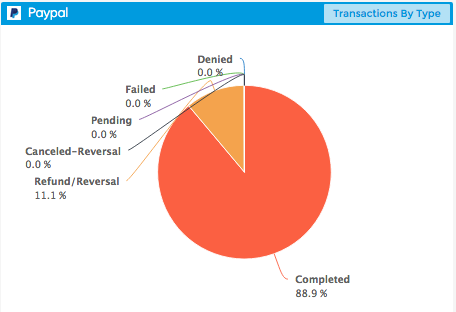
We also told you we had PayPal dashboards ready to go, we’re just waiting on team PayPal to officially “bless” our integration. As soon as they waive their magic wand you’ll be able to see all of your incoming and outgoing payments on one nifty dashboard!

What are we working on?

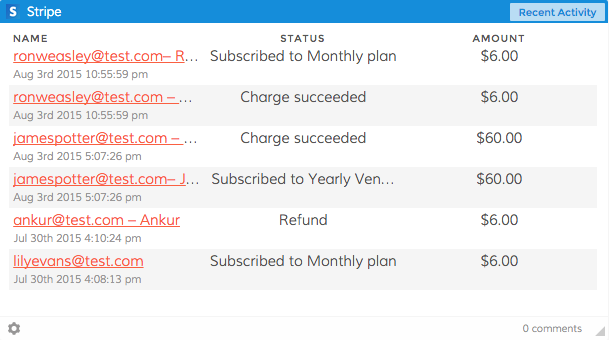
Dasheroo Stripe billing dashboard

We’ve got a ton of insights for your Stripe dashboards on the way!

Stripe is on the way. On the heels of our PayPal integration we thought we should also give you your very own Stripe dashboard. Stripe is what we use here at Dasheroo for our payments. So you’ll be able to see metrics in a given time period like Revenue, Most Recent Transactions, Refunds and more in one easy to understand place.

We had been working on Alerts but had to pause development for a few weeks.

Alerts will allow you to set a specific value in one of your Dasheroo insight metrics and get sent an email if your performance goes above or below that set value, whichever one you decide. So if you’re looking closely at your Google Sessions and you think it might spike because of an article you just had published you can set a value for if sessions go over 10% of what you normally see in a day. Then you’ll know it’s working! The feature is still on the backlog and we’re about to pick it up again because we think it’s pretty cool.

We’re also getting closer to the beginnings of a competitive dashboard. You’ll be able to track your social media fans and followers alongside whoever you choose as a competitor. Me? I’d stick some RSS feeds on the dashboard as well to keep an eye on what my competitors our putting out their blog. More on that as we get further along.

Working on something special for September to show at Salesforce.com’s annual event Dreamforce. Unfortunately we’re under lock and key for this one but stay tuned, it’s pretty cool.

Marketing

We’ve been working diligently on our search engine optimization so we’re found on page 1 when people are searching specific terms. Here’s what we’re doing:

1. Landing Pages: We’re in the process of creating targeted landing pages that focus on specific keywords. For instance, when we refer to “Google Sheets dashboard” we link it from the blog to our Google Sheets landing page where we talk all about the benefits of Google Sheets. The link has the keywords in it as well (https://www.dasheroo.com/google-sheets-dashboard).

2. Inbound Links: We’re working off of a spreadsheet of sites that make sense to have us on them linking back to our site. The more quality inbound links your site gets the better your rankings in the search engines.

3. Contributed Content: If you’ve noticed, I’ve been writing for business.com while Janine has been writing for Inc.com. That list of publications we contribute to is going to grow in the coming months and you’ll see some great articles on sales, marketing and overall leadership. It’s a ton of fun and Dasheroo gets links from sites that have some great domain authority.

4. Linking Within our Domain: We’re linking between articles on the blog where it makes sense, we’re linking from the blog back to those landing pages and we’re linking between pages on the same domain. Google likes this and it makes sense to drive traffic to other parts of our site.

Back to work time!

Track Our Startup: PayPal + iOS + Android

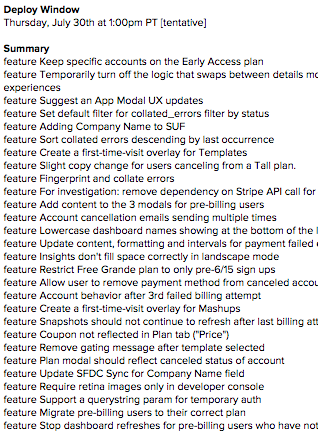
The long list team Dasheroo worked on in our release last week.

Features we worked on for last week’s release. Our developers are busy!

We’ve been busy doing weekly releases to get some features and back-end bugs fixes from our billing release. We’re working hard on the next few releases so that they’re customer-facing and we get you some of the features and applications you’ve been requesting for your business dashboards. We’re a week closer to releasing PayPal dashboards so that you can track things like revenue, refunds, upgrades, downgrades, recent activity and a host of other great payment metrics for your business.

We’ve been busy working on an iOS and Android apps so you can easily view your dashboards on your phone without mucking up your dashboard by fat-fingering your insights. We’re kind of at the mercy of Apple for the iOS app so look for more news on that in the coming weeks!

We’re gettin’ out there…

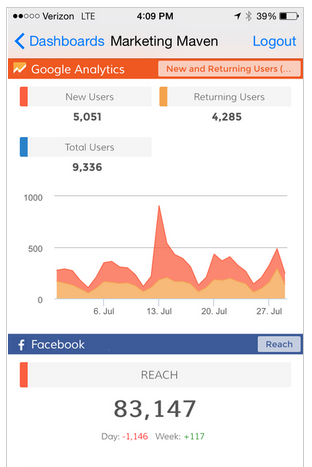
Dasheroo's iOS business dashboard.

Dasheroo iOS app…it’s coming.

My Business.com article Always Be Selling: The #1 Priority for Every Entrepreneur is (hopefully) an interesting read, plus I site the classic movie Glengarry Glen Ross!

JP wrote an Inc. article How to Use Influencer Marketing in 5 Steps to Increase Traffic 10-fold. We’ve done this at Dasheroo and will continue to use influencer marketing. Read it and see how it could help your business.

Do you know What’s Really Important in a Google Analytics Dashboard? We break it down for you in this easy article and all you need to get started is Dasheroo, shocker huh?

We wrote a great article on how we uncovered a secret target customer for Dasheroo, and that great customer target wrote an awesome review on us!

Startup Lessons Learned This Week: Setting Our Pricing

Last week in Startup Lessons Learned I discussed the importance of establishing sales strategies on both ends of the business spectrum - from a strong ‘auto convert’ for the SMBs all the way up to big ‘ol enterprise types. What that means is this - folks that will pull out their credit card for a $19 purchase when electronically prompted, all the way up to negotiated contracts in the several of thousands of dollars.

So when deciding on your startup pricing strategy, there are so many important items to consider. But I’m going to focus on the 3 biggies we drilled into when setting our initial ‘auto convert’ pricing, as I feel they establish the foundation of a good pricing strategy. Here we go:

1) Your costs. Evaluate both fixed and especially variable costs. For us, the incremental costs of supporting each new user is relatively low. Our incremental costs get down to efficiently scaling the backend server and database costs, being very efficient with API calls to the 3rd party applications we connect to, and customer support. With a business freemium model like we have, incremental variable costs must remain low. For yours? Who knows, but start with your cost basis, and make sure you are very realistic on your costs now, and how they will change over time, especially if you grow.

2) Your competition. You need to be mindful of the competitive environment. Businesses are very cost-sensitive. Does that mean you need to undercut your competition? Not necessarily. First, try to understand your competitor’s pricing approach. What are they basing it on? Is it per user or per ‘widget’? Figure out their pricing metric(s). If you can understand that you can shape your pricing to be a greater value. And that is really what it comes down to, to win the long term race. Value.

Note: Don’t get too crazed by just one competitor’s pricing. You could whip yourself into a frenzy trying to compete with it, and then they change their pricing the next day!

3) Your value. Here’s where your pricing strategy culminates into a successful business. Answering the question “What do users derive the most value from?” You can’t trick, cajole, or hold important stuff hostage, in order to drive long term profitable relationships with your users. And although price points are a huge consideration, if they are not based on ‘value realized’ it won’t matter.

Bottom line, here’s what we did for our SMB auto-convert pricing (I’ll talk agency and larger company pricing in a future post.)

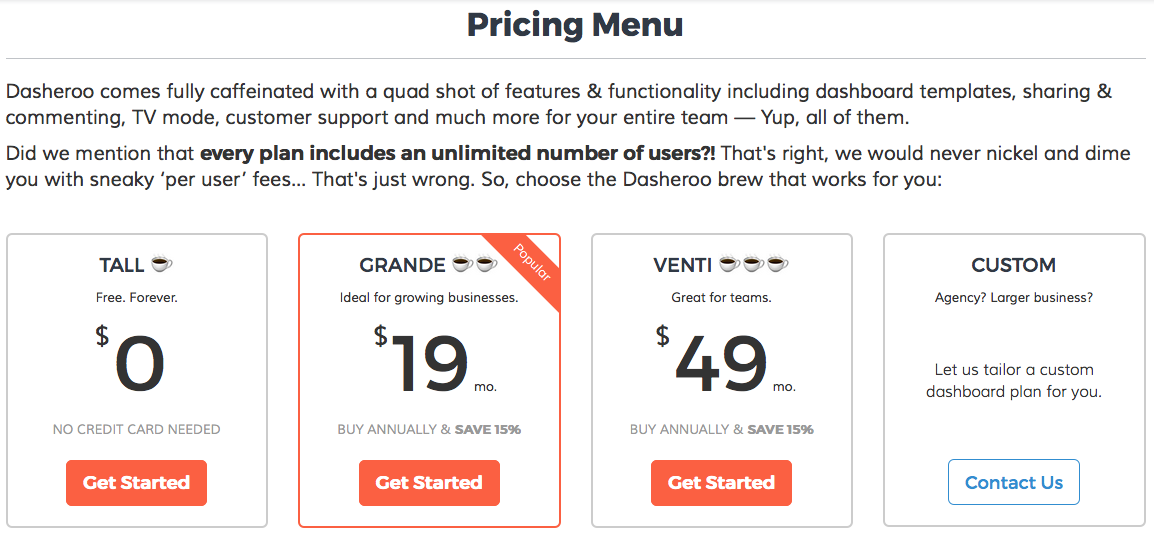
Ou just launched business dashboard pricing

Our just launched business dashboard pricing!

  • Free! We call this our “Tall” pricing tier. We feel business freemium reduces the risk a business takes, and allows for rapid global adoption. Sharp folks like Mailchimp, LinkedIn, Hootsuite and SurveyMonkey have all proven this out. Otherwise, users are forced to make a pay/flee decision after a 14-30 day trial, and often these busy users need a longer period of time to derive value from a product. We felt that leading with a 100% risk-free offer satisfies my three considerations above, provides a huge value, a competitive advantage and fits within our cost structure.
    • We’re big believers in really providing great value in the freemium edition. No stripped down bait-and-switch type stuff. At VerticalResponse (where a lot of us have experience from) we re-tooled the traditional 30-day free trial into a freemium.

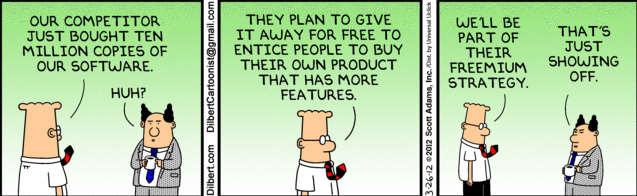
Dilbert: Freemium Model Cartoon

  • No ‘per user’ pricing. We really deliberated on this one! Debated. Argued. Hell, I think I argued with myself on this decision! But at the end, we all came to agreement that our pricing should be more like Basecamp’s pricing for project management than Insightly’s per-user pricing for CRM. CRM tools like Insightly naturally lend themselves to a per-user pricing schema, but with business dashboards, you get some users that may casually log in once per month, others that log in daily. So why make people hesitant to invite that casual user?
  • Great conversion price points and clear value triggers. So, the next pricing tiers are Grande and Venti, tipping a hat to Starbucks. You want to achieve a couple things here. First, there are natural price points that tend to drive a conversion. As in our $19 Grande plan. Sure we could have priced at $23 or $16. But we’ve done enough testing in our (long) lives to know that we’ll get as many folks to pay us $19 than $16 (I’ll take an extra $3/month to invest in innovation), and probably drive 30%+ conversions than pricing a couple bucks over the magic $20. Same goes for the Venti pricing. Secondly, our value-add (triggers) are clear. It’s completely usage based. You consume more Insights, we hope it’s clear that you should budget a little more per month for that additional usage, and a couple more bells and whistles.

A guarantee? We’ll most likely change our pricing at some point. As we learn, instrument (we love Mixpanel!) usage, get feedback from our awesome users and add more features and functionality we’ll adjust our prices. But we plan on always treating our current users well, and offer ‘grandfather’ plans to them.

Oh yeah, why the caffienated pricing? It just seemed catchy and fun. Hopefully it’s clear to people, otherwise we may change those labels as well!

What is the Value of a Facebook Like?

Placing a value on Facebook Likes. Dasheroo business dashboards.There have been a lot of articles written about how a business shouldn’t place a ton of value on Facebook Likes, but I’m here to tell you differently. Likes, especially quality likes, are amazing eyeballs on your brand. Check out how we’re proving a successful model at Dasheroo.

The details:

  • We’ve been advertising a Like campaign on Facebook since we started the company.
  • We’ve heavily targeted our Like campaign to specific users who should be qualified.
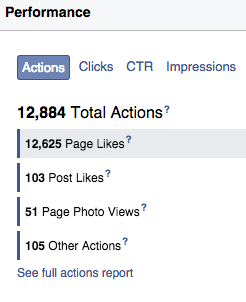
  • We have over 12,600 Likes from this campaign at 45¢ per like. We’ve spent $5,600 since March of last year.
  • We publish our blog to Facebook once per day and from time to time we may boost the post.
  • More than 40% of our social traffic comes from Facebook organic.
  • 18% of ALL of our traffic comes from Facebook.
  • 7.6% of all of our new users come from Facebook at an average of $16 per new user.

So these numbers are really pretty good if you think that we’ve not paid a ton to get in front of people. We get three great things out of this type of campaign:

  • We got huge awareness - At a recent trade show countless people said they saw us on Facebook.
  • We got new users - Once they’re in, they certainly are telling their friends about us.
  • At a cost effective rate.

Strength in numbers? You bet but just make sure the numbers are quality numbers when you’re looking at the value of a Facebook Like for your own page.

Track Our Startup! Austin digs & Eventbrite business dashboards

We’ve been keeping busier than ever, especially since our Dasherooers have kids that just got outta school. Lots of us have been traveling and will continue to this summer. It’s pretty cool being in a distributed company.

Eventbrite Business Dashboards Launched!New Austin Dasheroo Offices!

We’re pretty happy about this. If you’ve not yet seen the brand new Eventbrite insights they’re pretty cool especially if you’re tracking tickets and event sales and trying to get those butts in seats. Add them to your Dasheroo dashboards pronto!

Bigger Austin Office

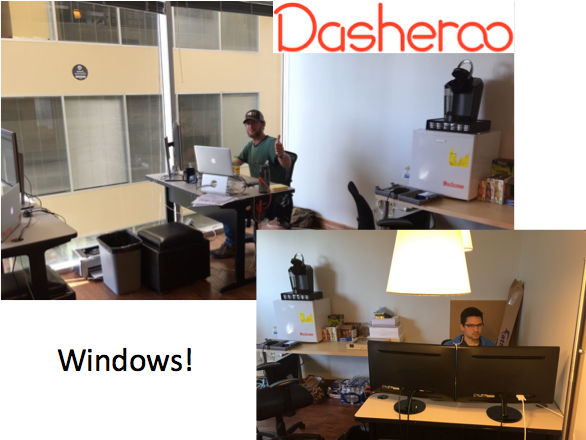
Our previous Austin office in TechRanch was big enough for 2 and had no windows. So since we hired 3 new people making it 5, there we had to get a bigger spot. James and team now all fit into the office with enough space to breathe and wait for it….WINDOWS!!

Billing

We are another week closer to billing. We are trying to think of every possible corner case before we launch it. Our latest issue is when someone cancels or downgrades their subscription they bought annually, what do we do? On one hand a big company like Salesforce keeps your money and doesn’t let you downgrade for the duration of your annual subscription. Then there’s Docusign (aren’t they cool?), they refund you the difference. We’re still trying to figure it all out.

P.S. We’re still knee-deep working on pricing scenarios.


3 Must-Reads: AMAZING SEO Tips from the Experts

This week we focused our learning on search engine optimization SEO tips that can help any business grow their website traffic. We’re gonna take some of their tips and put them to work for Dasheroo!

HowScreen Shot 2015-06-28 at 12.49.48 PM to Create Viral Content That Generates 2,500 Visitors Per Day

Neil Patel is a genius when it comes to creatively getting more visitors to your site using brilliant SEO tactics. In this article you’ll get a very detailed bunch of statistics on what makes your content viral with some practical tips on how to make it go viral.

Snuggle up with a binkie it’s a long (and thought provoking!) read.


ShGreat article from Scoop.it on republishing contentould you re-publish your content to other blogs, Medium or LinkedIn? A data-driven answer

Guillaume Decugis, CEO of Scoopit publishes this awesome case-study of how he re-published content to different sites and what came out of it. A highly recommended read for us at Dasheroo since we re-publish some of our own content.


5 Unusual Tips to Improve Your SEO with Social MediaSocial Media Examiner article

This is a great article that gives you practical how-to’s on what to include in your social media marketing and what Google likes to rank for.

Happy learning!

Eventbrite Business Dashboards Launch!

We are super excited to announce launching our newest integration, Eventbrite! Many of you use this awesome application to manage all aspects of your events so we wanted to give you a starting overview of things that matter the most to you. If you have more that you’d like to see we need to hear from you so submit your insight feedback please!
Without further adieu, here are the insights for Eventbrite you can add do your Dasheroo business dashboards:

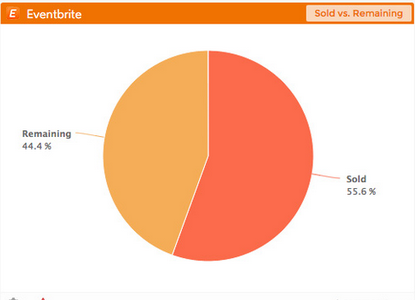
Eventbrite Dasheroo business Dashboard - Remaining vs. sold tickets

Tickets sold vs. remaining, start selling!

  • Ticket Sales insight - View a line chart that plots daily quantity of sold tickets (# of tickets/day) over time for the selected event
  • Ticket Sales by Type - View a pie chart that displays a breakdown of the different ticket types that have been sold for the selected event
  • Sold vs. Remaining insight - View a pie chart that displays a breakdown of the number of tickets sold compared to the number of tickets still remaining for the selected event
    Ticket Orders insight - View a line chart that plots daily order totals (# of orders/day) over time for the selected event
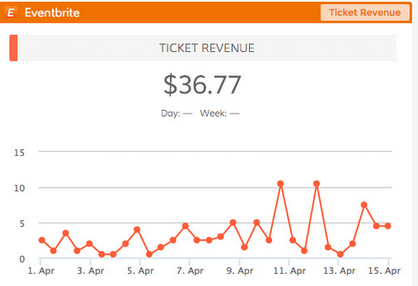
  • Ticket Revenue insight - View a line chart that plots daily dollar value of all sold tickets ($/day) over time for the selected event
  • Recent Orders insight - View a table that displays a listing of the most recent orders for the selected event with the the name of the buyer, date, quantity, price and order #
  • Most Orders insight - View a table that displays a listing of the events that generated the highest total number of orders within the selected date range with name of the event, number of orders and status (like “live” or “completed”)

    Eventbrite Dasheroo business Dashboard - Ticket Revenue

    How much revenue are you making from your event? It’s right here in your Dasheroo Eventbrite Ticket Revenue insight.

  • Most Revenue insight - View a table that displays a listing of the events that generated the highest total revenue within the selected date range with name of the event, number of orders and status (like “live” or “completed”)
  • Most Tickets insight - View a table that displays a listing of the events that generated the highest total number of tickets sold within the selected date range with name of the event, number of orders and status (like “live” or “completed”)

Whew! We’ll be adding more to this as we hear from you so don’t forget to let us know what you need!

Track Our Startup: We Appointed Amazing Advisors + Hired Awesome People

This past week a bunch of us have been traveling. What you might not know is that we’re a distributed company which to us means, get your sh*t done from anywhere, anytime. If you’re committing to it, just get it done. So Josh is in SoCal, I was in the Caribbean. James has his growing (and awesome) team in Austin where our only office is. But you know what? We got our sh*t done. Here’s the proof!

New Advisory Board

Walter Kortschak and John Jantsch, Dasheroo's new board of advisors.We were super excited to announce two new amazing people that joined team Dasheroo as advisory board members. We think it’s pretty important to surround ourselves with people way smarter and more experienced than us and these guys kill it!

Walter Kortschak has been around the tech block here in the Silicon Valley, he’s a technology venture investor who joined Summit Partners in 1989 and is the founder of Kortschak Investments. He’s invested in a ton of amazing companies himself, even little ol’ Dasheroo! Walter knows how tech companies go from zero to hero and will certainly provide amazing guidance to help us get to where we need to be.

John Jantsch is no stranger to the small business market as the guru behind Duct Tape Marketing. John gives us so much information on what the small businesses need to make molehills outta the mountains of data in front of them. He’s talking to them all the time and giving them recommendations for how to market their business, and how to better market ours too!

Welcome aboard guys!

Apps We’ve Been Working On

Eventbrite business dashboards are almost ready for primetime! It has been “bugging” (pun intended) us a bit but we’re almost there. We’ve also been working hard on our next app which is GetResponse to round out the sea of email marketing providers we connect with, since all of you use one provider or another.

As you know billing has been the bane of a few of our existences around the halls of Dasheroo; we’re looking at July to pull that puppy over the finish line.

Hiring

Who says the summer is slow? On Monday, two new folks joined Team Dasheroo! We hired Nivi Kumar as Sr. Product Manager who Nivi Kumar and Alex Lau, new Dasheroo people!resides here in the Bay Area. She’ll help Josh with amping up the number of applications we connect with and ultimately allowing any developer in the world to connect to any app in the world right in Dasheroo. That is our how-we’re-going-to-grow-a-developer-community-so-you-have-more-apps-than-you-know-what-to-do-with strategy. And if you’re a developer you’re going to love what we’re building and what Nivi is going to provide. We also hired Alex Lau who is a rockstar engineer to add to our crowded Austin office! He’ll be working on building out awesome new features and functionality to make sure you get the most value from your business dashboards.

We’ve got a few more awesome folks in the hopper that will help us get to our goal of 30,000 users by the end of the year. Can you help us get that many? You bet! Tell your friends about us because we don’t want to spend on ads.

Spending

Since we haven’t really talk about this it’s time we should. We’re tracking to our forecast, another reason we love monthly board meetings. Even though we’ve been hiring a tiny bit ahead of the curve, we firmly believe that if you’ve got someone who is good, bring them on and they’ll pay for themselves. Close to 90% of our budget has been on people, which is exactly what we wanted, so THERE Google Adwords :-)

Up Next?

  • App integrations in product planning: billing & e-commerce providers!
  • Getting training together as we bring new people on. We love training stuff!
  • May need a new office in Austin, we grew fast.
  • Working up a marketing plan to support user growth.

I’m sure there’s more, but we gotta get back to work.