Search Results for: testing

Which Test Won? A-B Testing for Clarks

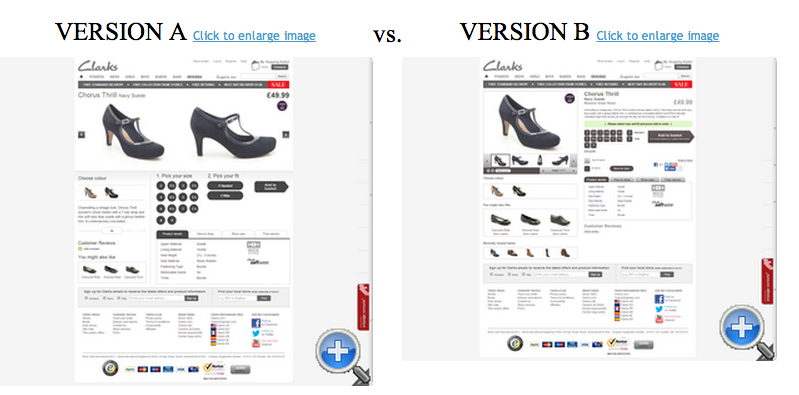
We love the folks over at Which Test Won since they’re as geeky about data as we are, they just love A-B testing. So we chose to look at a recent test they featured: a webpage designed for a tablet (version A) displayed for people that visit the website from a desktop vs. their regular ole’ desktop designed page (version B). Interesting huh?

Usually you can squeeze more stuff on a webpage above the fold which you can see version B has, tablet or “responsive” designed webpages tend to be cleaner and have a “less is more” appeal with larger buttons for those of us who fat finger links on our phones.

Screen Shot 2014-07-13 at 7.20.33 AM

Who won? We’ll let the cat outta the bag. Version B, the ole’ desktop version won for desktop visitors! I guess for Clarks shoes visitors like more stuff crammed onto a webpage.

According to Clarks, the tablet style product page actually decreased sales by 2.59% at a 94.89% confidence rate.

Check out more of these great tests on Which Test Won. Also read a great “how-to” on conducting tests using Optimizely here.

Website Testing: Which Test Won?

We’ve talked about website testing before, and we’ll keep talkin’ about it till the cows come home. Why? Cuz if you’re not testing you’re resting. (huh?) If you’re not trackin’ you’re slackin’ (better!).

Nuff of that gibberish. We love the folks over at Which Test Won because they report on INSANE testing that gets people incremental (or not) visitors, sign ups, customers, whatever you’re going for.

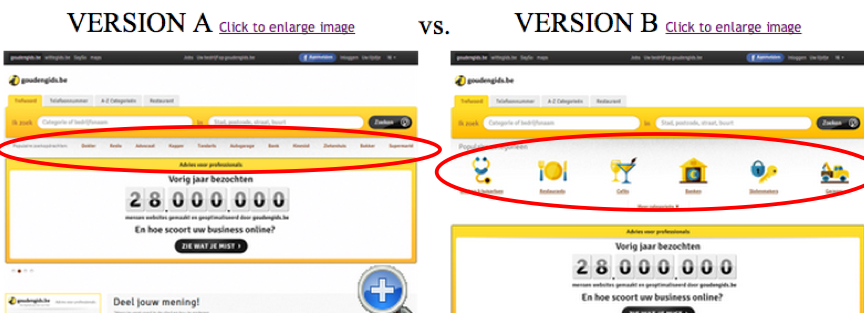
This particular test was a good one: to use or not to use icons with words on your site.

Screen Shot 2014-05-11 at 1.06.24 PM

Which one did you choose? We got it right, just sayin’. Ok, ok icons won.

5 Rules of Thumb for Testing

We’ve given some great ideas about testing when it comes to offers, timing and calls-to-action in the past which is great. But there are so many things to think about when you’re doing any kind of testing with your business. So we thought about it, I mean you don’t put both salsa and ketchup on your eggs at the same time without trying each one first right?

Here are 5 rules of testing you can put to work today!

  • Test one variable at a time: No need getting confusing results. Again, if you are a pro at this and your site gets lots of traffic, you can of course test A-B-C-Z variables. But if you’re a little more wet behind the ears as they say, try to choose 1 thing to test. Meaning, test your button CTA vs. a sign-up form, but typically don’t test radically different copy at the same time…
  • But…Sometimes Subtle Sucks: At the get-go, test variables that you think will show big variance. Spending time on tests that only provide a 5% variance are for folks that have tested and tested and…tested some more and are now at the point of eeking out whatever they can. But sometimes it’s Go Big or Go Home time. So, design 2 completely different landing pages - copy, design, format - and see what happens. You WILL get high variance. Then you just have to break things down and start testing in different variables. Exciting!
  • Run it through the RANDOMIZER!: What? This just means, make sure that you aren’t getting skewed results because, for instance, you had returning visitors only see one page, and new visitors see the other test page. That’ll really screw things up!
  • Timing is everything: Meaning, test simultaneously at the same time! People behave differently on a Wednesday than a Saturday. So if you test one variable on Wednesday and the other on Saturday, your results will be kaput!
  • Get a good sample size: We’re talking Statistically Significant results here people, standard deviations and all that stuff you slept through in calculus class. So, don’t pull the trigger too fast and declare a winner of your test after a handful of responses. Most commercial testing apps out there will tell you when a test result IS statistical. But if you’re going old school and looking at log files or web analytics or your shopping cart software, try to get 50-100+ responses in for a valid winner. And try to test for several days to normalize your test and minimize any extraneous circumstances that may skew results.

So go forth and test and get as much out of your testing as possible!

Are You Testing? Landing Page Testing Tips & Tools!

Always Be Testing! Whether you just launched your first product or app, or have been around for years, continual testing is key to your success. And since landing pages are so important and the prevalent ‘door in’ to most services, we’ll start there. So what do you test? Dang, we hate to say “it depends.” But, it does depend based on your business and objectives, but let’s throw out a few go-to variables to test.

1) Sign-ups: Does a sign-up form on page or a big button saying ‘Sign-up’, leading to a sign-up form work best?

Dwight! He gets the lead everytime!

Dwight! He gets the lead everytime!

2) Lead Generation: Does the call-to-action ‘See Product Video’ or ‘View Demo’ generate more quality leads?

3) Offers: Does ‘% off’ or ‘Save $’ get you more orders, sales & profit? You get the picture. And the possibilities are endless - we’ve tested button colors, headlines, button placement, # of fields on a sign-up form, and even adding pictures of our cute pup!

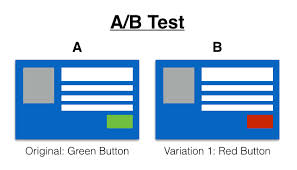
Here’s an example of a landing page test that pits a button CTA (call-to-action) against putting the sign-up form directly on the page. Note that the button CTA leads to an additional step where the user does have to fill out the same form:

Here’s a Button vs. Form sign-up test

Are ya gonna ask which test won?! We’ll put it this way - we’ve seen a Button CTA win on a homepage, but the Sign-Up form win on a Pay Per Click landing page. Moral to the story? Test it yourself! So go nuts, but unless you are a qualified testing ninja, keep these things in mind to make sure you are following good testing principles, and that your tests will actually yield actionable results.

And never fear, there’s several options for landing page testing software, including Optimizely, Visual Website Optimizer, and UnBounce. Go Forth And Test! And let us know how it goes:)

1-2-3′s of Setting Up an A-B Test in Optimizely

“Test before you invest”, one of my bosses instructed me when I was a grasshopper. What she meant was, before you bet the farm on a big offer to send out to your entire email list, or put on your website for everyone to see, figure out if you have the ‘right’ offer. What are your goals? Pure revenue, profit, new customer acquisition, existing customer retention? And should the offer be free shipping? A % off? A BOGO? You might not know until you test.

Fortunately, there’s a few tools out there that make it straightforward. We’re gonna talk about setting up an A-B test in Optimizely (or even multivariate, meaning oodles of variations, not just 2). Here’s the basics of how to set up a website A-B test:

1) Enter your URL right on the home page. Your page will load right into the editor. We like that for first-timers you can get started without having to create an account yet!

2) Select your page variation. It can be virtually anything - a button call-to-action test, a headline test, pricing test, you name it.

you can choose to test just about anything you want!

You can choose to test just about anything you want!

3) Choose the test metric that goes along with your variation. Clicks, sales, lead conversions, just about any goal you can think of.

4) Target your audience. This is key, do you want a basic 50/50 split across the board? Or just new (vs. returning) visitors?

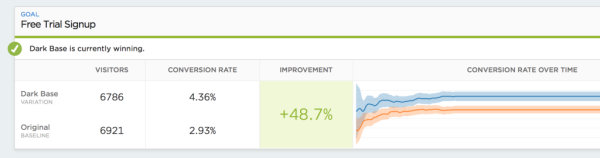
5) Launch it! You’ll start to see results ASAP. They also show statistical validity so you know when a test has reached enough activity to warrant a valid result. Note: If possible, we try to run our tests a bit longer than what Optimizely calls for, but that’s just us.

Make sure to run your a-b test long enough for valid results!

Make sure to run your a-b test long enough for valid results!

Voila! A-B testing done. Hey this isn’t an ad for Optimizely - there are other tools out there including Maxymiser and even good ‘ole Google Analytics.

Track Our Startup! This Week’s Progress with Business Dashboards

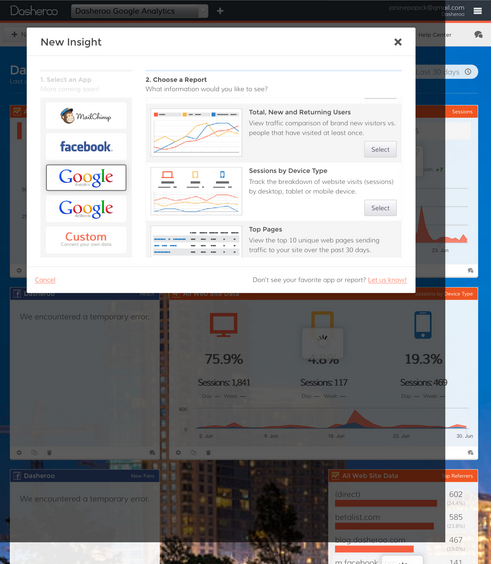
Dasheroo, with nifty thumbnails so you can see what type of graph or chart it is before you choose.

Dasheroo, with nifty thumbnails so you can see what type of graph or chart it is before you choose.

Last week we were under fire (well, we put ourselves under fire) with QA and tidying up our business dashboards for an Alpha release.

Under the category of “There’s a light at the end of the tunnel”…

Our lead developer took the number of times we have to ask for data from our data partners (Facebook, Google, etc.) to get you your data and decreased them by over half! That’s a good thing since they put up some serious limits before you have to talk to them about why you need to raise it.

We got our app off of our demo environment and onto app.dasheroo.com. We’ll be banging on this this coming week to make sure everything works dandy like it did in our test environment. That reminds us, we need so start paying Amazon Web Services now since we were using a buddy’s account to host our application. Thanks Nick, we’ll buy you killer sushi when you come to SF.

We’ve been testing what our app looks like across iPhones and iPads. Not bad, comments don’t really work but you can certainly see your data! The screenshot on the right was taken on an iPad.

We’ve been getting our Support page ready for primetime, and we’ll be getting a real tutorial from Austin over at Zoho on best practices for using Zoho support.

Under the category of “It’s always sumpin’”…

In order to host our app in a secure environment (SSL) we had to be “legit.” That means we needed to be listed and verified on yp.com or a site like that. We listed Dasheroo with our phone number, then yp.com calls us to verify, then we put in a code they give us so they know it’s us and poof! We’re in and now we’re secure. ROADBLOCK REMOVED!

It turned out that the task of making thumbnails of each of the Insights you preview before you choose was a real pain in the a*s! So we had our creative guru take a whack at it so Mr. Dev Stud could move onto making stuff work! ROADBLOCK REMOVED!

Facebook made a few sneaky changes which made us think that we need really good error messaging depending on what Facebook does on their end that might screw up data displays on our end. ROADBLOCK REMOVED!

We’re going to launch to 20 lucky people next week, we’re getting even closer.

Track Our Startup! This Week’s Progress With Business Dashboards!

In case you missed the last edition of Who Charted?

In case you missed the last edition of Who Charted?

We thought we got a ton done last update, but this past week was nuts too! Tough with the World Cup going on! With us trying to launch this to you as an “Alpha” in June we’re tying up a ton of loose ends here at Dasheroo.

  • QA TIME! We’re making sure all our our data sources for your business dashboards are giving us the proper data timely. Speaking of that, we’re diving into an issue we’re having with data that Google Analytics is presenting to us. Sometimes Google delays data for 3rd party partners like us and we’re trying to make that delay is short as possible.
  • We tied our website to our application, this is going to help you a ton when you just want to quickly login and get access to your data.
  • We’re at over 3100 Facebook Likes, engagement is going great, over 400 Twitter followers. Because we’ve been actively posting to Linkedin our traffic from Linkedin has doubled to 3.7% of overall traffic! And we’re pinning some fun charts to Pinterest. That all said, we did this nifty thing where we replaced our blog comments with our Facebook comments so they all appear in both places.
  • We got our demo ready for our first meeting this week.
  • We’re getting ready to get our first user (other than us!) on our product this week.
  • We set up our welcome email so you can feel all warm and fuzzy when you sign up, plus you know what to do.
  • We’ve been testing our end-to-end Zoho support plan so that when you submit something you want us to know about, we get it and know what to do. This includes loading our FAQs into Zoho Support so you can get access to those quick questions you might have.
  • We’ve reviewed our SEO for our Dasheroo site and we applied to DMOZ and Yahoo! directories to get the word out.
  • We listed our startup in every startup beta and beta announcement site we had the time to do! Crunchbase and Vator made the list!

On top of all of that one of the team members is out on vacay this week and two others are going the following but we’re not going to let it get in the way of getting something out the door. We think it’s important to get as much feedback as possible before we let it out to the masses. Your input is certainly gonna help that!

Track all of our updates!

Apple’s WWDC: Bing Replaced Google for Spotlight Search

Whoa, everyone was all up in arms that Apple didn’t have any hardware announcements at this year’s 2014 World Wide Developer Conference, but it announced one big important news item as it relates to Apple’s upcoming Mac OS X “Yosemite” and iOS 8 operating system:

Thanks 9to5mac.com!

Thanks 9to5mac.com!

Bing replaced Google for Spotlight Searches (Spotlight = search on Apple products.) More deets here but it’s pretty big!

Google will still be the default search provider for Safari which is the default broswer for iOS/MacOS but when the new release is out it’s going to be pretty simple for people to “search” using Bing automatically.

What does Bing get? A new FAT stream of people doing searches on their iPhones resulting in hopefully more ad revenue. Didn’t Apple use to hate Microsoft? Is someone turning over his his grave? Maybe now Bing will grow their 6% base of all mobile searches.

How does this trickle down? Now millions of users will be tapping into a new search engine to search on their mobile devices and begin searching keywords that might relate to your business.

What you need to do to maximize this news for your business:

  • You need to ensure that you’re site is properly SEO’d. If you’re doing a great job for Google searches you’re doing a great job for Bing.
  • You need to add to your Bing pay per click. This might result in you shuffling some dollars away from Google or adding to the kitty but it’s worth it to spend more time doing some Bing testing.
  • You need to start tracking mobile searches and visitors more than ever to see if you’re getting new visitors from Bing.

Reduce Shopping Cart Abandonment - Rescue Ideas #3

Hola! Those damn abandoned shopping carts. What’s a retailer to do? Well, in a couple previous posts we put up some ideas on how to get ‘em to come back and buy after they left: sending an abandoned cart email campaign and using ad remarketing to convince them to pull out that wallet and lay down some cold hard cash.

Well, let’s get proactive today and talk about ways to stop people from fleeing your cart in the first place, and how to reduce shopping cart abandonment right off the bat, shall we?

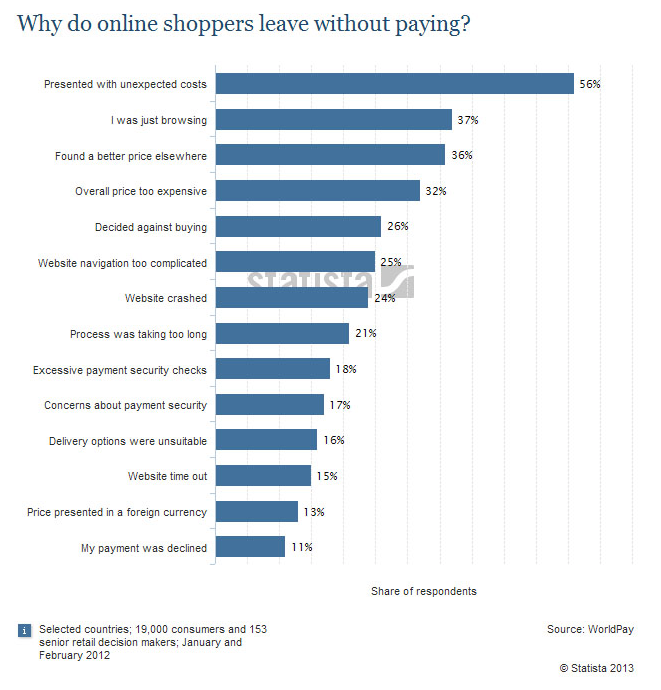
Here’s a great study from Statista outlining the main reasons shoppers do not complete a purchase:

Work your way through this list!

Work your way through this list!

So let’s drill in to how you can reduce shopping cart abandonment! We have personally experienced gains from the following:

1) State your shipping costs upfront! Ask for the zip code in the cart pre-check out and serve up your shipping options (i.e. slow boat, 3-4 day, overnight) with associated costs. It’s amazing how many sites still don’t offer this. That said, not to overcomplicate things, but consider an upgrade to free shipping in the cart if they reach a certain cart value.

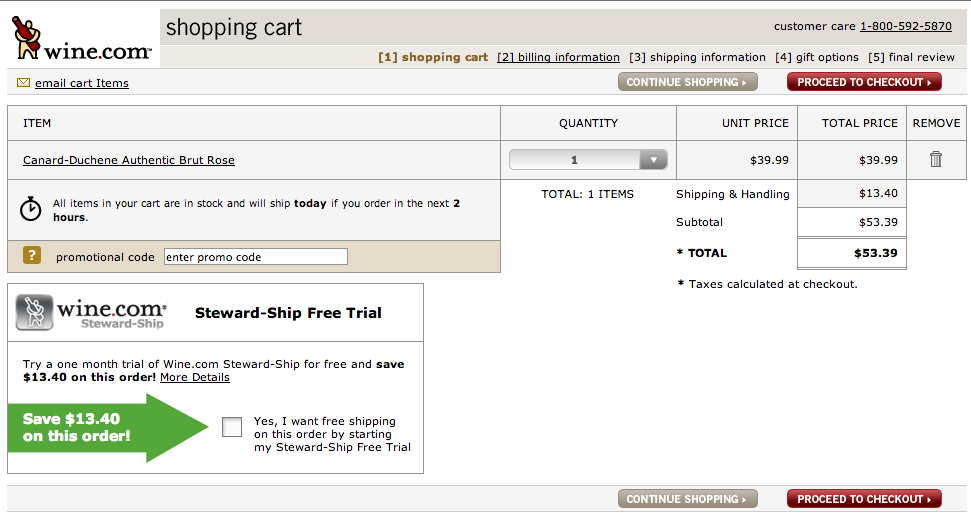
2) Use the Express Lane mentality! We are inpatient breed, aren’t we? Too many steps, too many clicks and you are dead. Well, not you, but your sales numbers. And your bonus. And your dreams of that big promotion next quarter. If you do choose a multi-step checkout, make the steps and progress clear. wine.com does a nice job of executing on a multi-step cart:

The clear progress steps help reduce cart abandonment, but we'd like to see them ask for zip code upfront.

The clear progress steps help reduce cart abandonment

3) MBG - The trusty ‘ol Money Back Guarantee, or even better Low Price Guarantee. Look up (at the chart), 36% of folks didn’t complete their purchase because they found a better deal somewhere else. So match it, at least for certain products. And show them how easy - and free! - it is to return their product and get a refund.

Now first and foremost, always test then measure (after all we ARE a business dashboards company.) Do not do a radical change without testing. Promise us that, OK? What works for some retailers and sites may not work for others!

This is Some Serious Social Media Advertising Measurement!

We really admire folks that measure and act on the metrics that drive their biz. Sounds easy enough, but for whatever reason there’s just not enough great examples of it…until NOW!

So there’s this very cool, Kickstarter-funded fashion retailer based outta SF called Betabrand. And their customer acquisition pro, Julian Scharman, is crotch-deep (yup, read on) in the metrics that drive his social media advertising strategy.

A quick tease? Scharman’s crotchety ads on Twitter drove conversion rates 407% higher, resulted in a 156% spike in retweets and a 78% increase in follows, in comparison that is, to ads without close up photos of clothed genitals. What? Hey this isn’t some Abercrombie & Fitch campaign, Betabrand actually focused on showing the product, not ‘not’ showing the product:


Crotches click! Bottom line: Always Be Measuring.

Crotches click! Bottom line: Always Be Measuring.

Cool thing is, this wasn’t necessarily planned as the social media advertising strategy; Scharman dug into the deets and followed the numbers! Bottom line: Always Be Testing & Measuring! You will succeed.

Read the entire article here on Pando Daily.