“Test before you invest”, one of my bosses instructed me when I was a grasshopper. What she meant was, before you bet the farm on a big offer to send out to your entire email list, or put on your website for everyone to see, figure out if you have the ‘right’ offer. What are your goals? Pure revenue, profit, new customer acquisition, existing customer retention? And should the offer be free shipping? A % off? A BOGO? You might not know until you test.
Fortunately, there’s a few tools out there that make it straightforward. We’re gonna talk about setting up an A-B test in Optimizely (or even multivariate, meaning oodles of variations, not just 2). Here’s the basics of how to set up a website A-B test:
1) Enter your URL right on the home page. Your page will load right into the editor. We like that for first-timers you can get started without having to create an account yet!
2) Select your page variation. It can be virtually anything - a button call-to-action test, a headline test, pricing test, you name it.
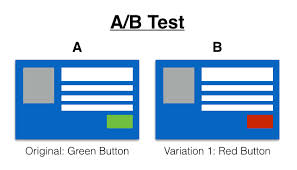
You can choose to test just about anything you want!
3) Choose the test metric that goes along with your variation. Clicks, sales, lead conversions, just about any goal you can think of.
4) Target your audience. This is key, do you want a basic 50/50 split across the board? Or just new (vs. returning) visitors?
5) Launch it! You’ll start to see results ASAP. They also show statistical validity so you know when a test has reached enough activity to warrant a valid result. Note: If possible, we try to run our tests a bit longer than what Optimizely calls for, but that’s just us.
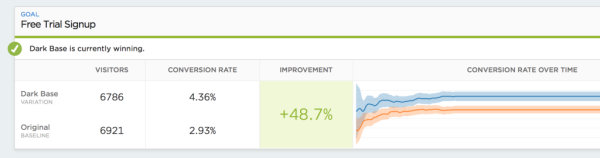
Make sure to run your a-b test long enough for valid results!
Voila! A-B testing done. Hey this isn’t an ad for Optimizely - there are other tools out there including Maxymiser and even good ‘ole Google Analytics.