
Hi! In a previous post, we talked about why Google may choose to overwrite your Title Tags, and instead use a snippet of your web page content, anchor link text or even the ODP (Open Directory Project). Hey we have an idea for a new post - what is the Open Directory Project?! Stay tuned.
Let’s go back to the basics. The title tag is a section of HTML code that every page should have. It declares what the page’s title is, and mainly what that page is all about.
Writing great Title Tags isn’t too difficult, but very important. Here’s some solid rules of thumb when writing yours:
- Do a little keyword research. See what people are searching for and try to come close to those. If you are selling corkscrews, you may want to craft tags around ‘How to open a bottle of wine’ or ‘how to use a corkscrew’ (we’re pros with corkscrews at Dasheroo!)
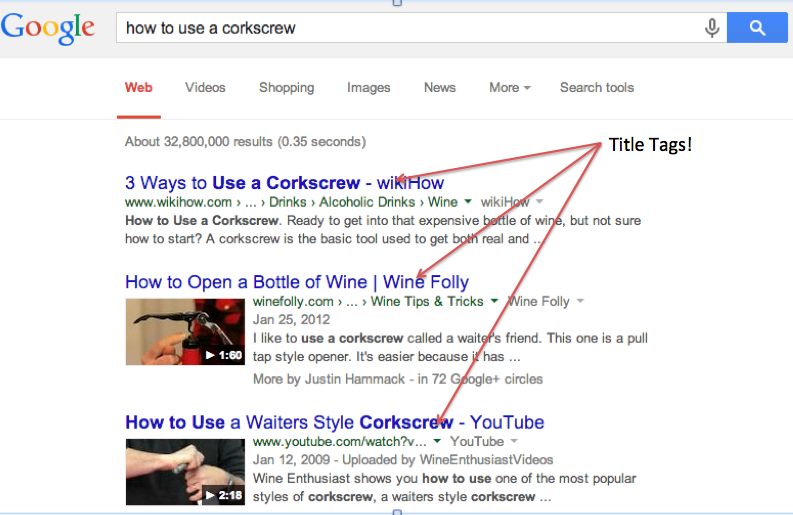
Writing Great Title Tags starts with some keyword research!
- Look at ‘related searches’ at the bottom of Google’s search results:
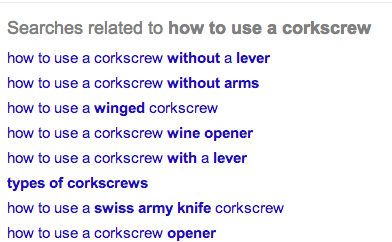
Google is great about serving up ideas for related searches that you can use!
- Keep it relatively short. Some people say 70 characters or less; others have tested Title Tags that are hundreds of characters. Google won’t really say. So just stick with concise + descriptive of page = success!
- Be accurate - the title tag copy has to reflect the content of the web page you are writing it for.
- There’s really no need to include your website name in each title tag. Maybe the home page, but there’s really not that much value with the goal of ‘keeping it concise’. Google will pick up your URL anyway, so unless your site name is vastly different than your URL, don’t sweat it.
Bottom line, just focus on showing what you think is important to your potential customer, and will help them decide whether they’ll find your web page valuable. If so, you’re good to go. Note: It’s always a good idea to review your Title Tags every so often. Lots of times people will change their web page copy based on experience, new information, etc., but not remember to update these tags. Plus, this is an easy thing to revise and see if it all all improves your click through rates!